Tasker
Tasker: A focused open-source task planner with recurring work, views, and productivity stats. Ranked #104 of 148 in To-Do List Apps by our editors (3.0/10); pricing: Open source; best for open-source web task tracking.
At a glance
- Editor score3.0 / 10
- PricingOpen source
- Best forOpen-source web task tracking
- Paid fromFree
- Recurring tasksYes
- Facts checked22 Sep 2026
Where it wins
- Recurring tasks automatically generate their next instance.
- Calendar, inbox, overdue, and unscheduled views support planning.
- Markdown importing, shortcuts, and quick capture speed task entry.
Where it doesn't
- No task reminders are included.
- Calendar synchronization is not available.
- The product is primarily focused on web access.
Our verdict on Tasker
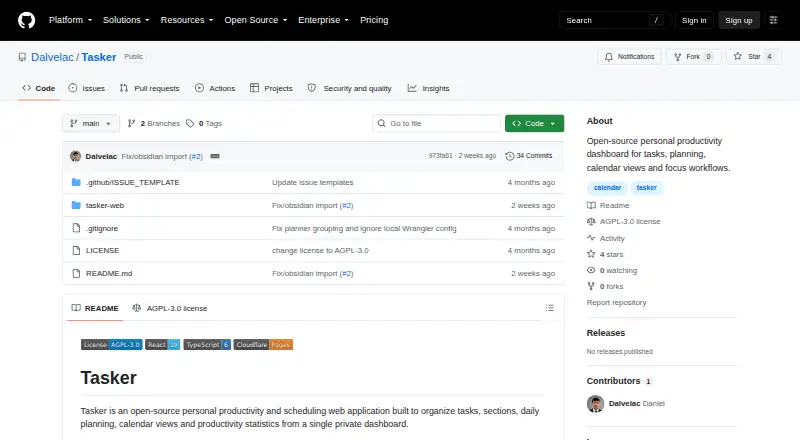
Tasker is an open-source personal productivity and scheduling application for individuals managing daily workflows and personal projects. It supports task creation, editing, completion, reopening, and deletion, with sections for organizing tasks and projects. Planning views include Today, Plan My Day, upcoming, overdue, inbox, and unscheduled queues, while a calendar view displays scheduled tasks and events. The web focus makes it a fit for people who want a browser-based task system with an API and the option of private deployment.
Task organization is the product’s strongest area. Users can capture tasks quickly with keyboard shortcuts, move work through inbox and planning views, and manage daily, weekly, or monthly recurring tasks. Tasker automatically generates the next instance of recurring work, which suits routines and repeated personal obligations. Markdown notes importing adds a practical way to bring existing written information into a task workflow. Productivity statistics and a GitHub-style heatmap provide a historical view of activity for people who want to track consistency over time.
The published feature set is more focused than a full reminder or connected-calendar system. Tasker does not include task reminders or calendar synchronization, so users who need alerts or a shared calendar connection should choose an alternative built around those capabilities. It is also primarily a web application rather than a broad multi-device suite. Its open-source model, API, private-deployment option, and Cloudflare Pages with Cloudflare D1 support will appeal to individuals who value control over their task data and are comfortable with a web-based workflow. Choose Tasker for structured personal planning, recurring tasks, and activity statistics; look elsewhere for mobile apps, reminders, or external calendar integration.
Your product? Our editors can test Tasker in depth and publish a review, labelled as paid · from $149/mo →
Tasker pricing
Tasker fact sheet
| Free plan | Not verified |
|---|---|
| Paid from | Free |
| Recurring tasks | Yes |
| Task reminders | No |
| Calendar sync | No |
| Subtasks | Not verified |
| Offline access | Not verified |
| Active task limit | Not verified |
| Supported platforms | web |
| Deployment | Cloud, Self-hosted |
| Platforms | Web |
| Built for | Solo, Small business (editorial estimate) |
| Pricing | Open source |
| Website | github.com |
| Facts checked | 22 Sep 2026 |
Alternatives to Tasker
- TodoistA complete task manager with broad platform coverage, recurring tasks, and team workspaces.9.2
- TickTickA broad to-do app for users who want tasks, planning, habits, and focus tools together.9.0
- Microsoft To DoA capable free choice for daily planning, shared lists, and Microsoft-connected task management.8.8



Also Ranked In
Tasker is ranked in 2 of our directories.
Used Tasker? Be the first to review it
The editor score above is our own research. What this page doesn't have yet is a reader's view — what you used Tasker for, what worked and what didn't. No stars are seeded and no review is paid for; an editor reads every one before it appears.
Write a reviewTwo minutes · verified accounts only · read by an editor before it appears
Featured on iTechGuides

Tasker is listed in our To-Do List Apps directory. Add the badge to your site — it links back to this page.
<a href="https://www.itechguides.com/products/tasker-to-do-list-app/"><img src="https://www.itechguides.com/best/badge/tasker-to-do-list-app.svg" alt="Featured on iTechGuides" width="230" height="46"></a>
Reviewed by iTechGuides Editors · Editorial team · Updated Oct 2026
Advertiser disclosure: iTechGuides is reader-supported. Vendors can pay for top positions in our rankings and for a place on other products' pages, and we may earn a commission when you click some links. Bought places stand at the number bought; this page and our disclosure say so. Paying vendors may get a fuller, more detailed review from our editors, and that review can change their score. How we rank.
Last updated · How we research and update