
Synology Photos
Synology Photos: A capable private photo library for Synology NAS owners who want control and depth. Ranked #4 of 70 in Photo Storage Services by our editors (8.9/10); pricing: Free plan; best for synology NAS owners wanting a private library.
At a glance
- Editor score8.9 / 10
- PricingFree plan
- Best forSynology NAS owners wanting a private library
- Free planYes
- Paid fromFree
- Original-quality storageYes
- Founded2000 · Banqiao District, New Taipei City, Taiwan
- Facts checked21 Sep 2026
Where it wins
- Searches by people, places, tags, metadata, and camera attributes
- Supports RAW, full-resolution photos, mobile backup, and video backup
- Adds permissions, protected links, face recognition, and automatic albums
Where it doesn't
- Requires a Synology NAS and installed drives
- Face and object recognition depend on compatible NAS models
- Synology Image Assistant is a separate desktop utility
Our verdict on Synology Photos
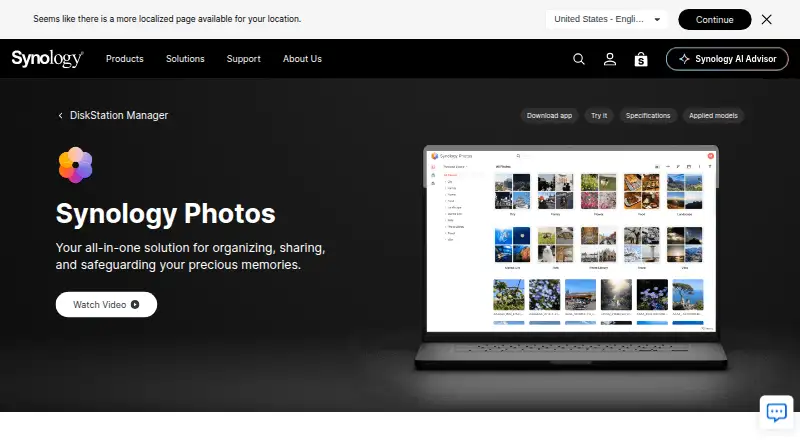
Synology Photos is a self-hosted photo and video management application for Synology NAS devices running DiskStation Manager. It suits individuals and households that want a private media library, as well as groups that need shared folders with selected-user access. Browser access, iOS and Android apps, personal libraries, Shared Space, and mobile backup cover the main browsing, organization, sharing, and backup workflows. Storage capacity depends on the NAS and installed drives, rather than a separate hosted allowance.
The Free plan has no paid premium tiers, but it requires a Synology NAS. That makes the product a fit for existing Synology owners and a less direct choice for anyone seeking a cloud-only photo service. The platform includes web, iOS, Android, and self-hosted access. Synology Hyper Backup supports the wider Synology setup, while Synology Image Assistant is a separate desktop utility for additional previews and compressed videos. Setup therefore centers on owning and maintaining compatible NAS hardware, with the available storage shaped by the installed drives.
Its strongest area is library depth. Users can browse chronologically or by folders, search using metadata, people, geolocation, tags, and camera attributes, and create automatic albums based on people, subjects, places, tags, videos, and recent additions. Conditional albums, face naming, hiding and merging, RAW support, full-resolution photos, password-protected links, expiration dates, folder-level permissions, and casting to Apple TV, Android TV, Chromecast, and AirPlay-compatible devices give it broad coverage. Choose Synology Photos for a private, feature-rich library tied to Synology hardware; choose an alternative if you do not want a NAS-centered setup or need recognition features on unsupported hardware.
Your product? Our editors can test Synology Photos in depth and publish a review, labelled as paid · from $149/mo →
Synology Photos pricing
All 1 Synology Photos plans and prices →
Synology Photos fact sheet
| Free plan | Yes |
|---|---|
| Paid from | Free |
| Free storage | Not verified |
| Original-quality storage | Yes |
| Face search | Yes |
| Shared albums | Yes |
| Family sharing | Yes |
| Desktop app | Yes |
| Video backup | Yes |
| Deployment | Self-hosted, Desktop, Mobile, Browser extension |
| Platforms | Web, Windows, macOS, iOS, Android, Chrome extension |
| Support | Live chat, Docs |
| Built for | Solo, Small business, Mid-market, Enterprise (editorial estimate) |
| Pricing | Free plan (source) |
| Website | synology.com |
| Facts checked | 21 Sep 2026 |
Alternatives to Synology Photos
- Google PhotosAn easy photo backup service with broad search, editing, sharing, and device coverage.9.4
- Apple PhotosA capable photo library for Apple households, with affordable entry pricing and limited free storage.9.2
- Amazon PhotosA capable photo backup and sharing service, especially for Prime members.9.0



See all Synology Photos alternatives →
Synology Photos vs the competition
- Synology Photos vs Google Photos
- Synology Photos vs Amazon Photos
- Synology Photos vs Flickr
- Synology Photos vs SmugMug
- Synology Photos vs Piwigo
- Synology Photos vs Immich




Compare Synology Photos with any tool side by side →
Also Ranked In
Synology Photos is ranked in 10 of our directories; the 6 strongest besides Photo Storage Services.
Used Synology Photos? Be the first to review it
The editor score above is our own research. What this page doesn't have yet is a reader's view — what you used Synology Photos for, what worked and what didn't. No stars are seeded and no review is paid for; an editor reads every one before it appears.
Write a reviewTwo minutes · verified accounts only · read by an editor before it appears
Featured on iTechGuides

Synology Photos is listed in our Photo Storage Services directory. Add the badge to your site — it links back to this page.
<a href="https://www.itechguides.com/products/synology-photos/"><img src="https://www.itechguides.com/best/badge/synology-photos.svg" alt="Featured on iTechGuides" width="230" height="46"></a>
Reviewed by iTechGuides Editors · Editorial team · Updated Oct 2026
Advertiser disclosure: iTechGuides is reader-supported. Vendors can pay for top positions in our rankings and for a place on other products' pages, and we may earn a commission when you click some links. Bought places stand at the number bought; this page and our disclosure say so. Paying vendors may get a fuller, more detailed review from our editors, and that review can change their score. How we rank.
Last updated · How we research and update