Syncplay
Syncplay: A free, open-source companion for watching local media in sync across supported players. Ranked #46 of 75 in Media Player Software by our editors (4.4/10); pricing: Free plan; best for groups watching local media in sync.
At a glance
- Editor score4.4 / 10
- PricingFree plan
- Best forGroups watching local media in sync
- Free planYes
- Paid fromFree
- Network playbackYes
- Facts checked22 Sep 2026
Where it wins
- Synchronises playback, seeking, and position across viewers
- Shared playlists support local media directories and supported URLs
- Managed rooms, chat, and desynchronisation correction support group viewing
Where it doesn't
- Requires a separate compatible media player for playback
- Media formats and subtitle handling depend on the selected player
- Server and client setup adds complexity beyond a standalone player
Our verdict on Syncplay
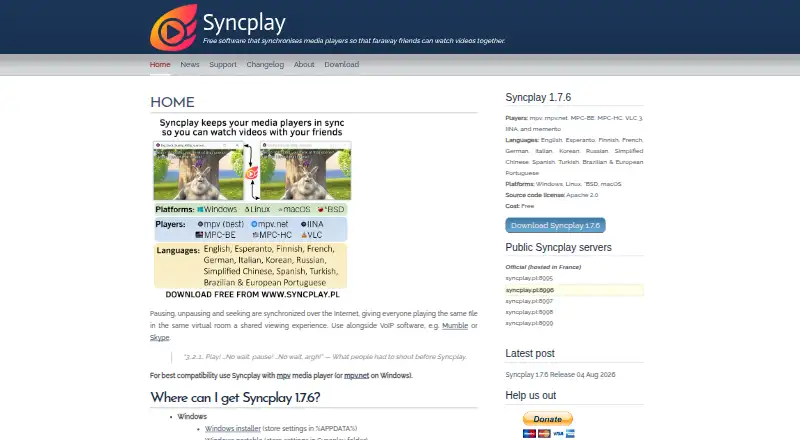
Syncplay is free, open-source synchronisation software for people watching video together from different locations. It works as a client and server alongside supported media players rather than as a standalone player. Viewers connect through shared rooms, supply their own local media file or supported stream, and synchronise play, pause, seeking, and playback position. It fits solo users, small groups, mid-market teams, and enterprise environments that need coordinated viewing across Windows, Linux, *BSD, macOS, or self-hosted deployments.
Its strongest capability is coordinated playback across different locations. Shared playlists can use local media directories and supported URLs, while managed rooms can restrict who may seek, pause, or resume. When playback drifts, Syncplay can slow down, rewind, or fast-forward to correct desynchronisation. Text chat appears inside mpv, and configurable on-screen messages and event notifications provide session feedback. These features make Syncplay a focused choice for organised group viewing rather than a general media library or playback application.
Platform fit depends on the media player selected for each viewer. Syncplay integrates with mpv, mpv.net, MPC-BE, MPC-HC, VLC, IINA, and memento, and supports stream URLs through compatible players. That flexibility also means the playback experience varies by player: media formats, subtitle handling, hardware acceleration, and 4K playback depend on the selected application. Choose Syncplay when synchronisation, rooms, shared playlists, and group controls matter most. Choose a standalone media player instead if the priority is a single application responsible for playback features and media handling.
Your product? Our editors can test Syncplay in depth and publish a review, labelled as paid · from $149/mo →
Syncplay pricing
Syncplay fact sheet
| Free plan | Yes |
|---|---|
| Paid from | Free |
| Supported platforms | Windows, Linux, *BSD, macOS |
| Network playback | Yes |
| Subtitle support | Not verified |
| Format support | Not verified |
| Hardware acceleration | Not verified |
| 4K playback | Not verified |
| License model | Free |
| Deployment | Desktop, Self-hosted |
| Platforms | Windows, Linux, macOS |
| Support | Email, Community, Docs |
| Built for | Solo, Small business, Mid-market, Enterprise (editorial estimate) |
| Integrations | 7 integrations: mpv, mpv.net, MPC-BE, MPC-HC, VLC, IINA … |
| Pricing | Free plan |
| Website | syncplay.pl |
| Facts checked | 22 Sep 2026 |
Syncplay integrations
Syncplay lists 7 integrations on its own site.
- mpv
- mpv.net
- MPC-BE
- MPC-HC
- VLC
- IINA
- memento
Alternatives to Syncplay
- VLC media playerA broad, capable free player for local, network, and streamed media across major platforms.9.4
- mpvA flexible, scriptable player for users who prefer control over convenience.9.1
- KMPlayerA broad media player with strong format, network, cloud, and casting support.9.0


See all Syncplay alternatives →
Used Syncplay? Be the first to review it
The editor score above is our own research. What this page doesn't have yet is a reader's view — what you used Syncplay for, what worked and what didn't. No stars are seeded and no review is paid for; an editor reads every one before it appears.
Write a reviewTwo minutes · verified accounts only · read by an editor before it appears
Featured on iTechGuides

Syncplay is listed in our Media Player Software directory. Add the badge to your site — it links back to this page.
<a href="https://www.itechguides.com/products/syncplay/"><img src="https://www.itechguides.com/best/badge/syncplay.svg" alt="Featured on iTechGuides" width="230" height="46"></a>
Reviewed by iTechGuides Editors · Editorial team · Updated Oct 2026
Advertiser disclosure: iTechGuides is reader-supported. Vendors can pay for top positions in our rankings and for a place on other products' pages, and we may earn a commission when you click some links. Bought places stand at the number bought; this page and our disclosure say so. Paying vendors may get a fuller, more detailed review from our editors, and that review can change their score. How we rank.
Last updated · How we research and update