
VLC media player
VLC media player: A broad, capable free player for local, network, and streamed media across major platforms. Ranked #1 of 75 in Media Player Software by our editors (9.4/10); pricing: Free plan; best for anyone wanting a capable free all-platform player.
At a glance
- Editor score9.4 / 10
- PricingFree plan
- Best forAnyone wanting a capable free all-platform player
- Free planYes
- Paid fromFree
- Network playbackYes
- Facts checked21 Sep 2026
Where it wins
- Supports local, disc, device, webcam, network, and stream playback
- Works across Windows, macOS, Linux, iOS, and Android
- Includes subtitle support, hardware decoding, and 4K/8K playback
Where it doesn't
- Hardware-accelerated decoding depends on platform support
- Media libraries with search and history are specified for Android
- Does not include AI features
Our verdict on VLC media player
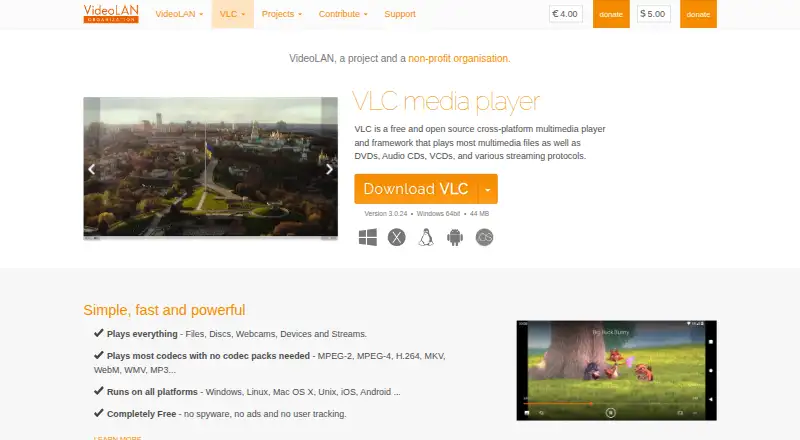
VLC media player is a free, open-source multimedia player and framework from VideoLAN. It is designed for people who want one application for local video and audio, DVDs, Audio CDs, VCDs, webcams, devices, network streams, and a wide range of common and specialized formats. Official coverage includes Windows, macOS, Linux, iOS, and Android, making it suitable for mixed-device households and teams that need broad platform access without a paid plan.
Pricing is straightforward: VLC is completely free, with no paid tiers described. Its published capabilities cover MPEG-1/2, MPEG-4, H.264, DivX, XviD, WMV, MKV, MP4, MOV, AVI, WebM, MP3, AAC, FLAC, DVD, Audio CD, and VCD playback. Network support spans HTTP, FTP, UDP/RTP, MMS, SMB, SFTP, NFS, HLS, and DASH. It also connects with Dropbox, Google Drive, OneDrive, Box, iCloud Drive, iTunes, UPnP/DLNA, Plex, Chromecast, and AirPlay. Subtitle-track selection, audio and video filters, playback-speed controls, fine seeking, network-share browsing, and NAS support add practical depth.
VLC’s main strength is breadth rather than a narrow focus: it combines local playback, network playback, subtitles, hardware-accelerated decoding on supported platforms, and 4K/8K playback in the VLC 3.0 branch. Android adds media libraries with search and playback history. That wide scope suits users who value format and source flexibility, while those seeking AI features should choose another product. Hardware acceleration also depends on platform support, so it should not be treated as identical across every device.
Your product? Our editors can test VLC media player in depth and publish a review, labelled as paid · from $149/mo →
VLC media player pricing
VLC media player fact sheet
| Free plan | Yes |
|---|---|
| Paid from | Free |
| Supported platforms | Windows, macOS, Linux, iOS, Android |
| Network playback | Yes |
| Subtitle support | Yes |
| Format support | MPEG-1/2, MPEG-4, H.264, DivX, XviD, WMV, MKV, MP4, MOV, AVI, WebM, MP3, AAC, FLAC, DVD, Audio CD, VCD |
| Hardware acceleration | Yes |
| 4K playback | Yes |
| License model | Free |
| Deployment | Desktop, Mobile |
| Platforms | Windows, macOS, Linux, iOS, Android |
| Support | Community, Docs |
| Built for | Solo, Small business, Mid-market, Enterprise (editorial estimate) |
| Integrations | 10 integrations: Dropbox, Google Drive, OneDrive, Box, iCloud Drive, iTunes … |
| Pricing | Free plan |
| Website | videolan.org |
| Facts checked | 21 Sep 2026 |
VLC media player integrations
VLC media player lists 10 integrations on its own site.
- Dropbox
- Google Drive
- OneDrive
- Box
- iCloud Drive
- iTunes
- UPnP/DLNA
- Plex
- Chromecast
- AirPlay
Alternatives to VLC media player
- mpvA flexible, scriptable player for users who prefer control over convenience.9.1
- KMPlayerA broad media player with strong format, network, cloud, and casting support.9.0
- SMPlayerA capable free desktop player for broad-format playback, streaming, subtitles, and YouTube.8.8



See all VLC media player alternatives →
VLC media player vs the competition
- VLC media player vs mpv
- VLC media player vs KMPlayer
- VLC media player vs SMPlayer
- VLC media player vs Infuse
- VLC media player vs MediaPortal
- VLC media player vs 5KPlayer


Compare VLC media player with any tool side by side →
Also Ranked In
VLC media player is ranked in 5 of our directories.
Used VLC media player? Be the first to review it
The editor score above is our own research. What this page doesn't have yet is a reader's view — what you used VLC media player for, what worked and what didn't. No stars are seeded and no review is paid for; an editor reads every one before it appears.
Write a reviewTwo minutes · verified accounts only · read by an editor before it appears
Featured on iTechGuides

VLC media player is listed in our Media Player Software directory. Add the badge to your site — it links back to this page.
<a href="https://www.itechguides.com/products/vlc-media-player/"><img src="https://www.itechguides.com/best/badge/vlc-media-player.svg" alt="Featured on iTechGuides" width="230" height="46"></a>
Reviewed by iTechGuides Editors · Editorial team · Updated Oct 2026
Advertiser disclosure: iTechGuides is reader-supported. Vendors can pay for top positions in our rankings and for a place on other products' pages, and we may earn a commission when you click some links. Bought places stand at the number bought; this page and our disclosure say so. Paying vendors may get a fuller, more detailed review from our editors, and that review can change their score. How we rank.
Last updated · How we research and update