
Syncovery
Syncovery: Flexible file backup across Windows, macOS, and Linux with perpetual pricing. Ranked #31 of 150 in Backup Software by our editors (5.5/10); pricing: From $39.90 · 30-day trial; best for technical users needing flexible file backup.
At a glance
- Editor score5.5 / 10
- PricingFrom $39.90 · 30-day trial
- Best forTechnical users needing flexible file backup
- Free planNo
- Server backupYes
- Facts checked23 Sep 2026
Where it wins
- Supports scheduled jobs, versioning, block-level, and synthetic backups
- Connects to major clouds plus FTP, SFTP, SSH, WebDAV, SMB, and rsync
- Offers AES-256 encryption, encrypted filenames, and ransomware protection
Where it doesn't
- Standard Edition excludes cloud support, compression, and encryption
- Focuses on file backup and restoration rather than full-system recovery
- Business pricing is higher than the listed private-use license prices
Our verdict on Syncovery
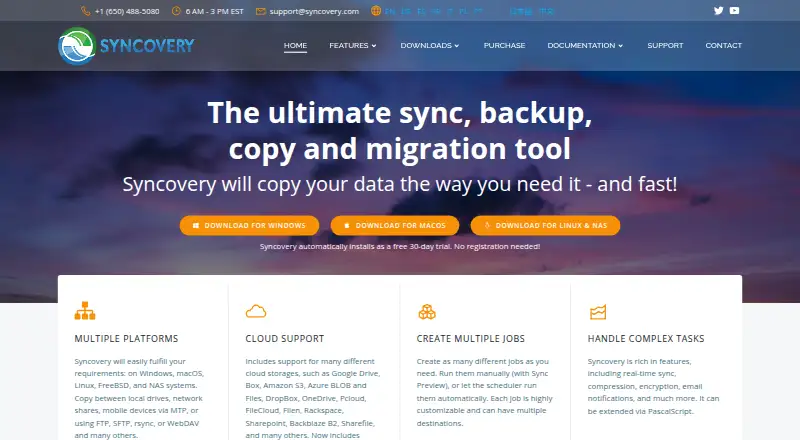
Syncovery is file synchronization and backup software for private users, businesses, servers, and cloud-storage workflows. It creates scheduled or manually run jobs between local drives, network shares, servers, NAS systems, and supported cloud services. Windows, macOS, and Linux users can manage file and folder versioning, restore older versions, and selectively restore files or folders. It is best suited to technical users who want detailed control over file backup jobs rather than a narrowly automated desktop backup tool.
The pricing structure uses perpetual, one-time licenses for private use. Standard Edition costs $39.90 and includes file backup and synchronization, a scheduler, and versioning, but does not include cloud-service support, compression, or encryption. Professional Edition costs $69.90 and adds cloud support, block-level copying, real-time synchronization, compression, and encryption. Premium Edition costs $99.90 and adds the File System Monitoring Service, Syncovery Remote Service, NTFS permission copying on Windows, and priority support. A 30-day trial is available, while business pricing is higher.
Syncovery’s main strength is breadth within file-focused workflows. It supports Amazon S3, Microsoft Azure, Google Drive, Dropbox, Microsoft OneDrive, SharePoint, Box, Backblaze B2, iCloud Drive, iCloud Photos, Rclone, FTP, SFTP, SSH, and WebDAV. Advanced options include AES-256 encryption, encrypted filenames, real-time synchronization on Windows and macOS, browser-based administration, and ransomware protection through protected network-share credentials. Choose Syncovery when flexible destinations, scheduling, versioning, and protocol connectivity matter. An alternative is more appropriate for buyers whose priority is full-system or server recovery rather than file-level backup and restoration.
Syncovery pricing
All 7 Syncovery plans and prices →
Syncovery fact sheet
| Free plan | No |
|---|---|
| Paid from | Not verified |
| Computer backup | Yes |
| Mobile backup | No |
| Server backup | Yes |
| Backup scope | Mixed |
| Restore modes | File |
| Ransomware protection | Yes |
| Supported platforms | Windows, macOS, Linux, NAS |
| Free trial | 30 days |
| Deployment | Desktop, Self-hosted |
| Platforms | Windows, macOS, Linux |
| Support | Email, Phone, Community, Docs |
| Built for | Solo, Small business, Mid-market, Enterprise (editorial estimate) |
| Integrations | 12 integrations: Amazon S3, Google Drive, Microsoft Azure, OneDrive, SharePoint, Dropbox … |
| Pricing | From $39.90 · 30-day trial (source) |
| Website | syncovery.com |
| Facts checked | 23 Sep 2026 |
Syncovery integrations
Syncovery lists 12 integrations on its own site.
- Amazon S3
- Google Drive
- Microsoft Azure
- OneDrive
- SharePoint
- Dropbox
- Box
- Backblaze B2
- FTP
- SFTP/SSH
- WebDAV
- Rclone
Alternatives to Syncovery
- Veeam Backup & ReplicationA wide-ranging backup platform for enterprise virtual and hybrid environments.9.0
- Rubrik Security CloudA cyber-recovery platform built around immutable backup, threat investigation, and clean-state recovery.8.2
- NAKIVO Backup & ReplicationA broad VM backup platform with recovery, replication, and disaster-recovery workflows.8.1

See all Syncovery alternatives →
Also listed in
Used Syncovery? Be the first to review it
The editor score above is our own research. What this page doesn't have yet is a reader's view — what you used Syncovery for, what worked and what didn't. No stars are seeded and no review is paid for; an editor reads every one before it appears.
Write a reviewTwo minutes · verified accounts only · read by an editor before it appears
Featured on iTechGuides

Syncovery is listed in our Backup Software directory. Add the badge to your site — it links back to this page.
<a href="https://www.itechguides.com/products/syncovery/"><img src="https://www.itechguides.com/best/badge/syncovery.svg" alt="Featured on iTechGuides" width="230" height="46"></a>
Reviewed by iTechGuides Editors · Editorial team · Updated Sep 2026
Advertiser disclosure: iTechGuides is reader-supported. We may earn a commission when you click some links. It never changes a score or a verdict. How we rank.
Last updated · How we research and update