Streamlabs Podcast Editor
Streamlabs Podcast Editor: A capable free browser editor for transcript-led video podcast workflows. Ranked #4 of 25 in AI Podcast Editing Software by our editors (8.7/10); pricing: Free plan; best for free browser video podcast editing.
At a glance
- Editor score8.7 / 10
- PricingFree plan
- Best forFree browser video podcast editing
- Free planYes
- Facts checked20 Sep 2026
Where it wins
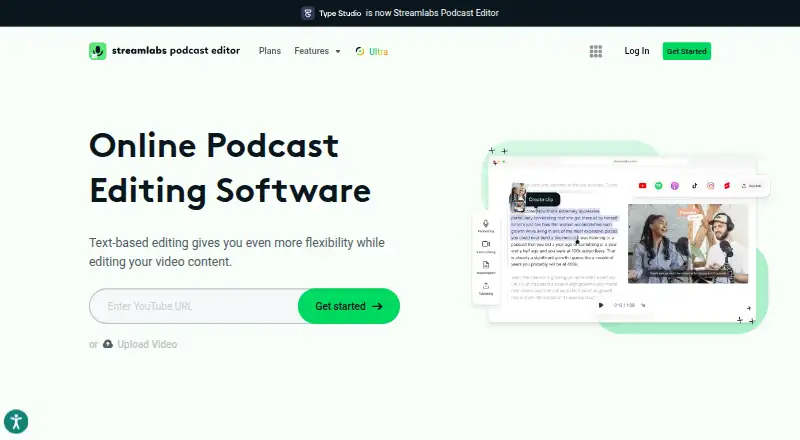
- Transcript-based editing removes pauses and filler words
- Free plan includes subtitles, resizing, exports, and 15GB storage
- Publishing, sharing, and YouTube, Drive, and Dropbox workflows
Where it doesn't
- Free plan is limited to 1 hour per month
- Free exports include Streamlabs branding
- Limited verified audio cleanup and multitrack capabilities
Our verdict on Streamlabs Podcast Editor
Streamlabs Podcast Editor is a browser-based video editor for podcasters, streamers, and other creators who want to cut and package spoken-word video without a desktop application. Its transcript-based workflow lets users edit video by modifying the generated transcript, while automatic subtitles, filler-word and pause removal, clip creation, images, templates, and aspect-ratio resizing support common podcast publishing tasks. Projects can produce video, audio, subtitle, or text exports, and interactive transcripts can support video-to-article workflows.
The free plan makes the product accessible for smaller projects, with 1 hour per month, videos up to 1 hour long, 15GB of storage, and Streamlabs branding. The paid Pro plan expands usage to 40 hours per month, supports videos up to 2 hours long, provides 250GB of storage, adds subtitle export and translation, and removes the watermark. The published plans make the main trade-off clear: occasional creators can work within the free allowance, while regular production teams gain more capacity and cleaner exports with Pro.
Its strongest fit is a browser-first workflow that combines editing, repurposing, and publishing. YouTube, Google Drive, and Dropbox integrations help connect content storage and distribution, while project sharing and invitations support collaborative work. The product is less suited to editors who need deep audio repair or multitrack production, since those capabilities are limited. Choose Streamlabs Podcast Editor for transcript-led video podcast editing, subtitles, translations, resizing, and fast content repurposing; choose another tool when detailed audio engineering is central to the workflow.
Your product? Our editors can test Streamlabs Podcast Editor in depth and publish a review, labelled as paid · from $149/mo →
Streamlabs Podcast Editor pricing
All 2 Streamlabs Podcast Editor plans and prices →
Streamlabs Podcast Editor fact sheet
| Free plan | Yes |
|---|---|
| Paid from | Not verified |
| Transcript editing | Not verified |
| Filler-word removal | Not verified |
| Noise reduction | Not verified |
| Loudness leveling | Not verified |
| Speaker labels | Not verified |
| Maximum upload length | Not verified |
| Supported languages | Not verified |
| Deployment | Cloud, Browser extension |
| Platforms | Web |
| Support | Tickets |
| Built for | Solo, Small business (editorial estimate) |
| Integrations | 3 integrations: YouTube, Google Drive, Dropbox |
| Pricing | Free plan (source) |
| Website | streamlabs.com |
| Facts checked | 20 Sep 2026 |
Streamlabs Podcast Editor integrations
Streamlabs Podcast Editor lists 3 integrations on its own site.
- YouTube
- Google Drive
- Dropbox
Alternatives to Streamlabs Podcast Editor
- Adobe PodcastA free browser-based editor with remote recording and clear premium upgrade limits.9.3
- DescriptA flexible text-first editor for teams producing podcasts and video together.9.2
- ZencastrA generous free plan for remote recording, transcription, editing, hosting, and publishing.8.8



See all Streamlabs Podcast Editor alternatives →
Streamlabs Podcast Editor vs the competition
- Streamlabs Podcast Editor vs Adobe Podcast
- Streamlabs Podcast Editor vs Descript
- Streamlabs Podcast Editor vs Zencastr
- Streamlabs Podcast Editor vs VEED
- Streamlabs Podcast Editor vs Async
- Streamlabs Podcast Editor vs Alitu



Compare Streamlabs Podcast Editor with any tool side by side →
Also Ranked In
Streamlabs Podcast Editor is ranked in 2 of our directories.
Used Streamlabs Podcast Editor? Be the first to review it
The editor score above is our own research. What this page doesn't have yet is a reader's view — what you used Streamlabs Podcast Editor for, what worked and what didn't. No stars are seeded and no review is paid for; an editor reads every one before it appears.
Write a reviewTwo minutes · verified accounts only · read by an editor before it appears
Featured on iTechGuides

Streamlabs Podcast Editor is listed in our AI Podcast Editing Software directory. Add the badge to your site — it links back to this page.
<a href="https://www.itechguides.com/products/streamlabs-podcast-editor/"><img src="https://www.itechguides.com/best/badge/streamlabs-podcast-editor.svg" alt="Featured on iTechGuides" width="230" height="46"></a>
Reviewed by iTechGuides Editors · Editorial team · Updated Oct 2026
Advertiser disclosure: iTechGuides is reader-supported. Vendors can pay for top positions in our rankings and for a place on other products' pages, and we may earn a commission when you click some links. Bought places stand at the number bought; this page and our disclosure say so. Paying vendors may get a fuller, more detailed review from our editors, and that review can change their score. How we rank.
Last updated · How we research and update