Start Menu Reviver
Start Menu Reviver: A free tile-based Start menu replacement with useful search and shortcut controls. Ranked #15 of 39 in Start Menu Customization Software by our editors (7.4/10); pricing: Free plan; best for free users preferring a tile-based Start menu.
At a glance
- Editor score7.4 / 10
- PricingFree plan
- Best forFree users preferring a tile-based Start menu
- Free planYes
- Paid fromFree
- Supported WindowsWindows_10
- Facts checked20 Sep 2026
Where it wins
- Custom tiles support websites, documents, media, and files
- Search covers applications, documents, and computer settings
- Touch-optimized layout includes resizable tiles and button styles
Where it doesn't
- Verified platform support is limited to Windows 10
- Taskbar controls are basic
- The dated documentation focuses on Windows 7, 8, and 10
Our verdict on Start Menu Reviver
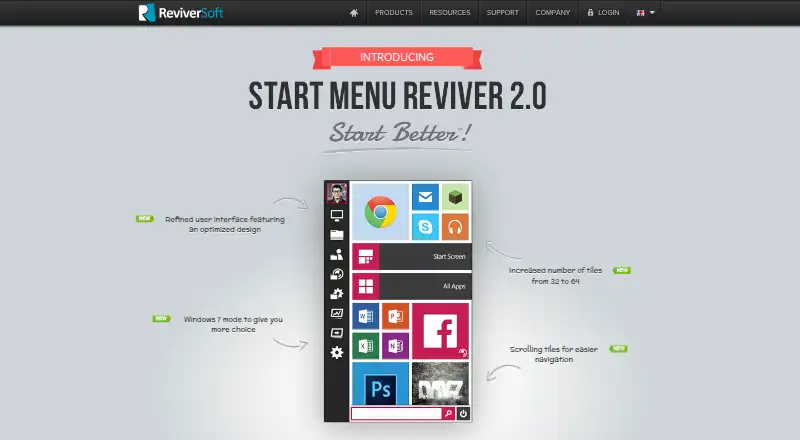
Start Menu Reviver is a free shell replacement for Windows 10 that gives users a tile-based alternative to the standard Start menu. It is aimed at people who want customizable shortcuts, a configurable Start button, and a touch-oriented layout for launching applications, websites, documents, media, and system tools. The interface can launch both desktop and modern Windows applications, while shortcut buttons provide direct access to Computer, Libraries, Network, Control Panel, Task Manager, Run, and Settings.
Its strongest area is the breadth of its Start menu controls. Users can create custom tiles for different content types, resize tiles for touch use, choose Start button styles, and search across applications, documents, and computer settings. The menu also includes access to the Windows 8 Start Screen, giving it a distinct tile-focused approach rather than a simple visual refresh. These features suit users who prefer an organized launch surface built around shortcuts and tiles.
The main trade-off is platform scope. The listed support centers on Windows 10, while the product documentation also discusses Windows 7 and Windows 8; users on newer Windows versions should consider a product with explicitly broader support. Taskbar controls are basic, so Start Menu Reviver is more focused on replacing and customizing the Start menu than on reshaping the full desktop shell. Choose it if a free, tile-based launcher with custom shortcuts and search matches your workflow. Choose an alternative if broad current Windows support or deeper taskbar customization matters more.
Your product? Our editors can test Start Menu Reviver in depth and publish a review, labelled as paid · from $149/mo →
Start Menu Reviver pricing
Start Menu Reviver fact sheet
| Free plan | Yes |
|---|---|
| Paid from | Free |
| Supported Windows | Windows_10 |
| Replacement mode | Shell_replacement |
| Start button controls | Yes |
| Custom search | Yes |
| Taskbar controls | Basic |
| Saved profiles | Not verified |
| Deployment | Desktop |
| Platforms | Windows |
| Support | Docs |
| Built for | Solo, Small business (editorial estimate) |
| Pricing | Free plan |
| Website | reviversoft.com |
| Facts checked | 20 Sep 2026 |
Alternatives to Start Menu Reviver
- Start11A paid Windows customization tool for detailed Start menu, taskbar, search, and deployment control.9.3
- Seelen UIA broad, free Windows shell replacement for users who want more than Start menu tweaks.9.1
- Open-Shell MenuA flexible classic Start menu replacement with useful search and shortcut controls.8.9

See all Start Menu Reviver alternatives →
Used Start Menu Reviver? Be the first to review it
The editor score above is our own research. What this page doesn't have yet is a reader's view — what you used Start Menu Reviver for, what worked and what didn't. No stars are seeded and no review is paid for; an editor reads every one before it appears.
Write a reviewTwo minutes · verified accounts only · read by an editor before it appears
Featured on iTechGuides

Start Menu Reviver is listed in our Start Menu Customization Software directory. Add the badge to your site — it links back to this page.
<a href="https://www.itechguides.com/products/start-menu-reviver/"><img src="https://www.itechguides.com/best/badge/start-menu-reviver.svg" alt="Featured on iTechGuides" width="230" height="46"></a>
Reviewed by iTechGuides Editors · Editorial team · Updated Oct 2026
Advertiser disclosure: iTechGuides is reader-supported. Vendors can pay for top positions in our rankings and for a place on other products' pages, and we may earn a commission when you click some links. Bought places stand at the number bought; this page and our disclosure say so. Paying vendors may get a fuller, more detailed review from our editors, and that review can change their score. How we rank.
Last updated · How we research and update