
Spinach AI
Spinach AI: A flexible meeting archive with pay-as-you-go pricing and broad workflow integrations. Ranked #53 of 111 in Meeting Notes Software by our editors (3.7/10); pricing: Free plan; best for pay-per-meeting-hour workflows.
At a glance
- Editor score3.7 / 10
- PricingFree plan
- Best forPay-per-meeting-hour workflows
- Free planYes
- Paid from$19/user/mo
- AI summariesYes
- Facts checked23 Sep 2026
Where it wins
- Pro pricing is $2.90 per meeting hour with unlimited users.
- Records, transcribes, summarizes, and extracts decisions and action items.
- Connects meetings to Zoom, Google Meet, Teams, Webex, and workflow tools.
Where it doesn't
- Free limits the number of meetings per month.
- Verified platform coverage is web only.
- Business pricing is seat-based rather than usage-based.
Our verdict on Spinach AI
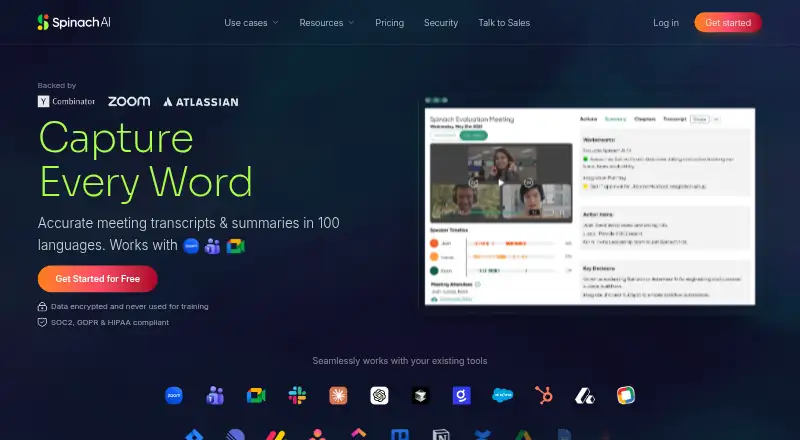
Spinach AI is meeting notes software for teams that need structured documentation after calls. It records and automatically transcribes meetings, creates summaries, extracts decisions and action items, and keeps recordings and transcripts in a searchable workspace. Meetings can come from Zoom, Google Meet, Microsoft Teams, and Webex, while audio and video files can also be uploaded. Templates, collections, playback linked to transcript timestamps, and ticket creation support teams that want meeting records to lead into follow-up work.
The pricing model suits teams with variable meeting volume. The Free plan costs $0 per month and includes a limited number of meetings per month. Pro costs $2.90 per meeting hour, billed monthly, with pay-as-you-go pricing and unlimited users. Business costs $29 per user per month with monthly billing, or $19 per user per month with annual billing; both options include team seats, shared settings, and admin controls. Enterprise adds advanced security, custom branding, SSO, and dedicated support, with no listed price. Teams should compare the usage-based Pro plan with Business seat pricing based on how consistently they meet and how much administration they need.
Its main strength is the connection between meeting capture and operational follow-up. Spinach AI supports automated exports and integrations with Slack, Notion, Confluence, Google Drive, Jira, Linear, Asana, Trello, Monday, ClickUp, and Salesforce. Searchable recordings, transcript-timestamp playback, customizable templates, collections, and ticket creation give the product useful depth beyond basic transcription. It is a strong fit for teams prioritizing searchable meeting history and action tracking, but teams requiring a desktop or mobile platform should consider a product with broader platform coverage.
Your product? Our editors can test Spinach AI in depth and publish a review, labelled as paid · from $149/mo →
Spinach AI pricing
All 4 Spinach AI plans and prices →
Spinach AI fact sheet
| Free plan | Yes |
|---|---|
| Paid from | $19/user/mo |
| Transcription | Yes |
| AI summaries | Yes |
| Action-item tracking | Yes |
| Searchable archive | Yes |
| Meeting recording | Yes |
| Speaker labels | Not verified |
| Note templates | Not verified |
| Deployment | Cloud |
| Platforms | Web |
| Compliance & security | SOC 2, GDPR, HIPAA |
| Support | Live chat, Email, Docs |
| Built for | Small business, Mid-market, Enterprise (editorial estimate) |
| Integrations | 13 integrations: Zoom, Microsoft Teams, Google Meet, Webex, Slack, Jira … See all → |
| Pricing | Free plan (source) |
| Website | spinach.ai |
| Facts checked | 23 Sep 2026 |
Spinach AI integrations
Spinach AI lists 13 integrations on its own site.
- Zoom
- Microsoft Teams
- Google Meet
- Webex
- Slack
- Jira
- Asana
- ClickUp
- Linear
- Trello
- Confluence
- Notion
- Google Docs
See all Spinach AI integrations →
Alternatives to Spinach AI
- Otter.aiA capable meeting archive with core transcription and summaries at a low paid entry price.9.2
- Krisp AI Meeting AssistantA full-featured meeting capture and follow-up tool with affordable annual pricing.9.0
- Fireflies.aiA broad meeting capture and intelligence suite for teams handling many languages and meeting sources.8.9



See all Spinach AI alternatives →
Also Ranked In
Spinach AI is ranked in 3 of our directories.
Used Spinach AI? Be the first to review it
The editor score above is our own research. What this page doesn't have yet is a reader's view — what you used Spinach AI for, what worked and what didn't. No stars are seeded and no review is paid for; an editor reads every one before it appears.
Write a reviewTwo minutes · verified accounts only · read by an editor before it appears
Featured on iTechGuides

Spinach AI is listed in our Meeting Notes Software directory. Add the badge to your site — it links back to this page.
<a href="https://www.itechguides.com/products/spinach-ai/"><img src="https://www.itechguides.com/best/badge/spinach-ai.svg" alt="Featured on iTechGuides" width="230" height="46"></a>
Reviewed by iTechGuides Editors · Editorial team · Updated Oct 2026
Advertiser disclosure: iTechGuides is reader-supported. Vendors can pay for top positions in our rankings and for a place on other products' pages, and we may earn a commission when you click some links. Bought places stand at the number bought; this page and our disclosure say so. Paying vendors may get a fuller, more detailed review from our editors, and that review can change their score. How we rank.
Last updated · How we research and update