
Sourcetable
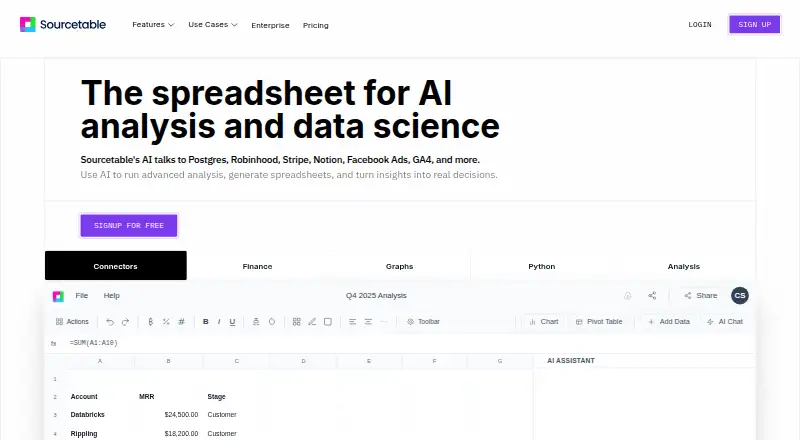
Sourcetable: A broad AI spreadsheet workspace for connecting, transforming and analyzing business data. Ranked #9 of 31 in AI Spreadsheet Tools by our editors (8.5/10); pricing: Free plan; best for teams connecting many data sources.
At a glance
- Editor score8.5 / 10
- PricingFree plan
- Best forTeams connecting many data sources
- Free planYes
- Primary platformMultiple
- Facts checked20 Sep 2026
Where it wins
- Connects databases and business applications across many data sources
- Combines formulas, analysis, transformations, charts and workflows
- Adds Python, SQL and advanced AI capabilities on paid plans
Where it doesn't
- Paid access starts at $29 per user per month
- Python and SQL tooling are limited to paid plans
- The Max plan costs $100 per user per month
Our verdict on Sourcetable
Sourcetable is a web-based spreadsheet and AI data-analysis tool for analysts, finance, operations, marketing, education and research teams. Users can upload Excel and Google Sheets files, ask questions in natural language, generate or fix formulas, clean and transform tables, and create charts, pivots and visualizations. Multi-sheet analysis, cross-tab references, automated reports and workflows extend it beyond basic spreadsheet editing.
The free plan gives teams a way to start, while the Regular plan includes an AI spreadsheet assistant, AI analysis and summarizations, smart formulas, pivots, charts, data cleaning, transformations and access to Data Connectors. Pro costs $29 per user per month and adds Deep Research, premium AI models, Python and data science tools, expanded chat memory, an SQL editor, query builder and library. Max costs $100 per user per month and adds the highest model intelligence, advanced agent capabilities, maximum chat memory, unlimited AI messages per month and early access to new features and AI models.
Sourcetable’s main strength is breadth: it connects with Google Sheets, Microsoft Excel, PostgreSQL, MySQL, MongoDB, Google Analytics 4, Google Ads, Stripe, Supabase, BigQuery, ClickHouse, DuckDB, Airtable, Asana and QuickBooks. Web, API and self-hosted access support different operating models. Choose it when one workspace needs spreadsheet work, data transformation, cross-source analysis and technical tooling. Teams needing only lightweight spreadsheet assistance may find the paid tiers more capability than they require, while advanced features such as Python and SQL require Pro or above.
Your product? Our editors can test Sourcetable in depth and publish a review, labelled as paid · from $149/mo →
Sourcetable pricing
All 5 Sourcetable plans and prices →
Sourcetable fact sheet
| Free plan | Yes |
|---|---|
| Paid from | Not verified |
| Primary platform | Multiple |
| Formula generation | Yes |
| Table transformation | Yes |
| Spreadsheet analysis | Yes |
| Workflow automation | Yes |
| Custom functions | Not verified |
| API access | Yes |
| Deployment | Cloud, Self-hosted |
| Platforms | Web |
| Compliance & security | GDPR, 2FA |
| Support | Email, Docs |
| Built for | Solo, Small business, Mid-market, Enterprise (editorial estimate) |
| Integrations | 15 integrations: Google Sheets, Microsoft Excel, PostgreSQL, MySQL, MongoDB, Google Analytics 4 … See all → |
| Pricing | Free plan (source) |
| Website | sourcetable.com |
| Facts checked | 20 Sep 2026 |
Sourcetable integrations
Sourcetable lists 15 integrations on its own site.
- Google Sheets
- Microsoft Excel
- PostgreSQL
- MySQL
- MongoDB
- Google Analytics 4
- Google Ads
- Stripe
- Supabase
- BigQuery
- ClickHouse
- DuckDB
- Airtable
- Asana
- QuickBooks
See all Sourcetable integrations →
Alternatives to Sourcetable
- RowsRows suits teams that need AI analysis, connected data, automation, and collaboration in one spreadsheet.9.4
- GPTExcelA wide-ranging spreadsheet copilot with a free tier and paid usage limits.9.2
- QuadraticA collaborative spreadsheet that combines AI, code, databases, and familiar exports.9.1



See all Sourcetable alternatives →
Used Sourcetable? Be the first to review it
The editor score above is our own research. What this page doesn't have yet is a reader's view — what you used Sourcetable for, what worked and what didn't. No stars are seeded and no review is paid for; an editor reads every one before it appears.
Write a reviewTwo minutes · verified accounts only · read by an editor before it appears
Featured on iTechGuides

Sourcetable is listed in our AI Spreadsheet Tools directory. Add the badge to your site — it links back to this page.
<a href="https://www.itechguides.com/products/sourcetable/"><img src="https://www.itechguides.com/best/badge/sourcetable.svg" alt="Featured on iTechGuides" width="230" height="46"></a>
Reviewed by iTechGuides Editors · Editorial team · Updated Oct 2026
Advertiser disclosure: iTechGuides is reader-supported. Vendors can pay for top positions in our rankings and for a place on other products' pages, and we may earn a commission when you click some links. Bought places stand at the number bought; this page and our disclosure say so. Paying vendors may get a fuller, more detailed review from our editors, and that review can change their score. How we rank.
Last updated · How we research and update