SimpleScreenRecorder
SimpleScreenRecorder: A focused Linux recorder with OpenGL capture, pause and resume, and flexible encoding. Ranked #26 of 27 in Screen Recorders by our editors (6.7/10); pricing: Free plan; best for linux users wanting free, configurable screen capture.
At a glance
- Editor score6.7 / 10
- PricingFree plan
- Best forLinux users wanting free, configurable screen capture
- Free planYes
- Paid fromFree
- Facts checked24 Sep 2026
Where it wins
- Capture the full screen, a selected area, or OpenGL applications.
- Pause and resume with a button or hotkey; preview while recording.
- Encode with codecs and formats supported by libav/FFmpeg.
Where it doesn't
- Runs on Linux only.
- Live streaming is experimental.
- Listed capabilities focus on capture and encoding, not broader production workflows.
Our verdict on SimpleScreenRecorder
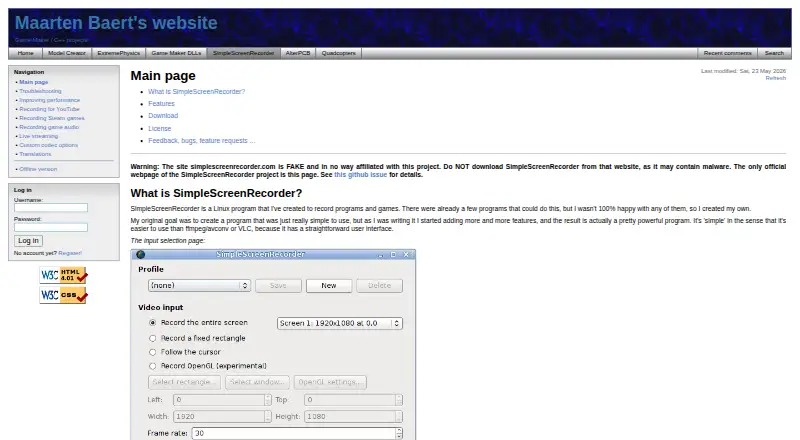
SimpleScreenRecorder is a Linux desktop program for recording applications, games, the full screen, or a selected area. Its configurable capture options make it a fit for Linux users who want a free, open-source recorder, including people recording OpenGL applications directly. A Qt-based graphical interface presents capture controls, a preview, and recording statistics such as file size, bitrate, recording time, and frame rate.
The capture workflow covers practical control during a recording: users can pause and resume with a button or hotkey, and can inspect a preview as capture proceeds. Encoding uses codecs and file formats supported by its libav/FFmpeg libraries, giving users options within that ecosystem. Live streaming is described as experimental, so it is better treated as an exploratory feature than a core reason to choose the program. Installation is available through Linux distribution repositories or by building from source.
Its focus is narrower than a general video production suite: the listed features center on capturing, monitoring, and encoding rather than editing or post-production. It is also Linux-only, which rules it out for teams needing a shared recorder across desktop operating systems. SimpleScreenRecorder suits solo users and small setups that prioritize configurable local capture at no cost; users who need mature streaming or a wider production workflow should look elsewhere. The project is distributed under the GNU General Public License.
Your product? Our editors can test SimpleScreenRecorder in depth and publish a review, labelled as paid · from $149/mo →
SimpleScreenRecorder pricing
SimpleScreenRecorder fact sheet
| Free plan | Yes |
|---|---|
| Paid from | Free |
| Webcam overlay | Not verified |
| Recording length limit | Not verified |
| Max video quality | Not verified |
| Cloud storage limit | Not verified |
| Transcription | Not verified |
| Capture platforms | Linux |
| Deployment | Desktop |
| Platforms | Linux |
| Support | |
| Built for | Solo, Small business (editorial estimate) |
| Pricing | Free plan |
| Website | maartenbaert.be |
| Facts checked | 24 Sep 2026 |
Alternatives to SimpleScreenRecorder
- OBS StudioPowerful desktop capture and live production, with scenes, audio mixing and replay tools.9.4
- CamtasiaA tutorial-focused recorder with 4K capture, multitrack editing, and training tools.9.2
- LoomRecord screen-and-camera updates, then share them with collaborators across common work tools.9.1



See all SimpleScreenRecorder alternatives →
Used SimpleScreenRecorder? Be the first to review it
The editor score above is our own research. What this page doesn't have yet is a reader's view — what you used SimpleScreenRecorder for, what worked and what didn't. No stars are seeded and no review is paid for; an editor reads every one before it appears.
Write a reviewTwo minutes · verified accounts only · read by an editor before it appears
Featured on iTechGuides

SimpleScreenRecorder is listed in our Screen Recorders directory. Add the badge to your site — it links back to this page.
<a href="https://www.itechguides.com/products/simplescreenrecorder-screen-recorder/"><img src="https://www.itechguides.com/best/badge/simplescreenrecorder-screen-recorder.svg" alt="Featured on iTechGuides" width="230" height="46"></a>
Reviewed by iTechGuides Editors · Editorial team · Updated Oct 2026
Advertiser disclosure: iTechGuides is reader-supported. Vendors can pay for top positions in our rankings and for a place on other products' pages, and we may earn a commission when you click some links. Bought places stand at the number bought; this page and our disclosure say so. Paying vendors may get a fuller, more detailed review from our editors, and that review can change their score. How we rank.
Last updated · How we research and update