
Camtasia
Camtasia: A deep desktop toolkit for training videos, tutorials, and structured learning content. Ranked #1 of 131 in Screen Recording Software by our editors (9.3/10); pricing: Free plan; best for professional training and tutorial production.
At a glance
- Editor score9.3 / 10
- PricingFree plan
- Best forProfessional training and tutorial production
- Free planYes
- Paid from$39/yr
- Webcam recordingYes
- Founded1987 · East Lansing, Michigan, United States
- Facts checked20 Sep 2026
Where it wins
- Multitrack editing with cursor, click, and keystroke controls
- Captions, quizzes, PowerPoint import, and SCORM export
- Records screen, webcam, microphone, and system audio up to 4K UHD
Where it doesn't
- Higher annual tiers rise sharply from the Starter price
- Starter exports include a watermark
- Available only on Windows and macOS
Our verdict on Camtasia
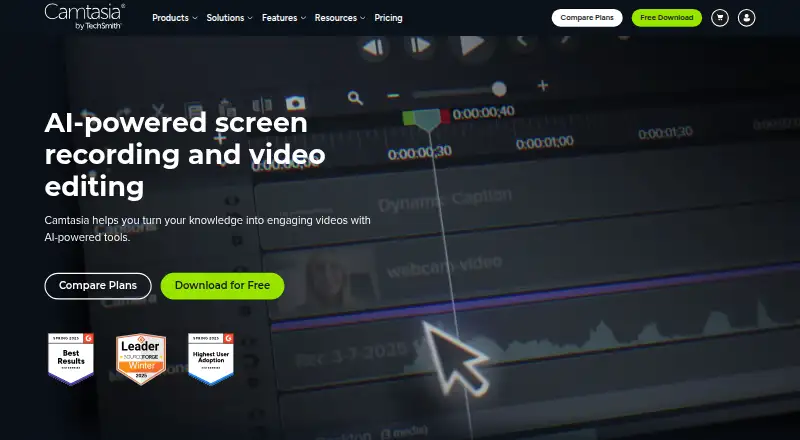
Camtasia is desktop software for recording screens, cameras, microphones, and system audio, then turning those recordings into finished videos. It is suited to educators, trainers, businesses, software teams, and creators producing tutorials, demonstrations, onboarding materials, lessons, and internal communications. Its feature set covers recording up to 4K UHD quality, webcam capture, annotations, captions, transitions, templates, and video export. Camtasia is available on Windows and macOS, with a free watermark-limited version and paid annual plans.
Pricing ranges from Starter at US$39 per user per year to Pro at US$599 per user per year, with annual billing across the published tiers. Starter includes unlimited 4K/60fps recordings, the Camtasia Editor with watermarked exports, and Camtasia Snagit. Essentials adds editable multitrack recording, text-based video editing, speech-to-text transcription, watermark-free exports, Audiate, and Snagit for US$179.88 per user per year. Create costs US$249 and adds AI script generation, voiceover generation, 200+ voiceover options, and multi-language support. Pro adds AI avatar generation, script translation, audio dubbing, 100M+ premium stock assets, and unlimited video sharing.
The main strength is instructional-production depth rather than simple capture. Cursor paths, clicks, and keystrokes can be edited; captions and subtitle files support accessibility workflows; and quizzes with SCORM export fit structured learning programs. PowerPoint importing and integrations with Slack, Microsoft Teams, and Screencast extend its fit for workplace content. Choose Camtasia when editing control, learning features, and polished training output matter. A lighter screen recorder may be a better fit for users who need only quick captures, and teams requiring platforms beyond Windows and macOS should look elsewhere.
Your product? Our editors can test Camtasia in depth and publish a review, labelled as paid · from $149/mo →
Camtasia pricing
All 4 Camtasia plans and prices →
Camtasia fact sheet
| Free plan | Yes |
|---|---|
| Paid from | $39/yr |
| Webcam recording | Yes |
| System audio | Yes |
| Microphone recording | Yes |
| Max recording length | Not verified |
| Maximum video quality | 4k |
| Supported platforms | web, windows, macos |
| Money-back guarantee | 14 days |
| Deployment | Cloud, Desktop |
| Platforms | Web, Windows, macOS |
| Compliance & security | SOC 2, GDPR |
| Support | Email, Live chat, Phone, Tickets, Docs |
| Built for | Small business, Mid-market, Enterprise (editorial estimate) |
| Integrations | 3 integrations: Slack, Microsoft Teams, PowerPoint |
| Pricing | Free plan (source) |
| Website | techsmith.com |
| Facts checked | 20 Sep 2026 |
Camtasia integrations
Camtasia lists 3 integrations on its own site.
- Slack
- Microsoft Teams
- PowerPoint
Alternatives to Camtasia
- ScreenPalA feature-rich choice for budget-conscious creators who need more than basic recording.9.1
- LoomA broad screen recorder for teams that communicate through polished async video.9.0
- Wondershare DemoCreatorA broad creator toolkit with separate-track capture, AI editing, and strong game-recording support.8.8



See all Camtasia alternatives →
Camtasia vs the competition
- Camtasia vs ScreenPal
- Camtasia vs Loom
- Camtasia vs Wondershare DemoCreator
- Camtasia vs ScreenFlow
- Camtasia vs OBS Studio
- Camtasia vs Screencastify



Compare Camtasia with any tool side by side →
Also Ranked In
Camtasia is ranked in 5 of our directories.
Used Camtasia? Be the first to review it
The editor score above is our own research. What this page doesn't have yet is a reader's view — what you used Camtasia for, what worked and what didn't. No stars are seeded and no review is paid for; an editor reads every one before it appears.
Write a reviewTwo minutes · verified accounts only · read by an editor before it appears
Featured on iTechGuides

Camtasia is listed in our Screen Recording Software directory. Add the badge to your site — it links back to this page.
<a href="https://www.itechguides.com/products/camtasia/"><img src="https://www.itechguides.com/best/badge/camtasia.svg" alt="Featured on iTechGuides" width="230" height="46"></a>
Reviewed by iTechGuides Editors · Editorial team · Updated Oct 2026
Advertiser disclosure: iTechGuides is reader-supported. Vendors can pay for top positions in our rankings and for a place on other products' pages, and we may earn a commission when you click some links. Bought places stand at the number bought; this page and our disclosure say so. Paying vendors may get a fuller, more detailed review from our editors, and that review can change their score. How we rank.
Last updated · How we research and update