
screenTAP
screenTAP: A £5-per-screen platform with strong scheduling, offline playback, and AI content tools. Ranked #73 of 207 in Digital Signage Software by our editors (3.0/10); pricing: Paid; best for affordable AI-assisted signage.
At a glance
- Editor score3.0 / 10
- PricingPaid
- Best forAffordable AI-assisted signage
- Free planNo
- Paid from£5/device/mo
- Facts checked22 Sep 2026
Where it wins
- £5 per screen monthly with every feature included
- Offline playback, automatic synchronization, and remote monitoring
- AI image tools plus broad content and data integrations
Where it doesn't
- No free plan is available
- The £5 price scales with every screen
- Platform coverage centers on web, Linux, Android, Raspberry Pi, and Tizen
Our verdict on screenTAP
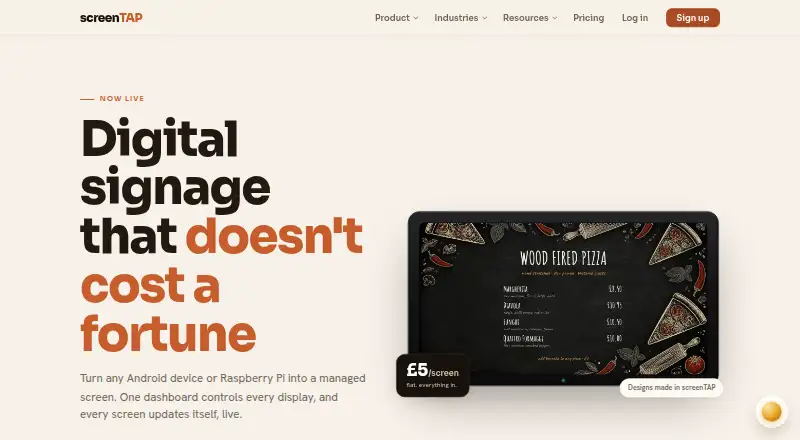
screenTAP is cloud-managed digital signage software for businesses publishing menus, promotions, notices, dashboards, and other visual content across multiple screens. It suits cafés, restaurants, retail stores, offices, gyms, hotels, and similar environments that need browser-based control over playlists, schedules, live feeds, data boards, and remote device management. Content can include images, video, graphics, RSS, social walls, weather, clocks, countdowns, stock tickers, Google Sheets, Power BI, live web pages, YouTube, Canva, and Google Slides.
Pricing is straightforward: the screenTAP plan costs £5 per screen per month, billed monthly, and includes every feature. The plan provides unlimited playlists, scheduling and dayparting, offline playback, team roles, approval workflows, and support for Android, Raspberry Pi, and Samsung Tizen. The published pricing also states 2 months free on the first 3 screens. Because pricing is calculated per screen, the monthly cost increases as an organization adds displays. There is no free plan, so smaller teams should assess the per-screen commitment before expanding.
Its strongest fit is for teams that value operational control and varied content sources without separating core capabilities into higher paid tiers. Remote monitoring includes screenshots, resync, and reboot functions, while video walls and synchronized playback support larger visual deployments. AI image generation and editing add content-creation assistance, and integrations include Google Sheets, Power BI, Canva, Google Slides, YouTube, Facebook and social walls, RSS feeds, and weather feeds. The player supports web, Linux, Android, Raspberry Pi, Samsung Tizen TVs, and browser-capable devices. Teams needing broader platform coverage should compare alternatives; screenTAP is most compelling for affordable, multi-screen signage with scheduling, offline synchronization, and AI-assisted content workflows.
Your product? Our editors can test screenTAP in depth and publish a review, labelled as paid · from $149/mo →
screenTAP pricing
All 1 screenTAP plans and prices →
screenTAP fact sheet
| Free plan | No |
|---|---|
| Paid from | £5/device/mo |
| Screen limit | Not verified |
| Offline playback | Yes |
| Content types | images, video, graphics, RSS, social walls, weather, clocks, countdowns, stock ticker, Google Sheets, Power BI, live web pages, YouTube, Canva, Google Slides |
| User roles | Advanced |
| API access | Not verified |
| Mobile app | Not verified |
| Deployment | Cloud, Self-hosted |
| Platforms | Web, Linux, Android |
| Support | Email, Docs |
| Built for | Small business, Mid-market, Enterprise (editorial estimate) |
| Integrations | 8 integrations: Google Sheets, Power BI, Canva, Google Slides, YouTube, Facebook and social walls … |
| Pricing | Paid (source) |
| Website | screentap.app |
| Facts checked | 22 Sep 2026 |
screenTAP integrations
screenTAP lists 8 integrations on its own site.
- Google Sheets
- Power BI
- Canva
- Google Slides
- YouTube
- Facebook and social walls
- RSS feeds
- Weather feeds
Alternatives to screenTAP
- OptiSignsA flexible signage platform with mobile administration, offline playback, and a free plan.9.3
- YodeckA flexible signage platform with a generous free tier and broad content support.9.2
- Play Digital SignageFeature-rich signage with a free screen option and wide platform coverage.9.1



See all screenTAP alternatives →
Used screenTAP? Be the first to review it
The editor score above is our own research. What this page doesn't have yet is a reader's view — what you used screenTAP for, what worked and what didn't. No stars are seeded and no review is paid for; an editor reads every one before it appears.
Write a reviewTwo minutes · verified accounts only · read by an editor before it appears
Featured on iTechGuides
screenTAP is listed in our Digital Signage Software directory. Add the badge to your site — it links back to this page.
<a href="https://www.itechguides.com/products/screentap/"><img src="https://www.itechguides.com/best/badge/screentap.svg" alt="Featured on iTechGuides" width="230" height="46"></a>
Reviewed by iTechGuides Editors · Editorial team · Updated Oct 2026
Advertiser disclosure: iTechGuides is reader-supported. Vendors can pay for top positions in our rankings and for a place on other products' pages, and we may earn a commission when you click some links. Bought places stand at the number bought; this page and our disclosure say so. Paying vendors may get a fuller, more detailed review from our editors, and that review can change their score. How we rank.
Last updated · How we research and update