Scalene
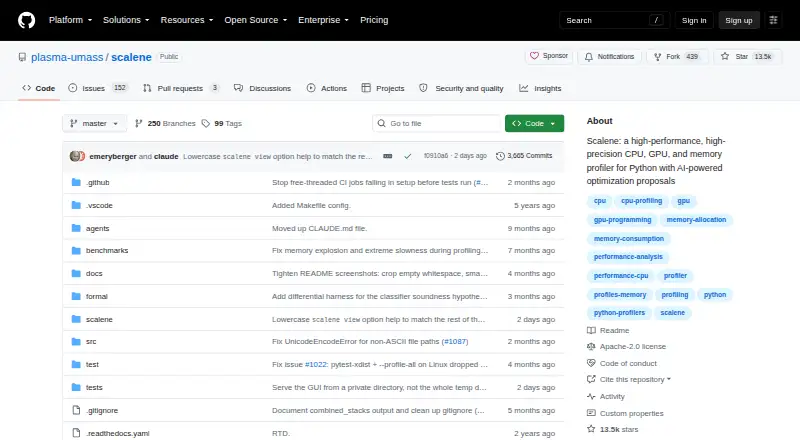
Scalene: A broad Python profiler for finding CPU, memory, GPU, copy, and async bottlenecks. Ranked #11 of 28 in Profiling Software by our editors (8.0/10); pricing: Open source; best for advanced Python performance analysis.
At a glance
- Editor score8.0 / 10
- PricingOpen source
- Best forAdvanced Python performance analysis
- Paid fromFree
- Profiling modesSampling
- Facts checked20 Sep 2026
Where it wins
- Profiles CPU, native, system, memory, GPU, copy volume, and async activity
- Combines CLI, browser, Jupyter, and Visual Studio Code workflows
- Open-source and supports offline operation with optional AI suggestions
Where it doesn't
- Supported language coverage is limited to Python
- The feature breadth may exceed the needs of simple CPU profiling
- AI suggestions require a configured provider or local model
Our verdict on Scalene
Scalene is an open-source profiling tool for Python applications, aimed at developers investigating performance across more than CPU usage alone. Its sampling-based analysis separates Python, native, and system time, while line-level and function-level views help narrow findings to specific code. It also covers memory allocation trends, likely leaks, GPU activity, copy volume, asynchronous waits, concurrency metrics, and stitched Python/native call stacks. That scope makes it a strong fit for advanced Python performance analysis, particularly when bottlenecks cross runtime, library, memory, or hardware boundaries.
The workflow spans a command-line interface, a browser-based graphical interface, Jupyter notebook magics, and a Visual Studio Code extension. Scalene operates locally and supports offline use, which suits developers who want profiling results close to their development environment. Jupyter and Visual Studio Code support also give it a practical place in notebook and editor-based workflows rather than restricting analysis to terminal output. Integrations with Amazon Bedrock, Microsoft Azure, OpenAI, and Ollama support optional AI-powered optimization suggestions, including use with local models through Ollama.
Its main trade-off is focus: Scalene supports Python rather than offering a multi-language profiling surface. The broad set of measurements can also be more than a straightforward CPU investigation requires, while AI suggestions add a provider or model configuration step. Choose Scalene when Python performance work spans CPU, native execution, memory, GPU, copying, or asynchronous behavior and you want open-source local tooling. Choose an alternative when your team needs profiling across multiple programming languages or only wants a narrower, simpler profiler.
Your product? Our editors can test Scalene in depth and publish a review, labelled as paid · from $149/mo →
Scalene pricing
Scalene fact sheet
| Free plan | Not verified |
|---|---|
| Paid from | Free |
| Profiling modes | Sampling |
| Supported languages | Python |
| CPU profiling | Yes |
| Memory profiling | Yes |
| Thread profiling | Yes |
| Deployment model | Desktop |
| Deployment | Desktop |
| Platforms | Web, Windows, macOS, Linux |
| Support | Community, Docs |
| Built for | Solo, Small business, Mid-market, Enterprise (editorial estimate) |
| Integrations | 6 integrations: Jupyter, Visual Studio Code, Amazon Bedrock, Microsoft Azure, OpenAI, Ollama |
| Pricing | Open source |
| Website | github.com |
| Facts checked | 20 Sep 2026 |
Scalene integrations
Scalene lists 6 integrations on its own site.
- Jupyter
- Visual Studio Code
- Amazon Bedrock
- Microsoft Azure
- OpenAI
- Ollama
Alternatives to Scalene
- Intel VTune ProfilerA free profiler covering CPU, memory, threading, GPU/NPU, I/O, MPI, and OpenMP.9.4
- AMD uProfA free AMD-focused profiler with broad CPU, system, threading, power, GPU, and tracing analysis.9.2
- PyroscopeA flexible profiler for teams that need continuous CPU and memory visibility at scale.9.1


See all Scalene alternatives →
Used Scalene? Be the first to review it
The editor score above is our own research. What this page doesn't have yet is a reader's view — what you used Scalene for, what worked and what didn't. No stars are seeded and no review is paid for; an editor reads every one before it appears.
Write a reviewTwo minutes · verified accounts only · read by an editor before it appears
Featured on iTechGuides

Scalene is listed in our Profiling Software directory. Add the badge to your site — it links back to this page.
<a href="https://www.itechguides.com/products/scalene/"><img src="https://www.itechguides.com/best/badge/scalene.svg" alt="Featured on iTechGuides" width="230" height="46"></a>
Reviewed by iTechGuides Editors · Editorial team · Updated Oct 2026
Advertiser disclosure: iTechGuides is reader-supported. Vendors can pay for top positions in our rankings and for a place on other products' pages, and we may earn a commission when you click some links. Bought places stand at the number bought; this page and our disclosure say so. Paying vendors may get a fuller, more detailed review from our editors, and that review can change their score. How we rank.
Last updated · How we research and update