
Royal TS
Royal TS: A capable Windows SSH client for teams sharing encrypted connection documents. Ranked #16 of 33 in SSH Clients by our editors (7.7/10); pricing: Free plan · 30-day trial; best for windows teams needing shared connection documents.
At a glance
- Editor score7.7 / 10
- PricingFree plan · 30-day trial
- Best forWindows teams needing shared connection documents
- Free planYes
- Paid from€49/user one-time
- Supported platformsWindows
- Facts checked20 Sep 2026
Where it wins
- Supports SSH, SFTP, SCP, port forwarding and multiple terminal protocols
- Encrypted documents, credential inheritance and external credential sources
- Team document sharing, workspaces and multi-user synchronization
Where it doesn't
- Windows is the only supported platform
- The free Lite tier is limited to 10 connections and 10 credentials
- The Individual User License costs 49 EUR as a one-time purchase
Our verdict on Royal TS
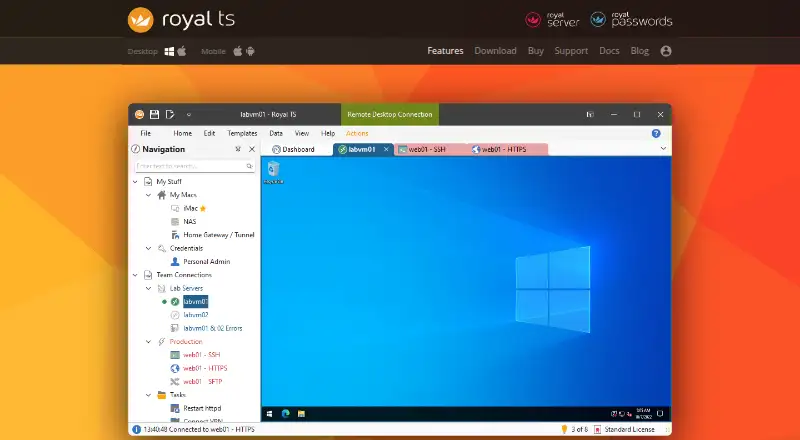
Royal TS is a Windows desktop client for managing remote connections and server environments. It combines SSH, Telnet, serial, Raw and Rlogin terminal connections with RDP, VNC, web connections, and FTP, SFTP and SCP file transfers. It is aimed at Windows administrators and teams that need organized access to servers, shared connection configurations, and separate handling of personal credentials.
Its strongest area is connection and document management. Users can organize connections with tabs, tab groups and customizable workspaces, while encrypted and password-protected documents help protect stored configurations. Credential assignment, inheritance and external credential sources support shared documents without requiring every user to share individual credentials. Royal TS also includes SSH-based port forwarding through Secure Gateway and command and key-sequence task automation. Integrations with LastPass, KeePass and Dropbox extend its fit with existing credential and storage workflows.
The pricing structure favors buyers seeking perpetual licensing. The free Lite plan allows up to 10 connections, up to 10 credentials and 1 document. According to the vendor’s pricing page, the Individual User License costs 49 EUR as a one-time purchase for a single user on multiple devices, with no subscription or annual fees. Site, Global and Extended Global licenses cost 849 EUR, 1,699 EUR and 3,199 EUR respectively, each as a one-time price; the Extended Global option includes 3 years of software maintenance. The product also offers a 30-day free trial. Royal TS is a strong fit for Windows teams that value shared documents and broad remote-access protocols, but teams requiring another desktop platform should choose an alternative.
Your product? Our editors can test Royal TS in depth and publish a review, labelled as paid · from $149/mo →
Royal TS pricing
All 6 Royal TS plans and prices →
Royal TS fact sheet
| Free plan | Yes |
|---|---|
| Paid from | €49/user one-time |
| Supported protocols | SSH, Telnet, RS232, Raw, Rlogin, RDP, VNC, HTTP/HTTPS, FTP, SFTP, SCP |
| Supported platforms | Windows |
| SFTP support | Yes |
| Port forwarding | Yes |
| Session management | Workspaces |
| Team session sharing | Yes |
| Free trial | 30 days |
| Deployment | Desktop |
| Platforms | Windows |
| Support | Email, Docs |
| Built for | Solo, Small business, Mid-market, Enterprise (editorial estimate) |
| Integrations | 3 integrations: LastPass, KeePass, Dropbox |
| Pricing | Free plan · 30-day trial (source) |
| Website | royalapps.com |
| Facts checked | 20 Sep 2026 |
Royal TS integrations
Royal TS lists 3 integrations on its own site.
- LastPass
- KeePass
- Dropbox
Alternatives to Royal TS
- TabbyA free, open-source terminal with broad shell support and advanced SSH workflows.9.2
- OpenSSHA mature, foundational SSH suite for command-line remote access, transfer, and tunneling.9.1
- PuTTYA capable free SSH client with broad protocol support and basic session management.9.0


See all Royal TS alternatives →
Also Ranked In
Royal TS is ranked in 2 of our directories.
Used Royal TS? Be the first to review it
The editor score above is our own research. What this page doesn't have yet is a reader's view — what you used Royal TS for, what worked and what didn't. No stars are seeded and no review is paid for; an editor reads every one before it appears.
Write a reviewTwo minutes · verified accounts only · read by an editor before it appears
Featured on iTechGuides

Royal TS is listed in our SSH Clients directory. Add the badge to your site — it links back to this page.
<a href="https://www.itechguides.com/products/royal-ts/"><img src="https://www.itechguides.com/best/badge/royal-ts.svg" alt="Featured on iTechGuides" width="230" height="46"></a>
Reviewed by iTechGuides Editors · Editorial team · Updated Oct 2026
Advertiser disclosure: iTechGuides is reader-supported. Vendors can pay for top positions in our rankings and for a place on other products' pages, and we may earn a commission when you click some links. Bought places stand at the number bought; this page and our disclosure say so. Paying vendors may get a fuller, more detailed review from our editors, and that review can change their score. How we rank.
Last updated · How we research and update