
Roomcaster
Roomcaster: A focused signage tool for scheduled, synchronized image and video playback. Ranked #197 of 207 in Digital Signage Software by our editors (3.0/10); pricing: Free plan · 14-day trial; best for church teams managing simple displays across rooms.
At a glance
- Editor score3.0 / 10
- PricingFree plan · 14-day trial
- Best forChurch teams managing simple displays across rooms
- Free planYes
- Paid from$9/mo
- Screen limit1 screens
- Facts checked23 Sep 2026
Where it wins
- Channels, playlists, and recurring or one-time schedules organize playback.
- Screen synchronization and TV-remote slide control support presentations.
- A free plan and $9 monthly entry keep small deployments accessible.
Where it doesn't
- Supports images and videos only, not other content types.
- Playback requires an internet connection; offline playback is unavailable.
- No mobile app, and device integrations are limited to Roku, Google TV, and Apple TV.
Our verdict on Roomcaster
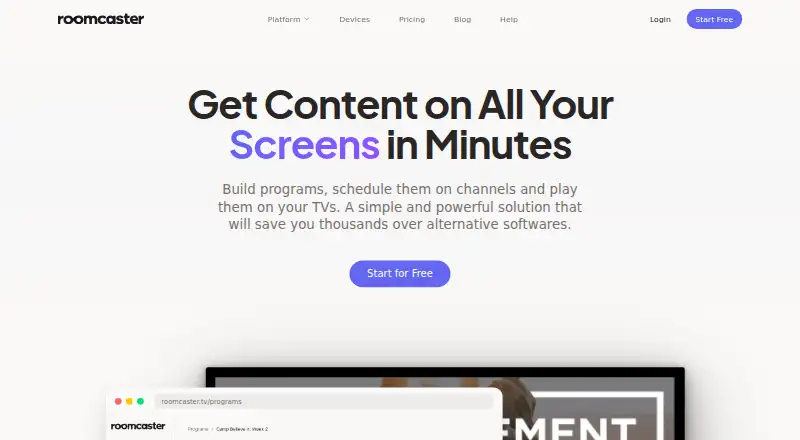
Roomcaster is a cloud-managed digital signage platform aimed primarily at churches and ministry teams that need to coordinate displays across rooms or ministries. Teams organize image and video media with categories and tags, create channels for different uses, and assemble ordered playlists with item durations. Scheduling supports recurring time slots and one-time events, while a default channel and looping setting help define what plays on a screen. The fit is strongest for small teams with straightforward display needs rather than organizations looking for a broad content system.
The product’s programming workflow is its clearest strength. A browser dashboard manages content, and schedules can assign programs to particular days and times. Playback can be synchronized across screens, and a TV remote can advance or return through presentation slides. These capabilities suit church services and ministry spaces where several displays should show coordinated material. Playback runs through Roku, Google TV, and Apple TV devices, so teams should check that one of those fits their screen setup. Roomcaster handles images and video, not a wider range of content types, and devices need an internet connection; teams requiring offline playback should look elsewhere.
Pricing scales mainly by screen capacity. Free is $0 monthly for one screen and 5GB storage, with a playback watermark and a two-hour video limit. Super Lite is $9 monthly for one screen and 10GB storage, removes the watermark, and allows unlimited video length. Starter costs $29 monthly for five screens, unlimited storage and users; Growth is $79 for 20 screens with those same listed capacity features, and Unlimited is $149 for unlimited screens, storage and users. A 14-day trial is offered. The free tier or Super Lite is a practical starting point for a single display; teams expanding across rooms can compare higher screen limits. Those needing phone-based management or offline playback should choose an alternative.
Your product? Our editors can test Roomcaster in depth and publish a review, labelled as paid · from $149/mo →
Roomcaster pricing
All 5 Roomcaster plans and prices →
Roomcaster fact sheet
| Free plan | Yes |
|---|---|
| Paid from | $9/mo |
| Screen limit | 1 screens |
| Offline playback | No |
| Content types | Images, videos |
| User roles | Not verified |
| API access | Not verified |
| Mobile app | No |
| Free trial | 14 days · no card needed |
| Money-back guarantee | 30 days |
| Deployment | Cloud, Browser extension |
| Platforms | Web, iOS, Android |
| Support | |
| Built for | Small business, Mid-market (editorial estimate) |
| Integrations | 3 integrations: Roku, Google TV, Apple TV |
| Pricing | Free plan · 14-day trial (source) |
| Website | roomcaster.tv |
| Facts checked | 23 Sep 2026 |
Roomcaster integrations
Roomcaster lists 3 integrations on its own site.
- Roku
- Google TV
- Apple TV
Alternatives to Roomcaster
- OptiSignsA flexible signage platform with mobile administration, offline playback, and a free plan.9.3
- YodeckA flexible signage platform with a generous free tier and broad content support.9.2
- Play Digital SignageFeature-rich signage with a free screen option and wide platform coverage.9.1



See all Roomcaster alternatives →
Used Roomcaster? Be the first to review it
The editor score above is our own research. What this page doesn't have yet is a reader's view — what you used Roomcaster for, what worked and what didn't. No stars are seeded and no review is paid for; an editor reads every one before it appears.
Write a reviewTwo minutes · verified accounts only · read by an editor before it appears
Featured on iTechGuides

Roomcaster is listed in our Digital Signage Software directory. Add the badge to your site — it links back to this page.
<a href="https://www.itechguides.com/products/roomcaster/"><img src="https://www.itechguides.com/best/badge/roomcaster.svg" alt="Featured on iTechGuides" width="230" height="46"></a>
Reviewed by iTechGuides Editors · Editorial team · Updated Oct 2026
Advertiser disclosure: iTechGuides is reader-supported. Vendors can pay for top positions in our rankings and for a place on other products' pages, and we may earn a commission when you click some links. Bought places stand at the number bought; this page and our disclosure say so. Paying vendors may get a fuller, more detailed review from our editors, and that review can change their score. How we rank.
Last updated · How we research and update