
Receipt Stash
Receipt Stash: A practical receipt workflow for small teams with predictable monthly scan volumes. Ranked #6 of 27 in Receipt Management Software by our editors (7.7/10); pricing: 14-day trial; best for small teams with predictable scan volumes.
At a glance
- Editor score7.7 / 10
- Pricing14-day trial
- Best forSmall teams with predictable scan volumes
- Free planNo
- Paid from$6/mo
- Mobile captureYes
- Founded2017 · Orewa, Auckland, New Zealand
- Facts checked22 Sep 2026
Where it wins
- Mobile, email, web and Dropbox receipt capture
- Line items, coding, duplicate detection and searchable archiving
- Xero and QuickBooks Online exports with unlimited users
Where it doesn't
- No free plan
- Plans charge extra for documents above the monthly allowance
- Higher scan volumes increase the monthly subscription cost
Our verdict on Receipt Stash
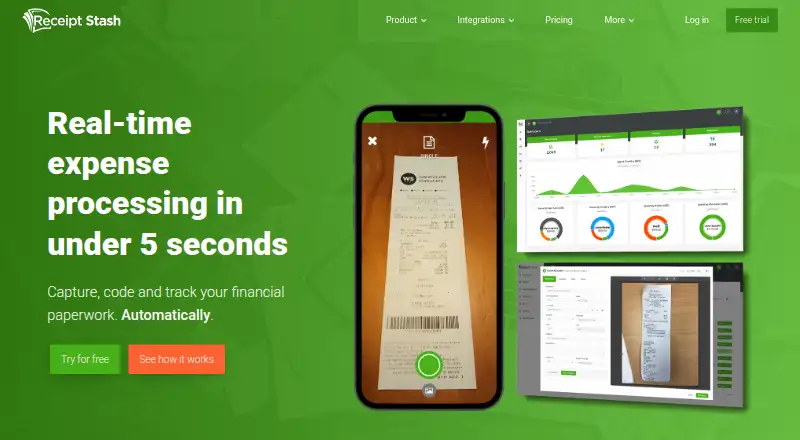
Receipt Stash is expense automation and management software for small and medium-sized businesses. It captures receipts and expense documents through iOS and Android apps, email forwarding, web uploads and Dropbox imports. The service extracts and codes expense data, supports expense reports and dashboards, and stores documents in a searchable cloud archive. Its line-item tools, merchant line-split rules and collaboration features also suit teams and bookkeepers managing shared expense records.
Pricing is based on monthly document scans. The 25-document plan costs $6 per month, followed by 50 scans at $11, 100 at $20, 200 at $36, 400 at $66 and 800 at $124. Every plan includes real-time data extraction, unlimited users, a 14-day free trial, and email, chat and web support. Documents above the monthly scan allowance incur an extra charge, so the lower tiers fit teams whose receipt volume is stable and easy to forecast. There is no free plan, but the trial does not require a card.
Receipt Stash fits businesses that want a focused path from receipt capture to accounting export. Dropbox, Xero and QuickBooks Online integrations connect the service to document storage and accounting workflows, while custom CSV and PDF exports support other reporting needs. Web, mobile and cloud deployment give teams several capture and access options without limiting the workflow to a single device. Choose it when automatic extraction, duplicate detection, line-item handling and volume-based pricing match your process. Teams looking for a free product or uncertain, frequently changing scan volumes should assess the overage model carefully before choosing a plan.
Your product? Our editors can test Receipt Stash in depth and publish a review, labelled as paid · from $149/mo →
Receipt Stash pricing
All 6 Receipt Stash plans and prices →
Receipt Stash fact sheet
| Free plan | No |
|---|---|
| Paid from | $6/mo |
| Mobile capture | Yes |
| Email receipt forwarding | Yes |
| Line-item extraction | Yes |
| Duplicate detection | Yes |
| Accounting sync | Yes |
| Receipt storage limit | Not verified |
| Supported platforms | Web_and_mobile |
| Free trial | 14 days · no card needed |
| Deployment | Cloud, Mobile |
| Platforms | Web, iOS, Android |
| Support | Email, Live chat, Docs |
| Built for | Small business, Mid-market (editorial estimate) |
| Integrations | 3 integrations: Dropbox, Xero, QuickBooks Online See all → |
| Pricing | 14-day trial (source) |
| Website | receipt-stash.com |
| Facts checked | 22 Sep 2026 |
Receipt Stash integrations
Receipt Stash lists 3 integrations on its own site.
- Dropbox
- Xero
- QuickBooks Online
See all Receipt Stash integrations →
Alternatives to Receipt Stash
- Dext PrepareDext Prepare automates document capture, extraction, approvals, and accounting publication.8.9
- AutoEntryBroad receipt and invoice capture with AI extraction and accounting-software publishing.8.7
- ShoeboxedA receipt platform combining multi-channel capture, human verification, and accounting exports.8.4



See all Receipt Stash alternatives →
Receipt Stash vs the competition
- Receipt Stash vs Dext Prepare
- Receipt Stash vs AutoEntry
- Receipt Stash vs Shoeboxed
- Receipt Stash vs Hubdoc
- Receipt Stash vs SparkReceipt
- Receipt Stash vs Finago eTasku


Compare Receipt Stash with any tool side by side →
Used Receipt Stash? Be the first to review it
The editor score above is our own research. What this page doesn't have yet is a reader's view — what you used Receipt Stash for, what worked and what didn't. No stars are seeded and no review is paid for; an editor reads every one before it appears.
Write a reviewTwo minutes · verified accounts only · read by an editor before it appears
Featured on iTechGuides

Receipt Stash is listed in our Receipt Management Software directory. Add the badge to your site — it links back to this page.
<a href="https://www.itechguides.com/products/receipt-stash/"><img src="https://www.itechguides.com/best/badge/receipt-stash.svg" alt="Featured on iTechGuides" width="230" height="46"></a>
Reviewed by iTechGuides Editors · Editorial team · Updated Sep 2026
Advertiser disclosure: iTechGuides is reader-supported. Vendors can pay for top positions in our rankings and for a place on other products' pages, and we may earn a commission when you click some links. Bought places stand at the number bought; this page and our disclosure say so. Paying vendors may get a fuller, more detailed review from our editors, and that review can change their score. How we rank.
Last updated · How we research and update