Raspberry Digital Signage
Raspberry Digital Signage: A focused, free Raspberry Pi signage system for DIY kiosk deployments. Ranked #196 of 207 in Digital Signage Software by our editors (3.0/10); pricing: Free plan; best for DIY Raspberry Pi kiosk deployments.
At a glance
- Editor score3.0 / 10
- PricingFree plan
- Best forDIY Raspberry Pi kiosk deployments
- Free planYes
- Paid fromFree
- Facts checked21 Sep 2026
Where it wins
- Free and open source for Raspberry Pi signage projects
- Full-screen kiosk playback with web-based administration
- REST API and multi-player scheduling via Signage Orchestrator
Where it doesn't
- Content support centers on web pages and HTML5 video
- No user roles are provided
- Scheduling multiple players requires Signage Orchestrator
Our verdict on Raspberry Digital Signage
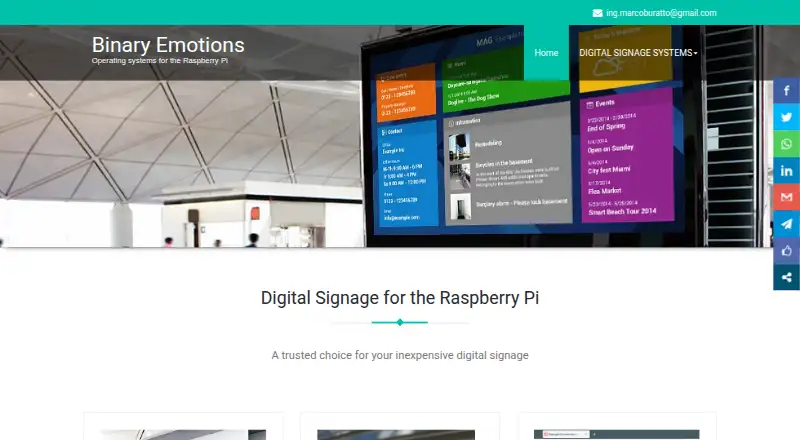
Raspberry Digital Signage is a Linux-based Raspberry Pi operating system for displaying web resources in a restricted full-screen browser view. It is aimed at teams and individuals building DIY kiosk deployments with Raspberry Pi hardware. Content can come from the internet, a local network, or folders hosted on the device, while the browser-based administration interface provides access to kiosk settings, remote configuration, screen rotation, and resolution controls. The open-source model also suits projects that prefer a self-hosted platform over a conventional hosted signage service.
Its feature depth is concentrated in browser-based playback and device control. Chromium extensions and browser settings persistence support customized display behavior, and the optional REST JSON API provides programmatic access. SSH remote management is documented for donor builds. WordPress and MagicMirror² are listed integrations, while Signage Orchestrator adds calendar-based scheduling across multiple players. This combination gives Raspberry Digital Signage a practical base for web dashboards, information screens, and kiosk-style displays, but its supported content types remain focused on web pages and HTML5 video.
The published model is free and open source, with a downloadable release build that has limited functionality and donor access for unrestricted features. No conventional paid tiers are presented. The product is a strong fit for Raspberry Pi projects that can manage Linux and self-hosted infrastructure, especially when kiosk playback, configuration control, and API access matter more than a broad content system. It is less suitable for organizations needing built-in user roles, a wider content format range, or multi-player scheduling without adding Signage Orchestrator.
Your product? Our editors can test Raspberry Digital Signage in depth and publish a review, labelled as paid · from $149/mo →
Raspberry Digital Signage pricing
Raspberry Digital Signage fact sheet
| Free plan | Yes |
|---|---|
| Paid from | Free |
| Screen limit | Not verified |
| Offline playback | Not verified |
| Content types | web pages, HTML5 video |
| User roles | None |
| API access | Yes |
| Mobile app | Not verified |
| Deployment | Self-hosted |
| Platforms | Linux |
| Support | Email, Docs |
| Built for | Solo, Small business (editorial estimate) |
| Integrations | 3 integrations: WordPress, MagicMirror², Signage Orchestrator |
| Pricing | Free plan (source) |
| Website | binaryemotions.com |
| Facts checked | 21 Sep 2026 |
Raspberry Digital Signage integrations
Raspberry Digital Signage lists 3 integrations on its own site.
- WordPress
- MagicMirror²
- Signage Orchestrator
Alternatives to Raspberry Digital Signage
- OptiSignsA flexible signage platform with mobile administration, offline playback, and a free plan.9.3
- YodeckA flexible signage platform with a generous free tier and broad content support.9.2
- Play Digital SignageFeature-rich signage with a free screen option and wide platform coverage.9.1



See all Raspberry Digital Signage alternatives →
Used Raspberry Digital Signage? Be the first to review it
The editor score above is our own research. What this page doesn't have yet is a reader's view — what you used Raspberry Digital Signage for, what worked and what didn't. No stars are seeded and no review is paid for; an editor reads every one before it appears.
Write a reviewTwo minutes · verified accounts only · read by an editor before it appears
Featured on iTechGuides

Raspberry Digital Signage is listed in our Digital Signage Software directory. Add the badge to your site — it links back to this page.
<a href="https://www.itechguides.com/products/raspberry-digital-signage/"><img src="https://www.itechguides.com/best/badge/raspberry-digital-signage.svg" alt="Featured on iTechGuides" width="230" height="46"></a>
Reviewed by iTechGuides Editors · Editorial team · Updated Oct 2026
Advertiser disclosure: iTechGuides is reader-supported. Vendors can pay for top positions in our rankings and for a place on other products' pages, and we may earn a commission when you click some links. Bought places stand at the number bought; this page and our disclosure say so. Paying vendors may get a fuller, more detailed review from our editors, and that review can change their score. How we rank.
Last updated · How we research and update