
RapidCut AI
RapidCut AI: A Premiere Pro plugin that automates podcast cleanup, captions, reframing, and exports. Ranked #20 of 25 in AI Podcast Editing Software by our editors (6.9/10); pricing: Free plan · 3-day trial; best for premiere-based podcast repurposing.
At a glance
- Editor score6.9 / 10
- PricingFree plan · 3-day trial
- Best forPremiere-based podcast repurposing
- Free planYes
- Paid from$19/mo
- Filler-word removalYes
- Facts checked22 Sep 2026
Where it wins
- Natural-language editing of Premiere Pro timelines
- Silence, filler-word, and stumble removal
- Captions, reframing, multicamera editing, and batch export
Where it doesn't
- Requires Adobe Premiere Pro on Windows or macOS
- Paid plans start at $19 per month
- Commercial and multi-seat use starts with Studio
Our verdict on RapidCut AI
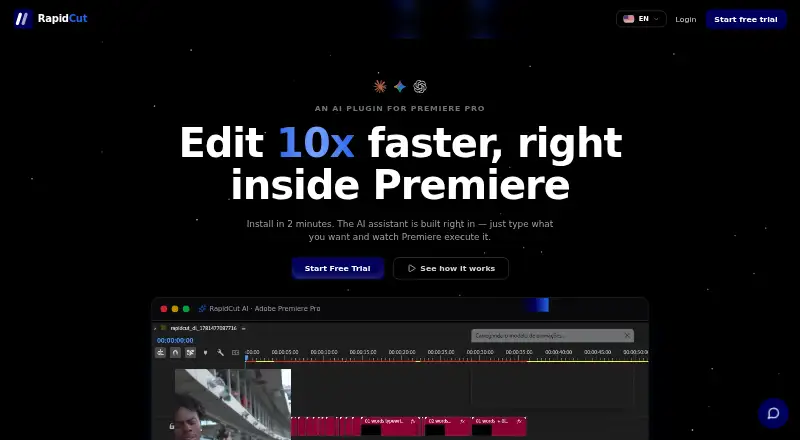
RapidCut AI is a Premiere Pro plugin for podcasters, YouTubers, course creators, and agencies. It applies natural-language commands to the user's local Premiere Pro timeline, handling repetitive work such as silence and dead-air removal, filler-word and stumble removal, caption generation, rough cuts, multicamera editing, auto-reframing for TikTok and Reels, and batch export with Media Encoder. Its strongest fit is for teams already building podcast content in Premiere and looking to repurpose episodes into short-form video.
The published plans show a freemium model with a free plan and paid tiers beginning at $19 per month. RapidCut Creator includes animated captions, AI editing, silence removal, B-roll and stock media, and a video downloader. Pro costs $29 per month and adds multicamera setup, 115 color looks, 78 sound effects, and three times more transcription and stock searches. Studio costs $59 per month and adds AI viral clips, custom LUT and sound-effect folders, commercial and multi-seat use, and priority support. Annual pricing is listed at $228 for Creator, $348 for Pro, and $708 for Studio.
RapidCut's ecosystem fit is central to its value. It integrates with Adobe Premiere Pro and can connect to Claude, ChatGPT, Gemini, OpenRouter, or its built-in AI assistant. The workflow remains tied to Premiere Pro on Windows and macOS, so it is less suitable for editors seeking a standalone browser-based podcast tool or a different editing environment. Choose RapidCut AI if Premiere timeline control, automated cleanup, captions, and repurposing are priorities. Consider an alternative if you need editing without Premiere Pro or want commercial and multi-seat capabilities without moving to the Studio plan.
Your product? Our editors can test RapidCut AI in depth and publish a review, labelled as paid · from $149/mo →
RapidCut AI pricing
All 3 RapidCut AI plans and prices →
RapidCut AI fact sheet
| Free plan | Yes |
|---|---|
| Paid from | $19/mo |
| Transcript editing | Not verified |
| Filler-word removal | Yes |
| Noise reduction | Not verified |
| Loudness leveling | Not verified |
| Speaker labels | Not verified |
| Maximum upload length | Not verified |
| Supported languages | Not verified |
| Free trial | 3 days · card required |
| Money-back guarantee | 14 days |
| Deployment | Desktop |
| Platforms | Windows, macOS |
| Support | |
| Built for | Solo, Small business, Mid-market (editorial estimate) |
| Integrations | 5 integrations: Adobe Premiere Pro, Claude, ChatGPT, Gemini, OpenRouter |
| Pricing | Free plan · 3-day trial (source) |
| Website | rapidcutai.com |
| Facts checked | 22 Sep 2026 |
RapidCut AI integrations
RapidCut AI lists 5 integrations on its own site.
- Adobe Premiere Pro
- Claude
- ChatGPT
- Gemini
- OpenRouter
Alternatives to RapidCut AI
- Adobe PodcastA free browser-based editor with remote recording and clear premium upgrade limits.9.3
- DescriptA flexible text-first editor for teams producing podcasts and video together.9.2
- ZencastrA generous free plan for remote recording, transcription, editing, hosting, and publishing.8.8



See all RapidCut AI alternatives →
Used RapidCut AI? Be the first to review it
The editor score above is our own research. What this page doesn't have yet is a reader's view — what you used RapidCut AI for, what worked and what didn't. No stars are seeded and no review is paid for; an editor reads every one before it appears.
Write a reviewTwo minutes · verified accounts only · read by an editor before it appears
Featured on iTechGuides

RapidCut AI is listed in our AI Podcast Editing Software directory. Add the badge to your site — it links back to this page.
<a href="https://www.itechguides.com/products/rapidcut-ai/"><img src="https://www.itechguides.com/best/badge/rapidcut-ai.svg" alt="Featured on iTechGuides" width="230" height="46"></a>
Reviewed by iTechGuides Editors · Editorial team · Updated Oct 2026
Advertiser disclosure: iTechGuides is reader-supported. Vendors can pay for top positions in our rankings and for a place on other products' pages, and we may earn a commission when you click some links. Bought places stand at the number bought; this page and our disclosure say so. Paying vendors may get a fuller, more detailed review from our editors, and that review can change their score. How we rank.
Last updated · How we research and update