QTerminal
QTerminal: A focused Linux and macOS terminal with tabs, panes, bookmarks, and D-Bus automation. Ranked #27 of 40 in Terminal Emulators by our editors (6.8/10); pricing: Free plan; best for linux and macOS users wanting simple panes and bookmarks.
At a glance
- Editor score6.8 / 10
- PricingFree plan
- Best forLinux and macOS users wanting simple panes and bookmarks
- Free planYes
- Paid fromFree
- Split panesYes
- Facts checked20 Sep 2026
Where it wins
- Free and open source under the GPLv2-or-later license
- Tabbed sessions, split panes, dropdown mode, search, and bookmarks
- D-Bus interfaces support window and tab automation
Where it doesn't
- Documented platform coverage is limited to Linux and macOS
- Automation is centered on D-Bus interfaces
- Users needing GPU, SSH, or session-sync features should look elsewhere
Our verdict on QTerminal
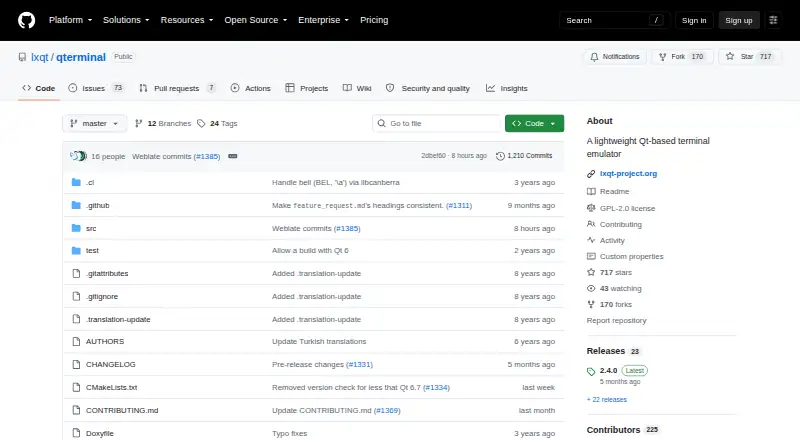
QTerminal is a lightweight, Qt-based terminal emulator maintained by the LXQt Project. It can also be used independently of the LXQt desktop environment, making it suitable for Linux and macOS users who want a focused terminal rather than a broader workspace tool. Its core interface combines multiple terminal tabs with vertical or horizontal split panes, while dropdown mode provides a quick-access terminal layout. Text search, command bookmarks, shortcut editing, configurable interface settings, and system clipboard integration round out the everyday feature set.
For organization and customization, QTerminal covers the essentials without moving beyond its terminal-emulator focus. Users can arrange sessions in tabs or split views, search terminal text, save frequently used commands as bookmarks, and adjust shortcuts and interface behavior. Integration with QTermWidget supports its Qt terminal foundation, while system clipboard support connects terminal work with the desktop. The documented D-Bus window and tab interface also gives Linux-oriented workflows a way to automate terminal actions.
QTerminal is a strong fit for users who value free, open-source software and want straightforward session organization on Linux or macOS. Official binary packages are available through major Linux and BSD distributions, and macOS bundle build support is documented. Its GPLv2-or-later licensing is worth reviewing for organizations with specific distribution requirements. The product stays narrowly focused: users looking for GPU acceleration, SSH-oriented workflows, or session synchronization should choose a terminal emulator that specifically provides those capabilities.
Your product? Our editors can test QTerminal in depth and publish a review, labelled as paid · from $149/mo →
QTerminal pricing
QTerminal fact sheet
| Free plan | Yes |
|---|---|
| Paid from | Free |
| Supported platforms | linux, macos |
| Split panes | Yes |
| Session sync | Not verified |
| GPU acceleration | Not verified |
| Scripting API | Yes |
| SSH support | Not verified |
| Deployment | Desktop |
| Platforms | Linux, macOS |
| Integrations | 3 integrations: QTermWidget, D-Bus, system clipboard |
| Pricing | Free plan |
| Website | github.com |
| Facts checked | 20 Sep 2026 |
QTerminal integrations
QTerminal lists 3 integrations on its own site.
- QTermWidget
- D-Bus
- system clipboard
Alternatives to QTerminal
- TabbyA versatile open-source terminal for power users who automate across systems.9.4
- Windows TerminalA free, open-source Windows terminal with tabs, panes, profiles, and automation.9.3
- iTerm2A capable Mac terminal with advanced panes, profiles, session restoration, and automation.9.2


See all QTerminal alternatives →
Used QTerminal? Be the first to review it
The editor score above is our own research. What this page doesn't have yet is a reader's view — what you used QTerminal for, what worked and what didn't. No stars are seeded and no review is paid for; an editor reads every one before it appears.
Write a reviewTwo minutes · verified accounts only · read by an editor before it appears
Featured on iTechGuides

QTerminal is listed in our Terminal Emulators directory. Add the badge to your site — it links back to this page.
<a href="https://www.itechguides.com/products/qterminal/"><img src="https://www.itechguides.com/best/badge/qterminal.svg" alt="Featured on iTechGuides" width="230" height="46"></a>
Reviewed by iTechGuides Editors · Editorial team · Updated Oct 2026
Advertiser disclosure: iTechGuides is reader-supported. Vendors can pay for top positions in our rankings and for a place on other products' pages, and we may earn a commission when you click some links. Bought places stand at the number bought; this page and our disclosure say so. Paying vendors may get a fuller, more detailed review from our editors, and that review can change their score. How we rank.
Last updated · How we research and update