
ProfitBooks
ProfitBooks: A practical bookkeeping suite for small businesses that need inventory and reports. Ranked #22 of 74 in Bookkeeping Software by our editors (7.1/10); pricing: Free plan; best for small businesses needing inventory and reports.
At a glance
- Editor score7.1 / 10
- PricingFree plan
- Best forSmall businesses needing inventory and reports
- Free planYes
- Bank feedsNo
- Founded2012 · Pune, Maharashtra, India
- Facts checked20 Sep 2026
Where it wins
- Free single-user plan with basic financial reports and inventory access
- Inventory tracking across warehouses with stock management
- Accountant and auditor collaboration with role-based access
Where it doesn't
- Bank workflows use CSV or Excel imports rather than connected bank feeds
- WhatsApp integration is available only as a paid add-on
- Advanced capabilities require higher paid tiers
Our verdict on ProfitBooks
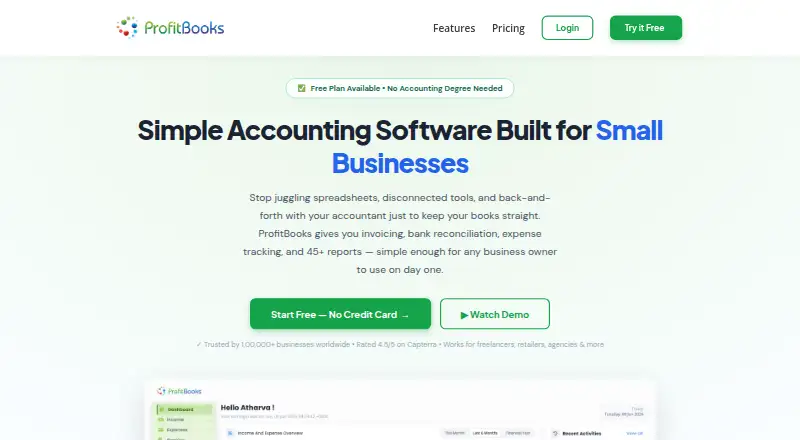
ProfitBooks is cloud accounting and bookkeeping software for freelancers, retailers, service providers, sole proprietors, and growing small and medium-sized businesses. It combines double-entry bookkeeping, journal entries, invoicing, estimates, sales orders, payment tracking, expense recording, inventory management, tax reporting, and financial reports. The product runs in a web browser and has iOS and Android apps, making it suitable for small businesses that want bookkeeping, stock control, and reporting in one system.
The published plans show a free Startup tier for a single user, with basic financial reports and inventory access. Essential costs $9.95 per month or $99 per year and adds invoice reminders and signatures, GSTR1, and GSTR3B. Growth costs $20 per month or $199 per year and adds payroll management, multicurrency support, and three warehouses. SMB Pro costs $35 per month or $349 per year and adds custom roles, Projects, and auditor access. WhatsApp integration is available as an add-on on Essential and is not included in the listed plan highlights. The pricing page also offers USD and INR displays, with INR prices excluding GST.
Its accounting workflow covers bank-statement import and transaction reconciliation, but the stated process uses CSV or Excel files rather than connected bank feeds. That makes ProfitBooks a better fit for businesses comfortable importing statements and reviewing transactions within the software than for teams seeking direct bank connectivity. Inventory tracking, financial and tax reports, receipt and payment recording, and accountant collaboration give it useful breadth for small operations. Businesses needing payroll, multicurrency, or multiple warehouses should review Growth, while teams needing custom roles or auditor access should consider SMB Pro. ProfitBooks is a sensible choice for inventory-focused small businesses; organizations prioritizing connected banking or broader integrations should choose an alternative.
Questions about ProfitBooks
Does ProfitBooks have a free plan? No free plan is listed; paid plans start at $9.95/mo (Essential).
How much does ProfitBooks cost? ProfitBooks lists 3 paid plans; the lowest is Essential at $9.95/mo.
What does ProfitBooks run on? Web, iOS and Android. It runs in the cloud and as a mobile app.
Does ProfitBooks offer a money-back guarantee? Yes: 30 days.
Who is ProfitBooks built for? Solo users, small businesses and mid-market companies (our editorial estimate).
Your product? Our editors can test ProfitBooks in depth and publish a review, labelled as paid · from $149/mo →
ProfitBooks pricing
All 4 ProfitBooks plans and prices →
ProfitBooks fact sheet
| Free plan | Yes |
|---|---|
| Paid from | Not verified |
| Bank feeds | No |
| Automated reconciliation | Yes |
| Invoice creation | Yes |
| Receipt capture | Yes |
| Inventory tracking | Yes |
| Accountant access | Yes |
| Mobile platforms | Ios and android |
| Money-back guarantee | 30 days |
| Deployment | Cloud, Mobile |
| Platforms | Web, iOS, Android |
| Support | Email, Live chat, Docs |
| Built for | Solo, Small business, Mid-market (editorial estimate) |
| Pricing | Free plan (source) |
| Website | profitbooks.net |
| Facts checked | 20 Sep 2026 |
Alternatives to ProfitBooks
- Zoho BooksA broad bookkeeping suite with a capable free plan and scalable paid tiers.9.4
- Xero BillsA paid bookkeeping platform with strong bill management, reconciliation, and payment tools.9.3
- QuickBooks Desktop EnterpriseA Windows-based accounting suite built for inventory-heavy, multi-company operations.9.2

See all ProfitBooks alternatives →
Also Ranked In
ProfitBooks is ranked in 4 of our directories.
Used ProfitBooks? Be the first to review it
The editor score above is our own research. What this page doesn't have yet is a reader's view — what you used ProfitBooks for, what worked and what didn't. No stars are seeded and no review is paid for; an editor reads every one before it appears.
Write a reviewTwo minutes · verified accounts only · read by an editor before it appears
Featured on iTechGuides

ProfitBooks is listed in our Bookkeeping Software directory. Add the badge to your site — it links back to this page.
<a href="https://www.itechguides.com/products/profitbooks/"><img src="https://www.itechguides.com/best/badge/profitbooks.svg" alt="Featured on iTechGuides" width="230" height="46"></a>
Reviewed by iTechGuides Editors · Editorial team · Updated Nov 2026
Advertiser disclosure: iTechGuides is reader-supported. Vendors can pay for top positions in our rankings and for a place on other products' pages, and we may earn a commission when you click some links. Bought places stand at the number bought; this page and our disclosure say so. Paying vendors may get a fuller, more detailed review from our editors, and that review can change their score. How we rank.
Last updated · How we research and update