PINCE
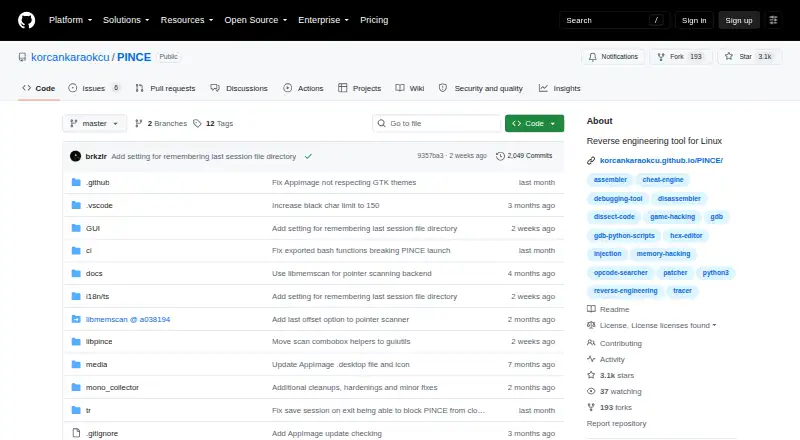
PINCE: A free, open-source Linux editor with scanning, debugging, patching, and scripting depth. Ranked #5 of 23 in Game Memory Editors by our editors (8.9/10); pricing: Free plan; best for linux users wanting a complete free editor.
At a glance
- Editor score8.9 / 10
- PricingFree plan
- Best forLinux users wanting a complete free editor
- Free planYes
- Paid fromFree
- Operating systemsLinux
- Facts checked21 Sep 2026
Where it wins
- Combines memory and pointer scanning with variable locking and editing
- Includes GDB debugging, disassembly, breakpoints, and watchpoints
- Adds Python scripting, runtime dissection, patching, and injection tools
Where it doesn't
- Documented for Linux rather than cross-platform use
- Currently supports x86 targets
- Its broad toolset is geared toward technical reverse-engineering workflows
Our verdict on PINCE
PINCE is an open-source front end for GNU Project Debugger (GDB), built for game memory editing and reverse engineering on Linux. It suits users who need more than basic value changes, combining memory and pointer scanning with variable inspection, editing, and locking. The tool also covers disassembly, memory viewing, register inspection, breakpoints, watchpoints, code patching, NOPing, runtime injection, and sessions with address tables. Support for native Linux games and many games running through WINE or Proton broadens its use within a Linux gaming setup.
Its standout strength is the breadth of its technical workflow. PINCE brings memory operations, GDB-based debugging, and runtime analysis into one application, while the Libpince Engine provides Python scripting. Mono and IL2CPP runtime dissection adds a focused option for games using those technologies. This makes PINCE a stronger fit for users who want to inspect program behavior, automate tasks, or move from scanning into debugging and patching without changing tools. Users seeking only a simple memory-value editor may find that scope unnecessary.
Platform fit is the main boundary. PINCE is documented as Linux-only and currently supports x86 targets; native Linux i386 support is documented, while the distributed AppImage is x86_64. WINE and Proton support can help users working with compatible Windows games on Linux, but it does not turn PINCE into a general Windows or macOS editor. Choose PINCE for a free, open-source Linux toolkit with scanning, debugger controls, scripting, and runtime dissection. Choose an alternative if cross-platform coverage or architectures outside its documented x86 focus are central requirements.
Your product? Our editors can test PINCE in depth and publish a review, labelled as paid · from $149/mo →
PINCE pricing
PINCE fact sheet
| Free plan | Yes |
|---|---|
| Paid from | Free |
| Operating systems | Linux |
| Pointer scanning | Yes |
| Debugger | Yes |
| Scripting support | Yes |
| Architecture support | Both |
| Open source | Yes |
| Deployment | Self-hosted |
| Platforms | Linux |
| Support | Community, Docs |
| Built for | Solo, Small business (editorial estimate) |
| Integrations | 3 integrations: GNU Project Debugger (GDB), WINE, Proton |
| Pricing | Free plan |
| Website | github.com |
| Facts checked | 21 Sep 2026 |
PINCE integrations
PINCE lists 3 integrations on its own site.
- GNU Project Debugger (GDB)
- WINE
- Proton
Alternatives to PINCE
- Cheat EngineA broad, free desktop editor for inspecting and modifying single-player games.9.4
- MemDBGA broad open-source toolkit for memory scanning, debugging, patching, and trainer work.9.2
- Cheat Engine LinuxAn open-source Linux toolkit for memory editing, debugging, scripting, and Cheat Engine compatibility.9.1

PINCE vs the competition
- PINCE vs Cheat Engine
- PINCE vs MemDBG
- PINCE vs Cheat Engine Linux
- PINCE vs Bit Slicer
- PINCE vs CoSMOS
- PINCE vs Game Cheetah
Compare PINCE with any tool side by side →
Used PINCE? Be the first to review it
The editor score above is our own research. What this page doesn't have yet is a reader's view — what you used PINCE for, what worked and what didn't. No stars are seeded and no review is paid for; an editor reads every one before it appears.
Write a reviewTwo minutes · verified accounts only · read by an editor before it appears
Featured on iTechGuides

PINCE is listed in our Game Memory Editors directory. Add the badge to your site — it links back to this page.
<a href="https://www.itechguides.com/products/pince/"><img src="https://www.itechguides.com/best/badge/pince.svg" alt="Featured on iTechGuides" width="230" height="46"></a>
Reviewed by iTechGuides Editors · Editorial team · Updated Oct 2026
Advertiser disclosure: iTechGuides is reader-supported. Vendors can pay for top positions in our rankings and for a place on other products' pages, and we may earn a commission when you click some links. Bought places stand at the number bought; this page and our disclosure say so. Paying vendors may get a fuller, more detailed review from our editors, and that review can change their score. How we rank.
Last updated · How we research and update