
Picktime
Picktime: A low-cost scheduler for appointments, classes, events, resources, and payments. Ranked #18 of 135 in Appointment Scheduling Software by our editors (7.1/10); pricing: Free plan; best for budget-conscious businesses needing many resource types.
At a glance
- Editor score7.1 / 10
- PricingFree plan
- Best forBudget-conscious businesses needing many resource types
- Free planYes
- Paid from$2.25/user/mo
- Calendar syncTwo-way
- Facts checked20 Sep 2026
Where it wins
- Schedules appointments, classes, events, rooms, and equipment
- Supports two-way calendar sync, reminders, payments, and deposits
- Offers multi-location management with round-robin assignments
Where it doesn't
- The Free plan caps accounts at 3 users, 3 resources, 2 locations, and 2 classes
- Starter is limited to 3 users and 5 classes
- Paid plan pricing shown here requires annual billing
Our verdict on Picktime
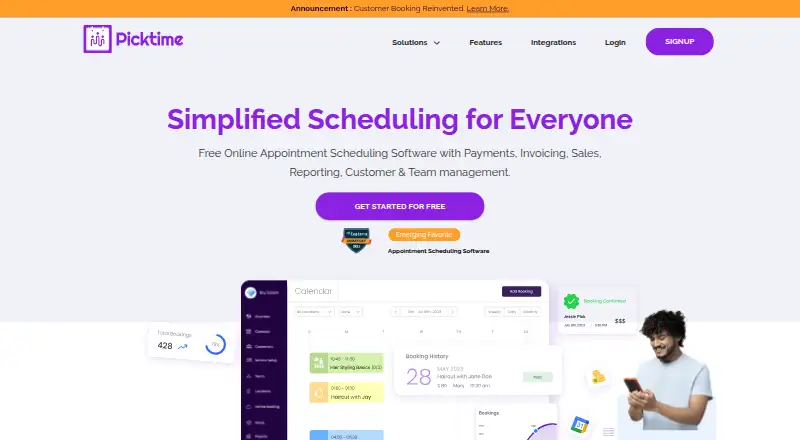
Picktime is an appointment scheduling platform for businesses managing more than one booking type. It supports appointments, classes, events, interviews, rooms, and equipment, with online booking pages, shared links, and website widgets for customer reservations. Teams can manage customers, staff availability, booking forms, recurring appointments, invoices, reports, resources, and multiple locations. Picktime is available on the web, iOS, and Android, making it suitable for businesses that need scheduling across varied services and physical resources rather than a single appointment calendar.
The plan structure is notable for its low advertised entry price. Free costs $0 per account and includes 3 users, 3 resources, 2 locations, 2 classes, unlimited appointments, and an online booking page. Starter costs $3 per user per month when billed annually and adds 5 classes, email notifications and reminders, PayPal, Stripe and Square payments, recurring bookings, and two-way calendar sync. Pro is listed at $2.25 per user per month billed annually, with 10 users, unlimited locations, unlimited classes, round robin, waitlists, and booking approval. Businesses should compare the plan limits carefully, especially because Pro is priced below Starter in the published plans.
Picktime’s platform fit is broad. Calendar connections include Google Calendar, Apple Calendar, Outlook, Microsoft 365, and Exchange, while video integrations include Google Meet, Microsoft Teams, Zoom, GoToMeeting, and Jitsi Meet. PayPal, Stripe, and Square support online payments, and automated email and SMS reminders help coordinate bookings. This breadth suits organizations coordinating staff, classes, events, rooms, equipment, and locations in one system. Businesses needing only a simple calendar may not need its wider resource and booking model, while budget-conscious teams with varied scheduling needs should find the combination of booking, payment, calendar, and resource tools relevant.
Your product? Our editors can test Picktime in depth and publish a review, labelled as paid · from $149/mo →
Picktime pricing
All 3 Picktime plans and prices →
Picktime fact sheet
| Free plan | Yes |
|---|---|
| Paid from | $2.25/user/mo |
| Booking pages | Yes |
| Calendar sync | Two-way |
| Group booking | Yes |
| Round-robin scheduling | Yes |
| Automated reminders | Yes |
| Payment collection | Yes |
| Deployment | Cloud, Mobile |
| Platforms | Web, iOS, Android |
| Support | Live chat, Docs |
| Built for | Solo, Small business, Mid-market, Enterprise (editorial estimate) |
| Integrations | 100+ integrations: PayPal, Stripe, Square, Google Meet, Microsoft Teams, Zoom … See all → |
| Pricing | Free plan (source) |
| Website | picktime.com |
| Facts checked | 20 Sep 2026 |
Picktime integrations
Picktime lists 100+ integrations on its own site — the 20 named here are the ones its pages call out.
- PayPal
- Stripe
- Square
- Google Meet
- Microsoft Teams
- Zoom
- GoToMeeting
- Jitsi Meet
- Google Calendar
- Outlook Calendar
- Apple Calendar
- Office 365 Calendar
- Microsoft Exchange
- Zapier
- WordPress
- Weebly
- Wix
- Joomla
- Squarespace
- Drupal
See all Picktime integrations →
Alternatives to Picktime
- CalendlyA broad scheduler with strong team routing, payments, reminders, and integrations.9.4
- Cal.comA flexible scheduler with free basics, team routing, payments, and developer tools.9.2
- Zoho BookingsA flexible scheduler with a capable free tier and strong Zoho ecosystem fit.9.1



See all Picktime alternatives →
Also Ranked In
Picktime is ranked in 4 of our directories.
Used Picktime? Be the first to review it
The editor score above is our own research. What this page doesn't have yet is a reader's view — what you used Picktime for, what worked and what didn't. No stars are seeded and no review is paid for; an editor reads every one before it appears.
Write a reviewTwo minutes · verified accounts only · read by an editor before it appears
Featured on iTechGuides

Picktime is listed in our Appointment Scheduling Software directory. Add the badge to your site — it links back to this page.
<a href="https://www.itechguides.com/products/picktime/"><img src="https://www.itechguides.com/best/badge/picktime.svg" alt="Featured on iTechGuides" width="230" height="46"></a>
Reviewed by iTechGuides Editors · Editorial team · Updated Oct 2026
Advertiser disclosure: iTechGuides is reader-supported. Vendors can pay for top positions in our rankings and for a place on other products' pages, and we may earn a commission when you click some links. Bought places stand at the number bought; this page and our disclosure say so. Paying vendors may get a fuller, more detailed review from our editors, and that review can change their score. How we rank.
Last updated · How we research and update