
Cal.com
Cal.com: A flexible scheduler with free basics, team routing, payments, and developer tools. Ranked #2 of 135 in Appointment Scheduling Software by our editors (9.2/10); pricing: Free plan · 14-day trial; best for technical teams wanting flexible scheduling.
At a glance
- Editor score9.2 / 10
- PricingFree plan · 14-day trial
- Best forTechnical teams wanting flexible scheduling
- Free planYes
- Paid from$12/user/mo
- Calendar syncTwo-way
- Facts checked21 Sep 2026
Where it wins
- Free plan includes unlimited event types and calendars
- Two-way sync, routing forms, payments, and team scheduling
- Embeds, APIs, mobile apps, and 100+ app integrations
Where it doesn't
- The Free plan supports only 1 user
- Paid prices shown apply to annual billing
- Advanced organization controls require the Organizations plan
Our verdict on Cal.com
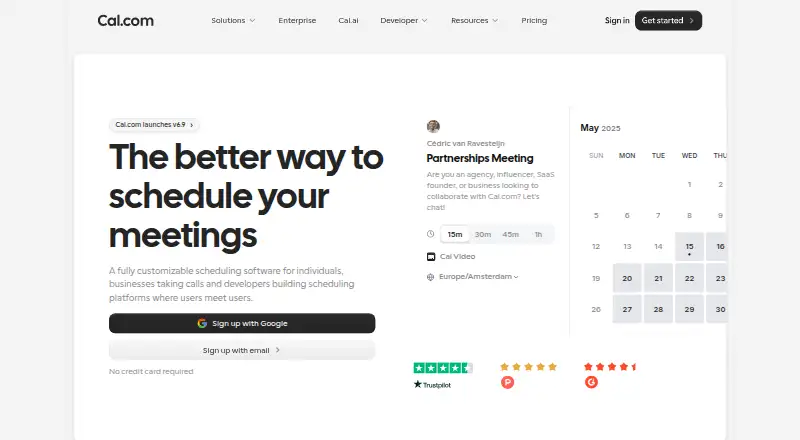
Cal.com is appointment and meeting scheduling software for individuals, teams, businesses, and developers building scheduling into applications. It connects with calendars, checks availability, publishes booking pages, collects payments, and automates email and SMS reminders and follow-ups. Teams can use shared availability, round-robin assignment, collective events, group bookings, and routing forms. Its platform coverage includes web, Windows, macOS, Linux, iOS, Android, a Chrome extension, and an API, making it suited to technical teams that need scheduling across products and workflows.
Pricing starts with a Free plan at $0 per user. It supports 1 user, unlimited event types and calendars, email and SMS notifications, 100+ app integrations, a mobile app, a browser extension, and Stripe and PayPal payments. Teams costs $12 per user per month with annual billing and adds shared availability for 1 team, round-robin scheduling, managed and collective event types, recurring events, customizable notifications, and routing forms. Organizations costs $28 per user per month with annual billing and adds unlimited sub-teams, custom-variable routing, a company subdomain, SAML SSO, SCIM, role-based permissions, and additional APIs. Enterprise adds dedicated onboarding and engineering support, SLA and uptime guarantees, HRIS and directory integrations, a dedicated database, and priority support.
The main distinction is how much scheduling logic and integration control a team needs. Calendar connections include Google, Outlook, Apple, and Zoho, while meeting options include Cal Video, Zoom, Google Meet, and Microsoft Teams. Salesforce, HubSpot, Zapier, Make, and webhooks extend workflow coverage, and embeddable booking pages and developer APIs support product integrations. Cal.com fits teams that want configurable scheduling, routing, payments, and technical integration options. Individuals or small teams needing only basic booking can start with Free, while organizations requiring SSO, SCIM, permissions, or multiple sub-teams need a higher tier.
Your product? Our editors can test Cal.com in depth and publish a review, labelled as paid · from $149/mo →
Cal.com pricing
All 4 Cal.com plans and prices →
Cal.com fact sheet
| Free plan | Yes |
|---|---|
| Paid from | $12/user/mo |
| Booking pages | Yes |
| Calendar sync | Two-way |
| Group booking | Yes |
| Round-robin scheduling | Yes |
| Automated reminders | Yes |
| Payment collection | Yes |
| Free trial | 14 days |
| Deployment | Cloud, Self-hosted, Desktop, Mobile, Browser extension |
| Platforms | Web, Windows, macOS, Linux, iOS, Android, Chrome extension |
| Compliance & security | SOC 2, ISO 27001, GDPR, HIPAA, SSO/SAML, 2FA |
| Support | Email, Docs |
| Built for | Solo, Small business, Mid-market, Enterprise (editorial estimate) |
| Integrations | 100+ integrations: Google Calendar, Outlook Calendar, Apple Calendar, Zoho Calendar, Salesforce, HubSpot … See all → |
| Pricing | Free plan · 14-day trial (source) |
| Website | cal.com |
| Facts checked | 21 Sep 2026 |
Cal.com integrations
Cal.com lists 100+ integrations on its own site — the 14 named here are the ones its pages call out.
- Google Calendar
- Outlook Calendar
- Apple Calendar
- Zoho Calendar
- Salesforce
- HubSpot
- Slack
- Zoom
- Google Meet
- Microsoft Teams
- Stripe
- PayPal
- Zapier
- Make
See all Cal.com integrations →
Alternatives to Cal.com
- CalendlyA broad scheduler with strong team routing, payments, reminders, and integrations.9.4
- Zoho BookingsA flexible scheduler with a capable free tier and strong Zoho ecosystem fit.9.1
- Zoom SchedulerA flexible scheduling option for teams that already work in Zoom.9.0


See all Cal.com alternatives →
Cal.com vs the competition
- Cal.com vs Calendly
- Cal.com vs Zoho Bookings
- Cal.com vs Zoom Scheduler
- Cal.com vs Acuity Scheduling
- Cal.com vs Setmore
- Cal.com vs YouCanBookMe



Compare Cal.com with any tool side by side →
Also Ranked In
Cal.com is ranked in 9 of our directories; the 6 strongest besides Appointment Scheduling Software.
Used Cal.com? Be the first to review it
The editor score above is our own research. What this page doesn't have yet is a reader's view — what you used Cal.com for, what worked and what didn't. No stars are seeded and no review is paid for; an editor reads every one before it appears.
Write a reviewTwo minutes · verified accounts only · read by an editor before it appears
Featured on iTechGuides

Cal.com is listed in our Appointment Scheduling Software directory. Add the badge to your site — it links back to this page.
<a href="https://www.itechguides.com/products/cal-com/"><img src="https://www.itechguides.com/best/badge/cal-com.svg" alt="Featured on iTechGuides" width="230" height="46"></a>
Reviewed by iTechGuides Editors · Editorial team · Updated Sep 2026
Advertiser disclosure: iTechGuides is reader-supported. Vendors can pay for top positions in our rankings and for a place on other products' pages, and we may earn a commission when you click some links. Bought places stand at the number bought; this page and our disclosure say so. Paying vendors may get a fuller, more detailed review from our editors, and that review can change their score. How we rank.
Last updated · How we research and update