
PayAnywhere
PayAnywhere: A flexible mobile POS for small businesses accepting cards, wallets, invoices, and offline payments. Ranked #2 of 26 in Mobile Payment Processing Software by our editors (9.2/10); pricing: Free plan; best for small businesses needing broad payment support.
At a glance
- Editor score9.2 / 10
- PricingFree plan
- Best forSmall businesses needing broad payment support
- Free planYes
- Tap to PayYes
- Facts checked20 Sep 2026
Where it wins
- Accepts chip, magstripe, contactless, debit, and digital wallets
- Tap to Pay on iPhone works without an extra card reader
- Includes invoices, inventory, employee controls, and offline capture
Where it doesn't
- Currently available only in the United States
- Tap to Pay on iPhone has separate per-item and per-device fees
- The listed integration is limited to Homebase
Our verdict on PayAnywhere
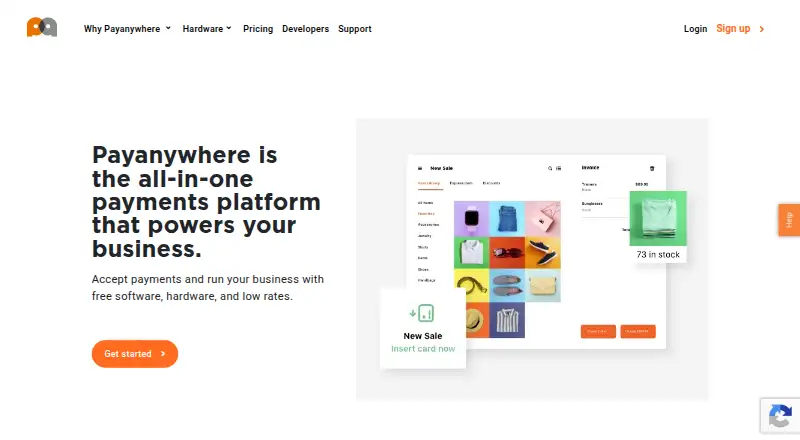
PayAnywhere is a mobile payment processing and point-of-sale platform for small businesses that take payments in stores, on job sites, online, or while moving between locations. It supports smartphones and tablets across web, iOS, and Android, with payment acceptance for EMV chip cards, magstripe cards, contactless cards, debit cards, Apple Pay, Samsung Pay, and other digital wallets. Retailers, food trucks, contractors, mobile entrepreneurs, and other small businesses can also manage invoices, recurring payments, inventory, employees, customers, reporting, deposits, and funding through the app and Payments Hub.
The published plans show a Pay as you go option with 2.69% for swipe, dip, or tap transactions and a 3.49% rate for keyed transactions. Custom pricing is based on processing volume, average transaction amount, and other business factors. The platform combines payment acceptance with operational tools rather than focusing only on checkout: merchants can create one-time and recurring invoices, capture transactions offline for later processing, manage employee roles and permissions, and track inventory. Default funding is within one business day, while same-day funding may be available to eligible merchants.
PayAnywhere fits businesses that need broad payment support without requiring a separate reader for Tap to Pay on iPhone. Optional Bluetooth card readers provide another acceptance path, and Homebase is the listed integration. The main boundaries are its United States availability and separate per-item and per-device fees for Tap to Pay on iPhone. Businesses needing a mobile POS with invoices, inventory, offline capture, and employee controls should consider PayAnywhere; companies operating outside the United States or seeking a wider listed integration ecosystem should look elsewhere.
Your product? Our editors can test PayAnywhere in depth and publish a review, labelled as paid · from $149/mo →
PayAnywhere pricing
All 2 PayAnywhere plans and prices →
PayAnywhere fact sheet
| Free plan | Yes |
|---|---|
| Paid from | Not verified |
| Reader required | No |
| Tap to Pay | Yes |
| Offline payments | Yes |
| Payout timing | Next_day |
| Payment methods | EMV chip cards, magstripe cards, contactless cards, debit cards, Apple Pay, Samsung Pay, and other digital wallets |
| Recurring payments | Yes |
| Deployment | Cloud, Mobile |
| Platforms | Web, iOS, Android |
| Compliance & security | PCI DSS |
| Support | Email, Phone, Live chat, Docs |
| Built for | Solo, Small business, Mid-market (editorial estimate) |
| Integrations | 1 integrations: Homebase |
| Pricing | Free plan (source) |
| Website | payanywhere.com |
| Facts checked | 20 Sep 2026 |
PayAnywhere integrations
PayAnywhere lists 1 integrations on its own site.
- Homebase
Alternatives to PayAnywhere
- Paid for StripeA flexible Stripe-based mobile POS for contactless payments, links, QR codes, and subscriptions.9.3
- PayPal Point of SaleA no-monthly-fee POS for in-person payments, inventory, reporting, and PayPal users.9.1
- ZellerA broad Australian payments platform with free Tap to Pay and paid terminals.8.9



See all PayAnywhere alternatives →
PayAnywhere vs the competition
- PayAnywhere vs Paid for Stripe
- PayAnywhere vs PayPal Point of Sale
- PayAnywhere vs Zeller
- PayAnywhere vs SwipeSimple
- PayAnywhere vs QuickBooks GoPayment
- PayAnywhere vs MobilePayments


Compare PayAnywhere with any tool side by side →
Also Ranked In
PayAnywhere is ranked in 3 of our directories.
Used PayAnywhere? Be the first to review it
The editor score above is our own research. What this page doesn't have yet is a reader's view — what you used PayAnywhere for, what worked and what didn't. No stars are seeded and no review is paid for; an editor reads every one before it appears.
Write a reviewTwo minutes · verified accounts only · read by an editor before it appears
Featured on iTechGuides

PayAnywhere is listed in our Mobile Payment Processing Software directory. Add the badge to your site — it links back to this page.
<a href="https://www.itechguides.com/products/payanywhere/"><img src="https://www.itechguides.com/best/badge/payanywhere.svg" alt="Featured on iTechGuides" width="230" height="46"></a>
Reviewed by iTechGuides Editors · Editorial team · Updated Oct 2026
Advertiser disclosure: iTechGuides is reader-supported. Vendors can pay for top positions in our rankings and for a place on other products' pages, and we may earn a commission when you click some links. Bought places stand at the number bought; this page and our disclosure say so. Paying vendors may get a fuller, more detailed review from our editors, and that review can change their score. How we rank.
Last updated · How we research and update