Panoptikon
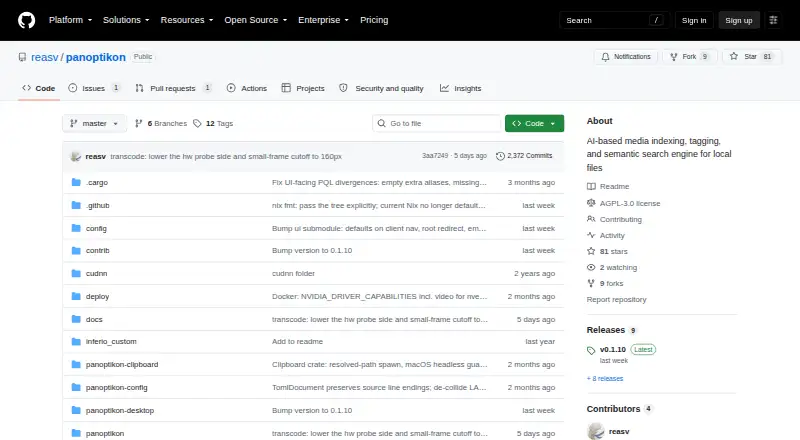
Panoptikon: An open-source, self-hosted search app for finding local media with text and AI tools. Ranked #19 of 57 in Desktop Search Software by our editors (7.0/10); pricing: Free plan; best for self-hosters wanting AI search across local media.
At a glance
- Editor score7.0 / 10
- PricingFree plan
- Best forSelf-hosters wanting AI search across local media
- Free planYes
- Paid fromFree
- Content searchYes
- Facts checked23 Sep 2026
Where it wins
- Searches file text, OCR output, and Whisper speech transcripts
- Uses image and text embeddings, tagging, and image captioning
- Offers a browser interface and REST API alongside desktop builds
Where it doesn't
- Indexes only allowed local or Docker-mounted media directories
- Requires users to configure directories and run scanning and extraction jobs
- Designed for technically minded users configuring open-source or custom AI models
Our verdict on Panoptikon
Panoptikon is a self-hosted search application for people who want to find multimedia files within selected local directories. It builds an index that references source paths and tracks files by hash, rather than describing a general search service across arbitrary locations. Its browser-based interface and desktop builds make it available across Windows, Linux, and Apple Silicon macOS, while a local service and REST API support other workflows. The project is aimed at technically minded users, including solo users and small teams, who are comfortable managing a self-hosted tool.
Its standout feature is the range of ways it can make media searchable. Panoptikon combines full-text search with OCR extraction, Whisper speech-to-text, CLIP image embeddings, text embeddings, automated tagging, and image captioning. Users can configure AI models, including custom models. That breadth can suit collections that mix documents, images, and speech, where a single text-only index would not cover the content. The API includes search, bookmarks, indexed data, and metadata, giving developers a way to connect the index to other applications.
The trade-off is scope and setup: indexing is limited to allowed local directories or Docker-mounted media directories, and users configure those locations and run scanning and extraction jobs. The project is free software under AGPL-3.0-or-later, with no commercial plan tiers described. That makes Panoptikon a fit for self-hosters who want control over local media indexing and are prepared to manage its processing workflow. Teams seeking a managed service, broad cloud-source indexing, or a simpler out-of-the-box desktop search tool should consider alternatives.
Your product? Our editors can test Panoptikon in depth and publish a review, labelled as paid · from $149/mo →
Panoptikon pricing
Panoptikon fact sheet
| Free plan | Yes |
|---|---|
| Paid from | Free |
| Supported platforms | web, Windows, macOS (Apple Silicon), Linux |
| Index locations | Allowed local directories; Docker-mounted media directories |
| Content search | Yes |
| Email search | Not verified |
| Message search | Not verified |
| OCR search | Yes |
| Indexed-item limit | Not verified |
| Deployment | Self-hosted, Desktop |
| Platforms | Web, Windows, macOS, Linux |
| Built for | Solo, Small business (editorial estimate) |
| Pricing | Free plan |
| Website | github.com |
| Facts checked | 23 Sep 2026 |
Alternatives to Panoptikon
- EverythingA free Windows search utility for instant filename and path discovery.9.3
- Copernic Desktop SearchA Windows search tool for broad local, network, email, and cloud indexing.9.2
- DocFetcherA free, portable full-text search tool for local files, archives, and PST email.9.0



See all Panoptikon alternatives →
Used Panoptikon? Be the first to review it
The editor score above is our own research. What this page doesn't have yet is a reader's view — what you used Panoptikon for, what worked and what didn't. No stars are seeded and no review is paid for; an editor reads every one before it appears.
Write a reviewTwo minutes · verified accounts only · read by an editor before it appears
Featured on iTechGuides

Panoptikon is listed in our Desktop Search Software directory. Add the badge to your site — it links back to this page.
<a href="https://www.itechguides.com/products/panoptikon/"><img src="https://www.itechguides.com/best/badge/panoptikon.svg" alt="Featured on iTechGuides" width="230" height="46"></a>
Reviewed by iTechGuides Editors · Editorial team · Updated Oct 2026
Advertiser disclosure: iTechGuides is reader-supported. Vendors can pay for top positions in our rankings and for a place on other products' pages, and we may earn a commission when you click some links. Bought places stand at the number bought; this page and our disclosure say so. Paying vendors may get a fuller, more detailed review from our editors, and that review can change their score. How we rank.
Last updated · How we research and update