
OpsFlow
OpsFlow: A flexible work-order platform with clear monthly tiers for multi-site operations. Ranked #20 of 36 in Work Order Management Software by our editors (7.0/10); pricing: Free plan · 30-day trial; best for small multi-site teams wanting predictable pricing.
At a glance
- Editor score7.0 / 10
- PricingFree plan · 30-day trial
- Best forSmall multi-site teams wanting predictable pricing
- Free planYes
- Recurring work ordersYes
- Facts checked21 Sep 2026
Where it wins
- Recurring preventive maintenance and automatic work routing
- Asset, inventory, approval, and multi-site management in one platform
- Free tier plus monthly plans from $25 with API and webhooks
Where it doesn't
- Full API access starts at the $59 Business plan
- Advanced reporting and approval workflows start at Business
- Web platform with mobile work-order access rather than a separately listed app
Our verdict on OpsFlow
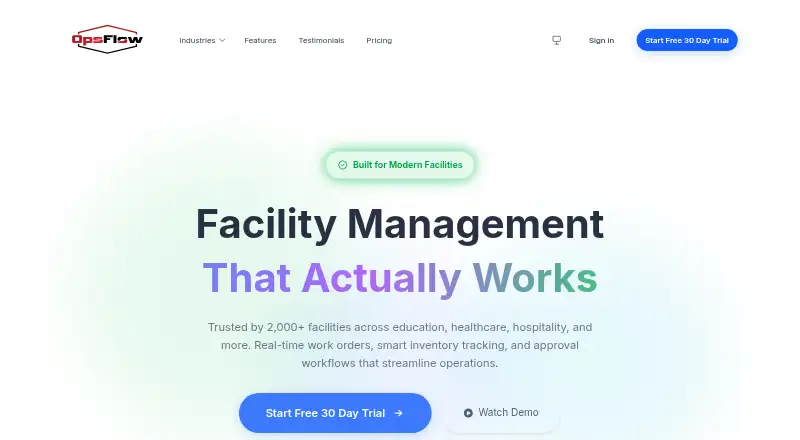
OpsFlow is facility management software for businesses, schools, healthcare organizations, governments, and other multi-site operators. It centralizes maintenance requests and work orders, supports recurring preventive maintenance, tracks assets and inventory, routes assignments, manages approvals, and provides analytics and reporting. Its responsive web application includes mobile work-order access, making it suited to teams coordinating facilities across sites without separating maintenance, assets, and requests across different systems.
The pricing structure is straightforward for teams comparing operating costs. The free tier is aimed at smaller deployments and includes up to 2 full users, 10 light users, 1 site, and email support. Team costs $25 per month and raises the allowance to 10 full users and 25 light users, with read-only API access and priority support. Business costs $59 per month for up to 50 full users and 200 light users, adding full API access, approval workflows, and advanced reporting. Enterprise costs $199 per month and includes unlimited users and sites, SSO/SAML support, on-premise deployment, and 24/7 phone support. A 30-day free trial is also available.
OpsFlow’s strongest fit is for organizations that need more than basic work-order tracking. Recurring maintenance, automatic routing, approval workflows, asset and inventory tracking, analytics, dashboards, reporting, API access, and webhooks cover the main operational layers of multi-site facility management. The tradeoff is platform scope: the listed platform is web, with mobile work-order access, and the API becomes fully available only on Business. Teams needing a focused maintenance request tool may find this broader feature set unnecessary, while organizations that need unlimited sites, SSO/SAML, or on-premise deployment should consider Enterprise. Small multi-site teams wanting predictable monthly pricing should start with the free tier or Team plan.
Your product? Our editors can test OpsFlow in depth and publish a review, labelled as paid · from $149/mo →
OpsFlow pricing
All 4 OpsFlow plans and prices →
OpsFlow fact sheet
| Free plan | Yes |
|---|---|
| Paid from | Not verified |
| Recurring work orders | Yes |
| Mobile access | Yes |
| Asset tracking | Yes |
| Priority levels | Not verified |
| Workflow automation | Yes |
| Deployment | Hybrid |
| Free trial | 30 days · no card needed |
| Deployment | Cloud, Self-hosted |
| Platforms | Web |
| Compliance & security | SOC 2, GDPR, SSO/SAML, 2FA |
| Support | Email, Live chat, Phone · 24/7 |
| Built for | Small business, Mid-market, Enterprise (editorial estimate) |
| Integrations | 1 integrations: API |
| Pricing | Free plan · 30-day trial (source) |
| Website | opsflow.com |
| Facts checked | 21 Sep 2026 |
OpsFlow integrations
OpsFlow lists 1 integrations on its own site.
- API
Alternatives to OpsFlow
- MaintainXAffordable mobile CMMS with strong work-order, maintenance, and inventory coverage.8.9
- FiixA mature CMMS with free entry, broad maintenance coverage, and paid-tier scalability.8.8
- UpKeepA broad CMMS for mobile maintenance teams, with advanced workflows reserved for higher tiers.8.7



See all OpsFlow alternatives →
Used OpsFlow? Be the first to review it
The editor score above is our own research. What this page doesn't have yet is a reader's view — what you used OpsFlow for, what worked and what didn't. No stars are seeded and no review is paid for; an editor reads every one before it appears.
Write a reviewTwo minutes · verified accounts only · read by an editor before it appears
Featured on iTechGuides

OpsFlow is listed in our Work Order Management Software directory. Add the badge to your site — it links back to this page.
<a href="https://www.itechguides.com/products/opsflow/"><img src="https://www.itechguides.com/best/badge/opsflow.svg" alt="Featured on iTechGuides" width="230" height="46"></a>
Reviewed by iTechGuides Editors · Editorial team · Updated Oct 2026
Advertiser disclosure: iTechGuides is reader-supported. Vendors can pay for top positions in our rankings and for a place on other products' pages, and we may earn a commission when you click some links. Bought places stand at the number bought; this page and our disclosure say so. Paying vendors may get a fuller, more detailed review from our editors, and that review can change their score. How we rank.
Last updated · How we research and update