Openza Tasks
Openza Tasks: A focused open-source desktop task manager for local storage and structured organization. Ranked #82 of 148 in To-Do List Apps by our editors (3.0/10); pricing: Free plan; best for local-first desktop task management.
At a glance
- Editor score3.0 / 10
- PricingFree plan
- Best forLocal-first desktop task management
- Free planYes
- Paid fromFree
- Facts checked22 Sep 2026
Where it wins
- Stores tasks locally in SQLite without requiring an account
- Supports projects, labels, subtasks, saved views, search, and backups
- Syncs with Todoist and Microsoft To Do across desktop platforms
Where it doesn't
- Desktop-only deployment limits access outside Windows, macOS, and Linux apps
- Recurrence, reminders, and calendar sync are not part of its feature set
- Support is centered on documentation for a personal open-source project
Our verdict on Openza Tasks
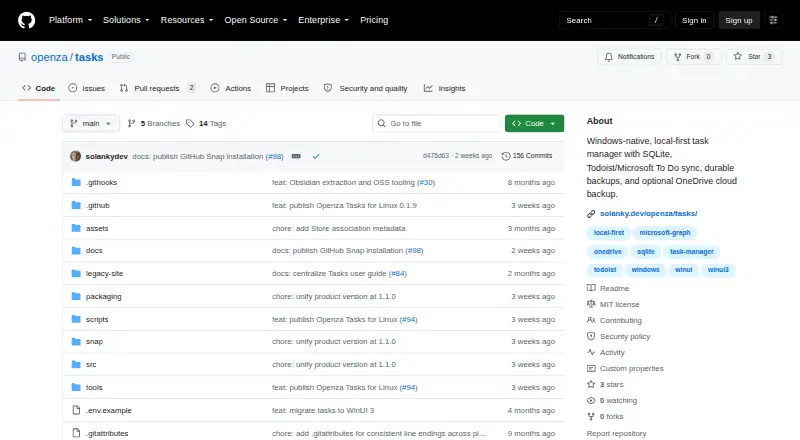
Openza Tasks is an open-source, local-first task manager for solo users and small teams who want desktop task organization without requiring an account. It stores task data in a local SQLite database and provides projects, labels, dates, priorities, notes, saved views, subtasks, sorting, filtering, grouping, and global search. The current product line includes a Windows-native WinUI 3 app and a Linux-first Avalonia desktop app, with macOS compatibility. Its focus is structured personal task management rather than broad collaboration or mobile access.
Its strongest distinction is the combination of local storage and data-control features. Users can create local and optional OneDrive backup snapshots, use automatic and manual restore points, import Markdown checkboxes, and export tasks. These capabilities make Openza Tasks a practical fit for people who value portable task data and recovery options. The product also connects with Todoist and Microsoft To Do, while GitHub and OneDrive appear in its integration set. Those connections add ecosystem flexibility without changing the local-first foundation.
Openza Tasks is distributed as open-source software, and the published product details identify a free plan. The software is deployed on desktop platforms rather than through a broader device ecosystem, and support is centered on documentation. Recurrence, reminders, and calendar sync are outside its feature set, so users who need scheduled task automation or calendar-led planning should choose a more specialized alternative. Pick Openza Tasks for local-first organization, backups, saved views, and optional synchronization with established task services; look elsewhere if mobile access, reminders, recurring tasks, or calendar integration are central requirements.
Your product? Our editors can test Openza Tasks in depth and publish a review, labelled as paid · from $149/mo →
Openza Tasks pricing
Openza Tasks fact sheet
| Free plan | Yes |
|---|---|
| Paid from | Free |
| Recurring tasks | Not verified |
| Task reminders | Not verified |
| Calendar sync | Not verified |
| Subtasks | Yes |
| Offline access | Not verified |
| Active task limit | Not verified |
| Supported platforms | Windows, macOS compatibility, Linux |
| Deployment | Desktop |
| Platforms | Windows, macOS, Linux |
| Support | Docs |
| Built for | Solo, Small business (editorial estimate) |
| Integrations | 4 integrations: Todoist, Microsoft To Do, OneDrive, GitHub |
| Pricing | Free plan |
| Website | github.com |
| Facts checked | 22 Sep 2026 |
Openza Tasks integrations
Openza Tasks lists 4 integrations on its own site.
- Todoist
- Microsoft To Do
- OneDrive
- GitHub
Alternatives to Openza Tasks
- TodoistA complete task manager with broad platform coverage, recurring tasks, and team workspaces.9.2
- TickTickA broad to-do app for users who want tasks, planning, habits, and focus tools together.9.0
- Microsoft To DoA capable free choice for daily planning, shared lists, and Microsoft-connected task management.8.8



See all Openza Tasks alternatives →
Used Openza Tasks? Be the first to review it
The editor score above is our own research. What this page doesn't have yet is a reader's view — what you used Openza Tasks for, what worked and what didn't. No stars are seeded and no review is paid for; an editor reads every one before it appears.
Write a reviewTwo minutes · verified accounts only · read by an editor before it appears
Featured on iTechGuides

Openza Tasks is listed in our To-Do List Apps directory. Add the badge to your site — it links back to this page.
<a href="https://www.itechguides.com/products/openza-tasks/"><img src="https://www.itechguides.com/best/badge/openza-tasks.svg" alt="Featured on iTechGuides" width="230" height="46"></a>
Reviewed by iTechGuides Editors · Editorial team · Updated Oct 2026
Advertiser disclosure: iTechGuides is reader-supported. Vendors can pay for top positions in our rankings and for a place on other products' pages, and we may earn a commission when you click some links. Bought places stand at the number bought; this page and our disclosure say so. Paying vendors may get a fuller, more detailed review from our editors, and that review can change their score. How we rank.
Last updated · How we research and update