
OpenSign
OpenSign: A focused, low-cost signage tool for small teams managing up to three screens. Ranked #192 of 207 in Digital Signage Software by our editors (3.0/10); pricing: Free plan; best for small teams managing up to three screens.
At a glance
- Editor score3.0 / 10
- PricingFree plan
- Best forSmall teams managing up to three screens
- Free planYes
- Paid from$9/mo
- Screen limit3 screens
- Facts checked21 Sep 2026
Where it wins
- Free plan with playlist creation, templates, scheduling, and browser display
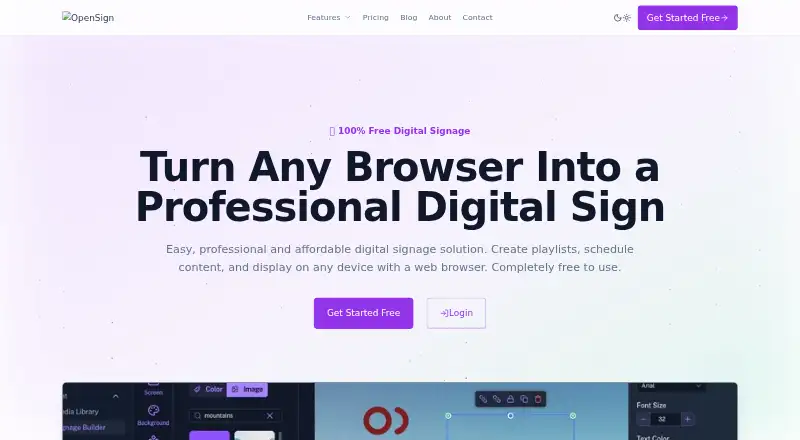
- Drag-and-drop editor with playlists, scheduling, preview, and multi-screen management
- Pro adds analytics, custom branding, priority support, and API access
Where it doesn't
- Display is browser-based rather than covering broader deployment options
- Advanced playlist management and analytics require the Pro plan
- May be too basic for teams needing more specialized signage capabilities
Our verdict on OpenSign
OpenSign is a cloud-based digital signage platform for individuals, small businesses, and growing organizations. It combines browser-based content creation with playlist management, scheduling, preview, and publishing to web-enabled displays. Users can work with images, videos, text, HTML, and templates, then manage content across multiple screens from one platform. Its fit is strongest for small teams that need straightforward signage without a complex deployment model.
The pricing structure is simple. The Free plan includes basic playlist creation, standard templates, community support, browser-based display, and basic scheduling. The Pro plan costs $9 per month on monthly billing and adds advanced playlist management, premium templates, priority support, advanced scheduling, content analytics, custom branding, and API access. That makes the paid tier relevant when a team needs reporting, branded presentation, deeper scheduling controls, or programmatic access rather than only basic publishing.
OpenSign’s main platform advantage is its browser-first workflow: the drag-and-drop editor, real-time preview, centralized multi-screen management, and browser-based display all support a web-led operating model. Cloud deployment, email support, community support, documentation, and GDPR compliance are also part of its published profile. The trade-off is focus. Teams that want a simple way to create and schedule content for a small screen estate should find the feature set well aligned; organizations seeking broader deployment coverage or a more specialized signage environment should consider a product with capabilities beyond browser-based display.
Your product? Our editors can test OpenSign in depth and publish a review, labelled as paid · from $149/mo →
OpenSign pricing
All 2 OpenSign plans and prices →
OpenSign fact sheet
| Free plan | Yes |
|---|---|
| Paid from | $9/mo |
| Screen limit | 3 screens |
| Offline playback | Not verified |
| Content types | images, videos, text, HTML, templates |
| User roles | Not verified |
| API access | Yes |
| Mobile app | Not verified |
| Deployment | Cloud |
| Platforms | Web |
| Compliance & security | GDPR |
| Support | Email, Community, Docs |
| Built for | Solo, Small business, Mid-market (editorial estimate) |
| Pricing | Free plan (source) |
| Website | opensign.us |
| Facts checked | 21 Sep 2026 |
Alternatives to OpenSign
- OptiSignsA flexible signage platform with mobile administration, offline playback, and a free plan.9.3
- YodeckA flexible signage platform with a generous free tier and broad content support.9.2
- Play Digital SignageFeature-rich signage with a free screen option and wide platform coverage.9.1



See all OpenSign alternatives →
Used OpenSign? Be the first to review it
The editor score above is our own research. What this page doesn't have yet is a reader's view — what you used OpenSign for, what worked and what didn't. No stars are seeded and no review is paid for; an editor reads every one before it appears.
Write a reviewTwo minutes · verified accounts only · read by an editor before it appears
Featured on iTechGuides

OpenSign is listed in our Digital Signage Software directory. Add the badge to your site — it links back to this page.
<a href="https://www.itechguides.com/products/opensign-digital-signage-software/"><img src="https://www.itechguides.com/best/badge/opensign-digital-signage-software.svg" alt="Featured on iTechGuides" width="230" height="46"></a>
Reviewed by iTechGuides Editors · Editorial team · Updated Oct 2026
Advertiser disclosure: iTechGuides is reader-supported. Vendors can pay for top positions in our rankings and for a place on other products' pages, and we may earn a commission when you click some links. Bought places stand at the number bought; this page and our disclosure say so. Paying vendors may get a fuller, more detailed review from our editors, and that review can change their score. How we rank.
Last updated · How we research and update