
OCR Receipt
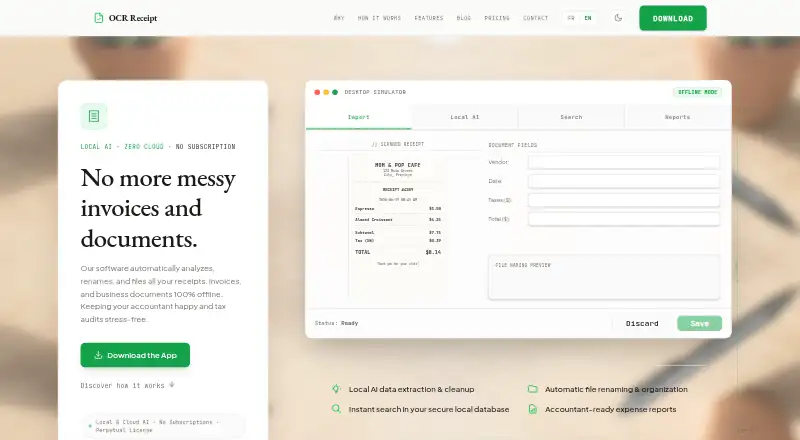
OCR Receipt: A privacy-focused desktop receipt tool for batch processing, with no accounting sync. Ranked #23 of 27 in Receipt Management Software by our editors (6.0/10); pricing: Free plan; best for desktop users processing receipt files in batches.
At a glance
- Editor score6.0 / 10
- PricingFree plan
- Best forDesktop users processing receipt files in batches
- Free planYes
- Facts checked20 Sep 2026
Where it wins
- Local OCR and AI extraction support offline workflows
- Batch processing with vendor, line-item, and tax extraction
- Exports to CSV, Excel, and PDF reports across desktop platforms
Where it doesn't
- No mobile capture or email intake
- No direct accounting integrations
- Free Lite limits AI extractions and auto-renaming each month
Our verdict on OCR Receipt
OCR Receipt is a desktop application for freelancers and small businesses that want to turn receipt PDFs and images into organized, searchable expense records. It runs on Windows, macOS, and Linux, with local OCR and AI extraction for privacy-conscious workflows. The product supports automatic file renaming, document search, vendor matching, line-item and tax extraction, multi-project organization, and exports to CSV, Excel, and PDF reports.
The pricing structure starts with Free Lite, a $0 USD one-time plan. It includes unlimited receipts, simple OCR, 10 AI extractions per month, CSV export, PDF reports with a watermark, and 10 auto-renames per month. Solo adds OCR and local AI, CSV and Excel export, PDF reports without a watermark, unlimited auto-renaming, a cloud AI option using BYOK, and multiple projects and workspaces. Pro includes those core capabilities plus advanced models and unlimited batch processing. The paid plans therefore focus on richer extraction, cleaner reporting, broader organization, and higher-volume workflows.
OCR Receipt is a focused fit for users who process receipt files in batches on a desktop and prefer local processing over a recurring subscription model. Its strongest distinction is the combination of batch handling, structured extraction, vendor normalization, and file organization in one workflow. The trade-off is a narrower ecosystem: there is no mobile capture, email intake, or direct accounting integration, while CSV export is the current route for moving data elsewhere. Choose OCR Receipt for desktop-based receipt organization and export-driven expense workflows; choose an alternative if mobile collection, inbox automation, or connected accounting workflows are essential.
Your product? Our editors can test OCR Receipt in depth and publish a review, labelled as paid · from $149/mo →
OCR Receipt pricing
All 3 OCR Receipt plans and prices →
OCR Receipt fact sheet
| Free plan | Yes |
|---|---|
| Paid from | Not verified |
| Mobile capture | Not verified |
| Email receipt forwarding | Not verified |
| Line-item extraction | Yes |
| Duplicate detection | Not verified |
| Accounting sync | No |
| Receipt storage limit | Not verified |
| Supported platforms | Desktop |
| Deployment | Desktop |
| Platforms | Windows, macOS, Linux |
| Support | Docs |
| Built for | Solo, Small business (editorial estimate) |
| Pricing | Free plan (source) |
| Website | ocrreceipt.com |
| Facts checked | 20 Sep 2026 |
Alternatives to OCR Receipt
- Dext PrepareDext Prepare automates document capture, extraction, approvals, and accounting publication.8.9
- AutoEntryBroad receipt and invoice capture with AI extraction and accounting-software publishing.8.7
- ShoeboxedA receipt platform combining multi-channel capture, human verification, and accounting exports.8.4



See all OCR Receipt alternatives →
Also Ranked In
OCR Receipt is ranked in 2 of our directories.
Used OCR Receipt? Be the first to review it
The editor score above is our own research. What this page doesn't have yet is a reader's view — what you used OCR Receipt for, what worked and what didn't. No stars are seeded and no review is paid for; an editor reads every one before it appears.
Write a reviewTwo minutes · verified accounts only · read by an editor before it appears
Featured on iTechGuides

OCR Receipt is listed in our Receipt Management Software directory. Add the badge to your site — it links back to this page.
<a href="https://www.itechguides.com/products/ocr-receipt/"><img src="https://www.itechguides.com/best/badge/ocr-receipt.svg" alt="Featured on iTechGuides" width="230" height="46"></a>
Reviewed by iTechGuides Editors · Editorial team · Updated Oct 2026
Advertiser disclosure: iTechGuides is reader-supported. Vendors can pay for top positions in our rankings and for a place on other products' pages, and we may earn a commission when you click some links. Bought places stand at the number bought; this page and our disclosure say so. Paying vendors may get a fuller, more detailed review from our editors, and that review can change their score. How we rank.
Last updated · How we research and update