
NoteGen
NoteGen: A broad, no-cost AI note workspace for users who value local storage and platform coverage. Ranked #19 of 42 in AI Note-Taking Apps by our editors (7.3/10); pricing: Free plan; best for privacy-focused users wanting maximum platform coverage.
At a glance
- Editor score7.3 / 10
- PricingFree plan
- Best forPrivacy-focused users wanting maximum platform coverage
- Free planYes
- Paid fromFree
- AI summariesYes
- Facts checked20 Sep 2026
Where it wins
- Captures text, voice, scans, images, links, files, and todos
- AI organization, retrieval, chat, summaries, and note operations
- Works across desktop, mobile, browsers, offline Markdown, and self-hosting
Where it doesn't
- AI features depend on configured models or system capabilities
- Mobile downloads are labeled beta
- Self-hosted NoteGen Server is described as experimental
Our verdict on NoteGen
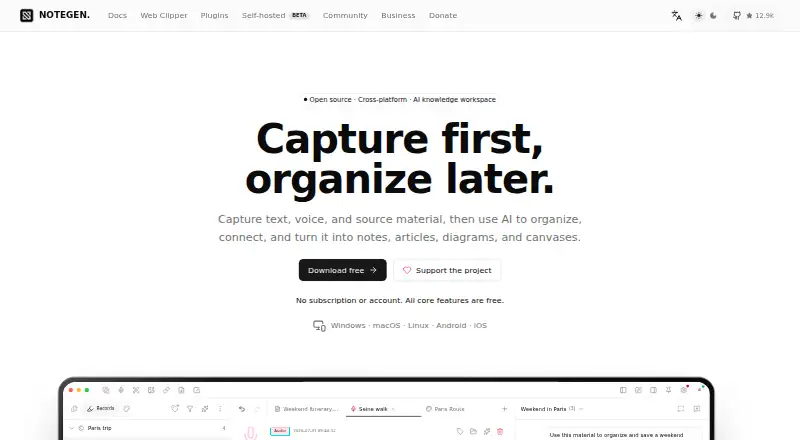
NoteGen is an open-source, local-first Markdown workspace for capturing and organizing information. It is designed for users who want one system for text, voice recordings, scans, screenshots, images, links, files, and todos across Windows, macOS, Linux, Android, iOS, and supported browsers. Core features do not require a subscription or account. Notes and attachments are stored locally by default, while selected records can be organized into structured Markdown notes with AI.
The product’s main strength is breadth. Its AI tools support questions, summaries, rewriting, note operations, and agent workflows, while knowledge-base retrieval combines vector, BM25, and fuzzy search. The Markdown editor includes source mode, tables, diagrams, attachments, and export. An infinite canvas adds connected nodes and AI-generated diagrams, and the browser web clipper saves selected text, images, and pages from Chrome, Edge, or Firefox. This makes NoteGen suitable for research-heavy workflows that move between captured material, organized notes, and visual thinking.
Synchronization is configurable rather than tied to one hosted service. NoteGen supports Git providers including GitHub, Gitee, GitLab, and Gitea, along with S3, WebDAV, OneDrive, iCloud Drive, cloud folders, and self-hosting. Offline Markdown access and local storage suit users who want control over their files and storage choices. The trade-off is that AI capability depends on configured models or system capabilities, mobile downloads are labeled beta, and the self-hosted NoteGen Server is experimental. Choose NoteGen for broad capture, retrieval, Markdown, and storage flexibility; consider an alternative if you need a more mature mobile release or a fully managed AI service.
Questions about NoteGen
What does NoteGen run on? Windows, macOS, Linux, iOS, Android and Chrome extension. It runs as a desktop app, as a mobile app, as a browser extension and self-hosted.
What does NoteGen integrate with? 11 integrations, including GitHub, Gitee, GitLab, Gitea and S3.
Who is NoteGen built for? Solo users and small businesses (our editorial estimate).
Your product? Our editors can test NoteGen in depth and publish a review, labelled as paid · from $149/mo →
NoteGen pricing
NoteGen fact sheet
| Free plan | Yes |
|---|---|
| Paid from | Free |
| AI summaries | Yes |
| AI note search | Yes |
| Audio transcription | Yes |
| Web clipper | Yes |
| Offline access | Yes |
| Supported platforms | Windows, macOS, Linux, Android, iOS, Chrome, Edge, Firefox |
| Deployment | Desktop, Mobile, Browser extension, Self-hosted |
| Platforms | Windows, macOS, Linux, iOS, Android, Chrome extension |
| Support | Docs, Community |
| Built for | Solo, Small business (editorial estimate) |
| Integrations | 11 integrations: GitHub, Gitee, GitLab, Gitea, S3, WebDAV … |
| Pricing | Free plan |
| Website | notegen.top |
| Facts checked | 20 Sep 2026 |
NoteGen integrations
NoteGen lists 11 integrations on its own site.
- GitHub
- Gitee
- GitLab
- Gitea
- S3
- WebDAV
- OneDrive
- iCloud Drive
- Chrome
- Edge
- Firefox
Alternatives to NoteGen
- Gemini NotebookA Google-centric research assistant with citations, study tools, and rich generated outputs.9.3
- EvernoteA mature workspace for organized notes, tasks, calendars, and AI meeting capture.9.1
- Microsoft OneNoteA flexible cross-platform notebook with offline access, collaboration, OCR, transcription, and Copilot.9.0



See all NoteGen alternatives →
Used NoteGen? Be the first to review it
The editor score above is our own research. What this page doesn't have yet is a reader's view — what you used NoteGen for, what worked and what didn't. No stars are seeded and no review is paid for; an editor reads every one before it appears.
Write a reviewTwo minutes · verified accounts only · read by an editor before it appears
Featured on iTechGuides

NoteGen is listed in our AI Note-Taking Apps directory. Add the badge to your site — it links back to this page.
<a href="https://www.itechguides.com/products/notegen/"><img src="https://www.itechguides.com/best/badge/notegen.svg" alt="Featured on iTechGuides" width="230" height="46"></a>
Reviewed by iTechGuides Editors · Editorial team · Updated Nov 2026
Advertiser disclosure: iTechGuides is reader-supported. Vendors can pay for top positions in our rankings and for a place on other products' pages, and we may earn a commission when you click some links. Bought places stand at the number bought; this page and our disclosure say so. Paying vendors may get a fuller, more detailed review from our editors, and that review can change their score. How we rank.
Last updated · How we research and update