
Notable
Notable: A focused desktop Markdown notebook with strong local-first organization and export tools. Ranked #139 of 214 in Note-Taking Apps by our editors (3.0/10); pricing: Free plan; best for free local Markdown notes on desktop.
At a glance
- Editor score3.0 / 10
- PricingFree plan
- Best forFree local Markdown notes on desktop
- Free planYes
- Paid fromFree
- Offline accessYes
- Facts checked20 Sep 2026
Where it wins
- Local storage supports offline note-taking and attachment access.
- Markdown, KaTeX, Mermaid, links, tags, and fuzzy search cover varied notes.
- Imports, exports, and Dropbox, Google Drive, and Git fit flexible workflows.
Where it doesn't
- Desktop-focused, with no current mobile note-taking experience.
- No AI features or real-time collaboration.
- Sharing is link-based rather than a collaborative editing workflow.
Our verdict on Notable
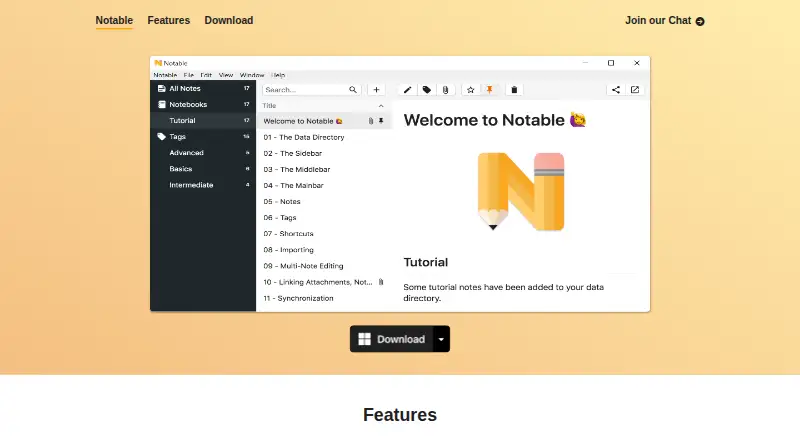
Notable is a free desktop note-taking application for people who want Markdown files stored locally on their device. It supports Windows, macOS, and Linux, making it suitable for users who prefer offline access and control over their notes and attachments. The feature set covers everyday writing as well as technical documentation: GitHub-Flavored Markdown, KaTeX expressions, Mermaid diagrams, task checkboxes, nested tags, fuzzy search, and links between notes and attachments. Split-editor and multi-note editing support more structured writing sessions.
Its local-first design is the central choice. Notes and attachments stay in a local data directory, while Dropbox, Google Drive, or Git can be used to synchronize that data. The app also imports from Evernote and Boostnote, then exports to Markdown, HTML, or PDF. Sharing notes through links adds a straightforward publishing option, but the product is better suited to individual desktop work than to teams that need real-time collaboration. Users who value local files, offline access, and portable exports should find the workflow well aligned with their needs.
Notable keeps its scope focused rather than adding AI features or a broad mobile experience. That makes it a practical choice for desktop Markdown note-taking, especially when diagrams, mathematical expressions, attachments, and task checkboxes matter. It is less suitable for buyers who need mobile note access, built-in AI assistance, or shared editing with collaborators. Choose Notable for a free, locally stored notebook across Windows, macOS, and Linux; choose another app when collaboration or mobile continuity is the priority.
Your product? Our editors can test Notable in depth and publish a review, labelled as paid · from $99/mo →
Notable pricing
Notable fact sheet
| Free plan | Yes |
|---|---|
| Paid from | Free |
| Offline access | Yes |
| Supported platforms | Windows, macOS, Linux |
| Note sharing | Yes |
| Real-time collaboration | Not verified |
| Storage limit | Not verified |
| Integrations | Dropbox, Google Drive, Git |
| Deployment | Desktop |
| Platforms | Windows, macOS, Linux |
| Support | Email, Community, Docs |
| Built for | Solo, Small business (editorial estimate) |
| Integrations | 3 integrations: Dropbox, Google Drive, Git |
| Pricing | Free plan |
| Website | notable.app |
| Facts checked | 20 Sep 2026 |
Notable integrations
Notable lists 3 integrations on its own site.
- Dropbox
- Google Drive
- Git
Alternatives to Notable
- Microsoft OneNoteA broad, collaborative note system with strong Microsoft integration and a capable free option.9.3
- NotionA flexible workspace for teams that want notes and knowledge bases alongside databases and collaboration.9.2
- EvernoteA broad note-taking workspace for organizing information, tasks, calendars, and documents.9.0


See all Notable alternatives →
Also Ranked In
Notable is ranked in 2 of our directories.
Used Notable? Be the first to review it
The editor score above is our own research. What this page doesn't have yet is a reader's view — what you used Notable for, what worked and what didn't. No stars are seeded and no review is paid for; an editor reads every one before it appears.
Write a reviewTwo minutes · verified accounts only · read by an editor before it appears
Featured on iTechGuides

Notable is listed in our Note-Taking Apps directory. Add the badge to your site — it links back to this page.
<a href="https://www.itechguides.com/products/notable/"><img src="https://www.itechguides.com/best/badge/notable.svg" alt="Featured on iTechGuides" width="230" height="46"></a>
Guides on Note-Taking apps
- Best note-taking apps for iPad and Apple Pencil 2026Aug 2026
- Best Note-Taking Apps for iPad: Top 7 in 2026Aug 2026
- Best Note-Taking Apps to Use in 2026Aug 2026
Reviewed by iTechGuides Editors · Editorial team · Updated Oct 2026
Advertiser disclosure: iTechGuides is reader-supported. Vendors can pay for top positions in our rankings and for a place on other products' pages, and we may earn a commission when you click some links. Bought places stand at the number bought; this page and our disclosure say so. Paying vendors may get a fuller, more detailed review from our editors, and that review can change their score. How we rank.
Last updated · How we research and update