MonitorControl
MonitorControl: A focused, open-source macOS utility for controlling compatible displays. Ranked #10 of 24 in Monitor Control Software by our editors (7.7/10); pricing: Free plan; best for free macOS brightness and volume control.
At a glance
- Editor score7.7 / 10
- PricingFree plan
- Best forFree macOS brightness and volume control
- Free planYes
- Paid fromFree
- Supported platformsmacOS
- Facts checked20 Sep 2026
Where it wins
- Free and open source with DDC and Apple display support
- Supports software dimming, ambient-light synchronization and OSD
- Works with media keys, shortcuts and virtual screens
Where it doesn't
- macOS only
- Requires a compatible display for DDC control
- No documented input switching, profiles, scheduling or CLI/API
Our verdict on MonitorControl
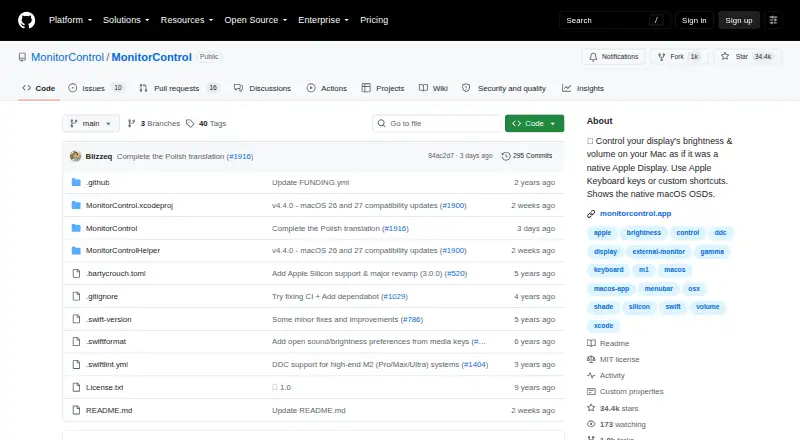
MonitorControl is a free, open-source macOS menu-bar application for adjusting brightness, volume and contrast across external and built-in displays. It is aimed at Mac users who want centralized display controls without replacing their existing monitor setup. Compatible external displays can use DDC, while Apple and built-in displays use native Apple protocols. Software dimming through gamma-table control extends brightness adjustment to displays that support shade control, including virtual screens.
Its strongest advantage is breadth across display types and control methods. Menu-bar sliders provide direct access, while standard Apple media keys and custom keyboard shortcuts support keyboard-based control. MonitorControl also offers native macOS on-screen display feedback for brightness and volume. Brightness can synchronize between built-in and Apple displays, including changes driven by ambient light. AirPlay, Sidecar, DisplayLink and other virtual screens are supported through shade control, giving the utility a wider reach than a basic external-monitor brightness controller.
The published feature set stays focused on control rather than monitor-management workflows. It does not provide documented input switching, saved monitor profiles, scheduling or CLI/API access, so users needing repeatable multi-monitor scenes or automation should choose a tool built around those functions instead. For Mac users who primarily need free brightness and volume controls, especially across Apple, compatible DDC and virtual displays, MonitorControl is a practical fit. It is less suitable for users on other operating systems or for setups that depend on monitor input management, profile presets or command-line control.
Your product? Our editors can test MonitorControl in depth and publish a review, labelled as paid · from $149/mo →
MonitorControl pricing
All 1 MonitorControl plans and prices →
MonitorControl fact sheet
| Free plan | Yes |
|---|---|
| Paid from | Free |
| Supported platforms | macOS |
| DDC/CI control | Yes |
| Input switching | Not verified |
| Monitor profiles | Not verified |
| Settings scheduling | Not verified |
| CLI or API access | Not verified |
| Auto brightness | Yes |
| Deployment | Desktop |
| Platforms | macOS |
| Support | Community |
| Built for | Solo, Small business (editorial estimate) |
| Pricing | Free plan (source) |
| Website | monitorcontrol.app |
| Facts checked | 20 Sep 2026 |
Alternatives to MonitorControl
- MonitorControl ProA free, open-source Windows tool for advanced monitor control, profiles, and automation.9.4
- Twinkle TrayA capable free Windows utility for multi-monitor control, profiles, scheduling, and scripting.9.2
- LunarA capable Mac monitor controller with automation, sensors, and a low one-time Pro price.8.9


See all MonitorControl alternatives →
Used MonitorControl? Be the first to review it
The editor score above is our own research. What this page doesn't have yet is a reader's view — what you used MonitorControl for, what worked and what didn't. No stars are seeded and no review is paid for; an editor reads every one before it appears.
Write a reviewTwo minutes · verified accounts only · read by an editor before it appears
Featured on iTechGuides

MonitorControl is listed in our Monitor Control Software directory. Add the badge to your site — it links back to this page.
<a href="https://www.itechguides.com/products/monitorcontrol/"><img src="https://www.itechguides.com/best/badge/monitorcontrol.svg" alt="Featured on iTechGuides" width="230" height="46"></a>
Reviewed by iTechGuides Editors · Editorial team · Updated Oct 2026
Advertiser disclosure: iTechGuides is reader-supported. Vendors can pay for top positions in our rankings and for a place on other products' pages, and we may earn a commission when you click some links. Bought places stand at the number bought; this page and our disclosure say so. Paying vendors may get a fuller, more detailed review from our editors, and that review can change their score. How we rank.
Last updated · How we research and update