
Twinkle Tray
Twinkle Tray: A capable free Windows utility for multi-monitor control, profiles, scheduling, and scripting. Ranked #2 of 24 in Monitor Control Software by our editors (9.2/10); pricing: Free plan; best for free Windows multi-monitor control.
At a glance
- Editor score9.2 / 10
- PricingFree plan
- Best forFree Windows multi-monitor control
- Free planYes
- Paid fromFree
- Supported platformsWindows
- Facts checked20 Sep 2026
Where it wins
- Controls brightness, contrast, volume, power state, and inputs via DDC/CI
- Adds profiles, scheduling, ambient-light adjustment, hotkeys, and normalization
- Supports command-line controls and automatic launch with Windows
Where it doesn't
- Windows-only coverage limits use on macOS and other platforms
- Some controls depend on compatible monitors and DDC/CI support
- Advanced display control may require configuration across different monitors
Our verdict on Twinkle Tray
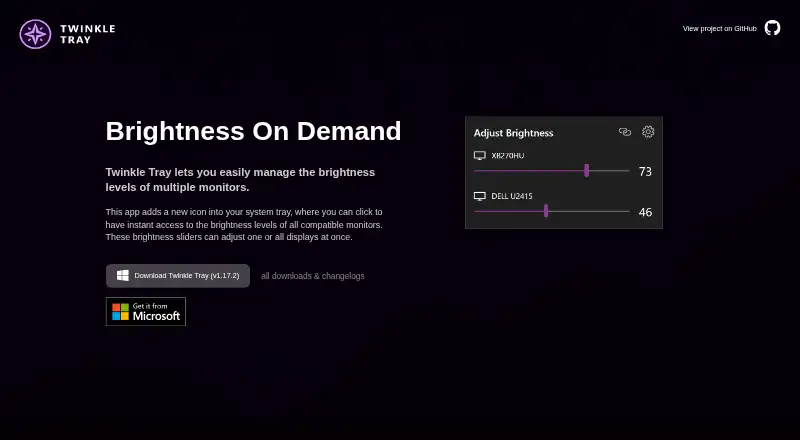
Twinkle Tray is a free Windows 10 and 11 desktop utility for managing brightness and display settings across compatible laptop and external monitors. It is aimed at people who use multiple displays and want more control than the standard Windows brightness interface provides. System-tray sliders handle one or several monitors, while DDC/CI support extends control to contrast, volume, power state, and input selection. The software is also open source and available for Windows through the official website, GitHub, and the Microsoft Store.
The pricing is straightforward: Twinkle Tray is free, with no paid plans or trial terms presented. Its feature set covers everyday adjustments as well as more structured workflows. Users can create monitor brightness profiles, assign hotkeys to individual or all displays, normalize brightness across monitors, and set brightness changes by time of day or idle state. Ambient-light-based adjustment adds an automatic option, while automatic launch with Windows keeps the utility available after startup. For users who want repeatable display routines without a subscription, the published feature set is broad for a free tool.
Its main constraint is platform coverage. Twinkle Tray is designed for Windows, so it is not a fit for someone looking for a cross-platform monitor-control utility. Display-specific functions also depend on compatible hardware, particularly for DDC/CI controls and input switching. The command-line controls make it relevant to users who want scripting or automation, while profiles and scheduling suit people managing changing work conditions. Choose Twinkle Tray for free, detailed multi-monitor control on Windows; choose an alternative if macOS, another operating system, or hardware-independent controls are central requirements.
Your product? Our editors can test Twinkle Tray in depth and publish a review, labelled as paid · from $149/mo →
Twinkle Tray pricing
Twinkle Tray fact sheet
| Free plan | Yes |
|---|---|
| Paid from | Free |
| Supported platforms | Windows |
| DDC/CI control | Yes |
| Input switching | Yes |
| Monitor profiles | Yes |
| Settings scheduling | Yes |
| CLI or API access | Yes |
| Auto brightness | Yes |
| Deployment | Desktop |
| Platforms | Windows |
| Support | Docs |
| Built for | Solo, Small business (editorial estimate) |
| Pricing | Free plan |
| Website | twinkletray.com |
| Facts checked | 20 Sep 2026 |
Alternatives to Twinkle Tray
- MonitorControl ProA free, open-source Windows tool for advanced monitor control, profiles, and automation.9.4
- LunarA capable Mac monitor controller with automation, sensors, and a low one-time Pro price.8.9
- ASUS DisplayWidget CenterA free cross-platform control hub for compatible ASUS and ROG monitors.8.8


See all Twinkle Tray alternatives →
Twinkle Tray vs the competition
- Twinkle Tray vs MonitorControl Pro
- Twinkle Tray vs Lunar
- Twinkle Tray vs ASUS DisplayWidget Center
- Twinkle Tray vs BetterDisplay
- Twinkle Tray vs DisplayBuddy
- Twinkle Tray vs ClickMonitorDDC


Compare Twinkle Tray with any tool side by side →
Used Twinkle Tray? Be the first to review it
The editor score above is our own research. What this page doesn't have yet is a reader's view — what you used Twinkle Tray for, what worked and what didn't. No stars are seeded and no review is paid for; an editor reads every one before it appears.
Write a reviewTwo minutes · verified accounts only · read by an editor before it appears
Featured on iTechGuides

Twinkle Tray is listed in our Monitor Control Software directory. Add the badge to your site — it links back to this page.
<a href="https://www.itechguides.com/products/twinkle-tray/"><img src="https://www.itechguides.com/best/badge/twinkle-tray.svg" alt="Featured on iTechGuides" width="230" height="46"></a>
Reviewed by iTechGuides Editors · Editorial team · Updated Oct 2026
Advertiser disclosure: iTechGuides is reader-supported. Vendors can pay for top positions in our rankings and for a place on other products' pages, and we may earn a commission when you click some links. Bought places stand at the number bought; this page and our disclosure say so. Paying vendors may get a fuller, more detailed review from our editors, and that review can change their score. How we rank.
Last updated · How we research and update