
MobaXterm
MobaXterm: A broad Windows SSH client with remote desktops, file transfer, tunneling and team session features. Ranked #9 of 33 in SSH Clients by our editors (8.4/10); pricing: Free plan; best for windows users needing many remote protocols.
At a glance
- Editor score8.4 / 10
- PricingFree plan
- Best forWindows users needing many remote protocols
- Free planYes
- Supported platformsWindows
- Founded2008 · Toulouse, France
- Facts checked20 Sep 2026
Where it wins
- Supports SSH, SFTP, RDP, VNC, Mosh, serial and other protocols
- Combines X11 forwarding, tunnels, file transfer and Unix commands
- Offers multi-execution and shared session files for team workflows
Where it doesn't
- Windows-only platform support
- Professional Edition costs $69 per user annually
- Advanced limits and features require the Professional Edition
Our verdict on MobaXterm
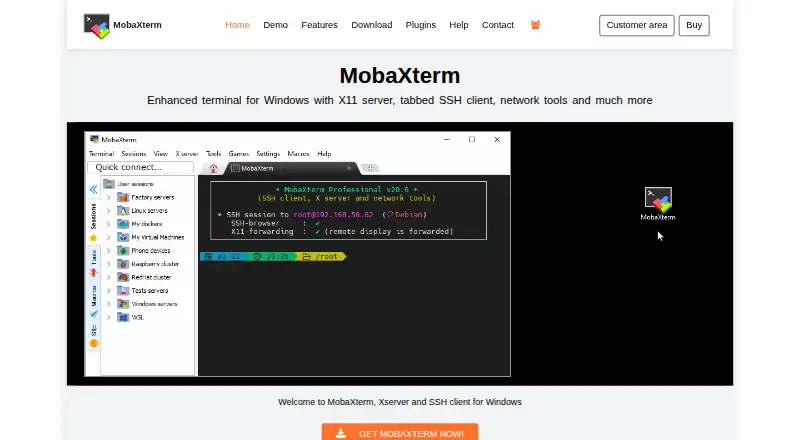
For programmers, system administrators, developers and webmasters managing remote Unix/Linux and Windows systems, MobaXterm brings terminal access, remote desktops, file transfer and network utilities into one Windows application. Its tabbed terminal includes embedded Unix commands, while the embedded X server supports X11 forwarding. The product also covers SSH, SFTP, SCP, FTP, FTPS, Telnet, Rlogin, RSH, RDP, VNC, XDMCP, Mosh and Serial sessions. Portable and installer versions support different deployment preferences.
The Home Edition is free for personal use and includes X server and SSH support, RDP, VNC and XDMCP remote desktop sessions, SSH, Telnet, Rlogin and Mosh sessions, an automatic SFTP browser, and both portable and installer versions. The Professional Edition costs $69 per user annually. It adds unlimited sessions, unlimited tunnels and macros, unlimited runtime for network daemons, enhanced security settings, company deployment and 12 months of updates. The license remains usable after optional update renewal ends, and volume discounts are available.
MobaXterm stands out through breadth rather than a narrow SSH focus. Its graphical SFTP browser supports drag-and-drop transfer, the tunnel manager handles port forwarding, and saved sessions can include bookmarks and desktop shortcuts. Multi-execution sends commands to multiple terminals, while shared session files support team workflows. That range suits Windows-based technical teams that need several remote protocols in one desktop tool. It is a less suitable choice for users who require a non-Windows client or only need a lightweight SSH application. Teams wanting unlimited sessions, tunnels, enhanced security settings or company deployment should choose Professional Edition; personal users with simpler needs can start with Home Edition.
Your product? Our editors can test MobaXterm in depth and publish a review, labelled as paid · from $149/mo →
MobaXterm pricing
All 2 MobaXterm plans and prices →
MobaXterm fact sheet
| Free plan | Yes |
|---|---|
| Paid from | Not verified |
| Supported protocols | SSH, SFTP, SCP, FTP, FTPS, Telnet, Rlogin, RSH, RDP, VNC, XDMCP, Mosh, Serial |
| Supported platforms | Windows |
| SFTP support | Yes |
| Port forwarding | Yes |
| Session management | Team |
| Team session sharing | Yes |
| Deployment | Desktop |
| Platforms | Windows |
| Compliance & security | GDPR |
| Support | Email, Docs |
| Built for | Solo, Small business, Mid-market, Enterprise (editorial estimate) |
| Pricing | Free plan (source) |
| Website | mobaxterm.mobatek.net |
| Facts checked | 20 Sep 2026 |
Alternatives to MobaXterm
- TabbyA free, open-source terminal with broad shell support and advanced SSH workflows.9.2
- OpenSSHA mature, foundational SSH suite for command-line remote access, transfer, and tunneling.9.1
- PuTTYA capable free SSH client with broad protocol support and basic session management.9.0


See all MobaXterm alternatives →
Also Ranked In
MobaXterm is ranked in 3 of our directories.
Used MobaXterm? Be the first to review it
The editor score above is our own research. What this page doesn't have yet is a reader's view — what you used MobaXterm for, what worked and what didn't. No stars are seeded and no review is paid for; an editor reads every one before it appears.
Write a reviewTwo minutes · verified accounts only · read by an editor before it appears
Featured on iTechGuides

MobaXterm is listed in our SSH Clients directory. Add the badge to your site — it links back to this page.
<a href="https://www.itechguides.com/products/mobaxterm/"><img src="https://www.itechguides.com/best/badge/mobaxterm.svg" alt="Featured on iTechGuides" width="230" height="46"></a>
Reviewed by iTechGuides Editors · Editorial team · Updated Oct 2026
Advertiser disclosure: iTechGuides is reader-supported. Vendors can pay for top positions in our rankings and for a place on other products' pages, and we may earn a commission when you click some links. Bought places stand at the number bought; this page and our disclosure say so. Paying vendors may get a fuller, more detailed review from our editors, and that review can change their score. How we rank.
Last updated · How we research and update