MaxLauncher
MaxLauncher: A flexible button-based launcher, but not a direct Start menu replacement. Ranked #35 of 39 in Start Menu Customization Software by our editors (5.4/10); pricing: Open source; best for users wanting a configurable button-based launcher.
At a glance
- Editor score5.4 / 10
- PricingOpen source
- Best forUsers wanting a configurable button-based launcher
- Paid fromFree
- Supported WindowsBoth
- Facts checked20 Sep 2026
Where it wins
- Up to 10 tabs with 30 configurable buttons per tab
- Keyboard-driven launching for programs, folders, commands, and files
- Portable mode, custom themes, multi-launch actions, and basic multi-monitor support
Where it doesn't
- It does not provide Start menu controls
- Multi-monitor support is basic
- Its launcher-focused design may not suit users seeking broad shell customization
Our verdict on MaxLauncher
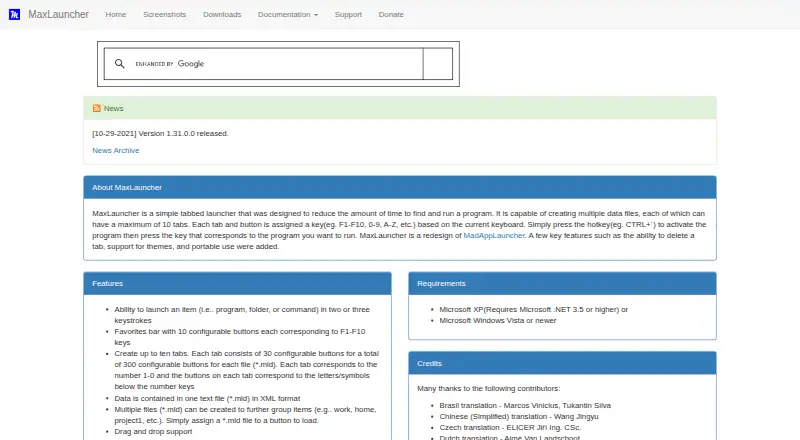
MaxLauncher is an open-source Windows desktop launcher for users who want a configurable way to start applications, folders, commands, and files. Its interface centers on tabs and buttons rather than replacing the Windows Start menu. Keyboard shortcuts activate the launcher, while drag-and-drop assignment helps organize frequently used items. The product is aimed at desktop users who prefer a personalized, button-based workflow and want portable use as an option.
Its main strength is the amount of organization available within a focused launcher. Users can create up to 10 tabs, with 30 configurable buttons per tab, alongside a favorites bar with 10 configurable buttons. Multiple configuration and data files support separate setups, while multi-launch actions can group several launches together. Custom themes and user-customizable themes add control over presentation, and the configurable activation hotkey keeps access keyboard-driven. Basic multi-monitor support is included for users working across displays.
MaxLauncher fits users who want a compact application and file launcher with substantial button and tab configuration. Portable installation mode also suits workflows that need the launcher’s setup to remain movable. However, its replacement mode is a launcher, not a Start menu customization layer, so it is a weaker match for anyone seeking changes to Start menu behavior or broader Windows shell controls. Taskbar controls are basic, and the product’s narrow focus means users looking for extensive system-interface customization should consider a more comprehensive alternative. Choose MaxLauncher for organized, shortcut-based launching; choose elsewhere for a full Start menu replacement.
Your product? Our editors can test MaxLauncher in depth and publish a review, labelled as paid · from $149/mo →
MaxLauncher pricing
MaxLauncher fact sheet
| Free plan | Not verified |
|---|---|
| Paid from | Free |
| Supported Windows | Both |
| Replacement mode | Launcher |
| Start button controls | Not verified |
| Custom search | Yes |
| Taskbar controls | Basic |
| Saved profiles | Not verified |
| Deployment | Desktop |
| Platforms | Windows |
| Support | Community, Docs |
| Built for | Solo, Small business (editorial estimate) |
| Pricing | Open source |
| Website | maxlauncher.sourceforge.io |
| Facts checked | 20 Sep 2026 |
Alternatives to MaxLauncher
- Start11A paid Windows customization tool for detailed Start menu, taskbar, search, and deployment control.9.3
- Seelen UIA broad, free Windows shell replacement for users who want more than Start menu tweaks.9.1
- Open-Shell MenuA flexible classic Start menu replacement with useful search and shortcut controls.8.9
See all MaxLauncher alternatives →
Used MaxLauncher? Be the first to review it
The editor score above is our own research. What this page doesn't have yet is a reader's view — what you used MaxLauncher for, what worked and what didn't. No stars are seeded and no review is paid for; an editor reads every one before it appears.
Write a reviewTwo minutes · verified accounts only · read by an editor before it appears
Featured on iTechGuides

MaxLauncher is listed in our Start Menu Customization Software directory. Add the badge to your site — it links back to this page.
<a href="https://www.itechguides.com/products/maxlauncher/"><img src="https://www.itechguides.com/best/badge/maxlauncher.svg" alt="Featured on iTechGuides" width="230" height="46"></a>
Reviewed by iTechGuides Editors · Editorial team · Updated Oct 2026
Advertiser disclosure: iTechGuides is reader-supported. Vendors can pay for top positions in our rankings and for a place on other products' pages, and we may earn a commission when you click some links. Bought places stand at the number bought; this page and our disclosure say so. Paying vendors may get a fuller, more detailed review from our editors, and that review can change their score. How we rank.
Last updated · How we research and update