Librera Reader
Librera Reader: A format-rich reader with catalog tools, conversion features, and Google Drive sync. Ranked #11 of 27 in Ebook Reader Software by our editors (8.1/10); pricing: Free plan; best for android readers needing conversion and catalog tools.
At a glance
- Editor score8.1 / 10
- PricingFree plan
- Best forAndroid readers needing conversion and catalog tools
- Free planYes
- Annotation toolsYes
- Facts checked22 Sep 2026
Where it wins
- Supports a wide range of ebook, document, comic, and archive formats
- Offers PDF reflow, document conversion, annotations, and text-to-speech
- Includes OPDS catalogs, dictionaries, and Google Drive synchronization
Where it doesn't
- The free version is ad-supported
- Verified platform coverage is limited to Android and web
- PRO pricing may vary by region
Our verdict on Librera Reader
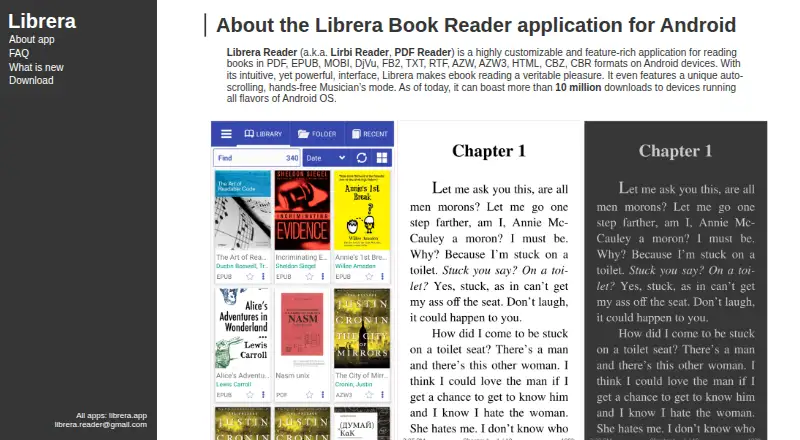
Librera Reader is an ebook and document-reading application aimed at Android readers who manage books across multiple formats and sources. It supports PDF, EPUB, EPUB3, MOBI, DjVu, FB2, TXT, RTF, AZW, AZW3, HTML, CBZ, and CBR files, with additional format coverage listed for DOC, DOCX, ODT, XPS, TIFF, PDB, MHT, and FB2.ZIP. Library scanning, folder browsing, document search, bookmarks, annotations, configurable reading modes, dictionaries, and text-to-speech make it suitable for readers who want more than a basic file viewer.
Its freemium structure keeps the entry point simple: the Free plan is an ad-supported ebook reader, while the paid PRO version supports bookmarks and annotations and synchronizes reading progress and setup across devices. Google Drive provides the synchronization path for reading progress and settings, including across Android devices. The app also includes online and offline dictionary integration, built-in media playback, and day, night, and vertical-scrolling modes. Readers who frequently convert or reflow documents may value the PDF text reflow and document conversion features.
Librera Reader is particularly suited to Android users who maintain personal libraries, browse OPDS or online catalogs, and read files from varied ecosystems. Its web and Android coverage gives it some flexibility, but the verified platform scope is narrower than a reader designed for a larger device ecosystem. The free plan is a practical starting point if ads are acceptable; readers seeking synchronized progress and setup can consider PRO, with pricing varying by region. Choose Librera Reader for format breadth, catalog access, and conversion tools. Consider an alternative if you need broader platform coverage or an ad-free free tier.
Your product? Our editors can test Librera Reader in depth and publish a review, labelled as paid · from $149/mo →
Librera Reader pricing
All 2 Librera Reader plans and prices →
Librera Reader fact sheet
| Free plan | Yes |
|---|---|
| Paid from | Not verified |
| Supported platforms | Android, web |
| Supported formats | PDF, EPUB, EPUB3, MOBI, DjVu, FB2, FB2.ZIP, TXT, RTF, AZW, AZW3, HTML, CBZ, CBR, DOC, DOCX, ODT, XPS, TIFF, PDB, MHT |
| Annotation tools | Yes |
| Reading sync | Yes |
| Offline reading | Not verified |
| Library storage | Not verified |
| Deployment | Mobile |
| Platforms | Web, Android |
| Support | Email, Docs |
| Built for | Solo, Small business (editorial estimate) |
| Integrations | 1 integrations: Google Drive |
| Pricing | Free plan (source) |
| Website | librera.mobi |
| Facts checked | 22 Sep 2026 |
Librera Reader integrations
Librera Reader lists 1 integrations on its own site.
- Google Drive
Alternatives to Librera Reader
- ReadestA cross-platform ebook reader for broad format support and detailed annotations.9.4
- BookFusionA flexible cloud library for mixed-format readers who want offline access and sync.9.2
- PocketBook ReaderA format-rich free reader for mobile users who need Adobe DRM and reading-position sync.9.0



See all Librera Reader alternatives →
Also Ranked In
Librera Reader is ranked in 2 of our directories.
Used Librera Reader? Be the first to review it
The editor score above is our own research. What this page doesn't have yet is a reader's view — what you used Librera Reader for, what worked and what didn't. No stars are seeded and no review is paid for; an editor reads every one before it appears.
Write a reviewTwo minutes · verified accounts only · read by an editor before it appears
Featured on iTechGuides

Librera Reader is listed in our Ebook Reader Software directory. Add the badge to your site — it links back to this page.
<a href="https://www.itechguides.com/products/librera-reader/"><img src="https://www.itechguides.com/best/badge/librera-reader.svg" alt="Featured on iTechGuides" width="230" height="46"></a>
Guides on ebook reader software
- Best eBook Reader Apps for Android in 2026: Kindle, Libby, ReadEra, Moon+ Reader, and MoreAug 2026
- 11 Best eBook Reader Apps for iOS 2024 (iPhone and iPad)Aug 2026
- Best Android eBook Reader Apps That Are Easy on Your EyesAug 2026
Reviewed by iTechGuides Editors · Editorial team · Updated Oct 2026
Advertiser disclosure: iTechGuides is reader-supported. Vendors can pay for top positions in our rankings and for a place on other products' pages, and we may earn a commission when you click some links. Bought places stand at the number bought; this page and our disclosure say so. Paying vendors may get a fuller, more detailed review from our editors, and that review can change their score. How we rank.
Last updated · How we research and update