
Ki-Wi Signage
Ki-Wi Signage: A capable signage platform for connected displays, with narrower platform coverage and tier details to weigh. Ranked #36 of 207 in Digital Signage Software by our editors (5.7/10); pricing: Paid; best for interactive signage with business-system connections.
At a glance
- Editor score5.7 / 10
- PricingPaid
- Best forInteractive signage with business-system connections
- Free planNo
- Facts checked21 Sep 2026
Where it wins
- Schedules content by screen, group or location
- Supports offline playback, monitoring and remote device control
- Connects to calendars, dashboards, drives, ERP and peripherals
Where it doesn't
- Platform coverage is limited to web, Windows, Linux and Android
- ENTRY limits screens, users and cloud storage
- Premium pricing is listed, but other tier prices are not
Our verdict on Ki-Wi Signage
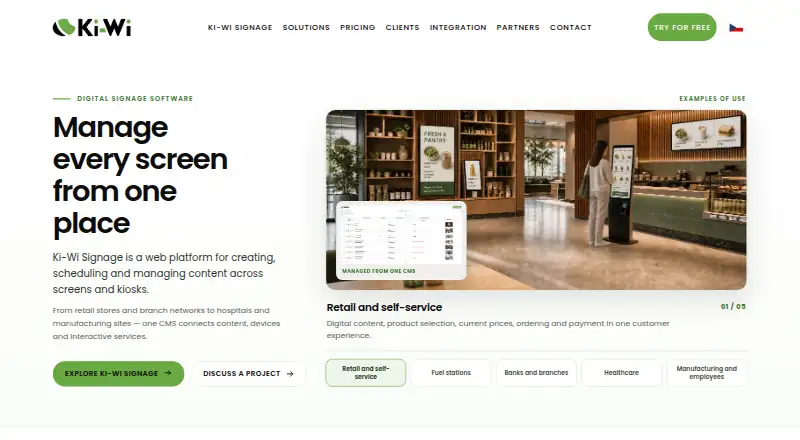
Ki-Wi Signage is a web-based platform for creating, scheduling and managing content across digital signage screens, kiosks and interactive displays. It suits retailers, branch networks, manufacturing sites, public institutions and other organizations coordinating distributed display networks. Content support includes images, video, audio, webpages, presentations, PDF, Office documents, HTML apps, live dashboards, streams and custom widgets. Advanced user roles, API access, touch interactions and self-service workflows make it relevant when signage needs to connect with wider business operations.
Its strongest fit is an environment where signage must respond to schedules, conditions or live business information. Content can be scheduled by screen, group or location, while dynamic playlists can use conditions such as time or weather. Integrations include Microsoft Power BI, Google and Microsoft Exchange calendars, Google Slides, SAP SuccessFactors, SharePoint, OneDrive, Google Drive, Google Analytics, RSS, Ki-Wi Menu, Signotec and barcode readers. Video Wall synchronization, remote monitoring and control, and local playback during short connection outages add useful capabilities for distributed deployments.
The plans create a clear distinction between entry-level and more advanced deployments. ENTRY includes a 5-year license, basic templates and widgets, 2 GB of cloud storage, limited screens and users, and standard helpdesk support. PREMIUM is listed at €15 per screen per month with monthly billing, adding a cloud solution, unlimited screens and users, 30 GB of storage, Video Wall management, dynamic playlists and advanced device management. ENTERPRISE adds on-premise deployment, unlimited storage and features, custom tailoring, 24/7 support and a personal account manager. Choose Ki-Wi Signage for interactive, integration-heavy networks; organizations needing broader platform coverage or simpler tier comparison should evaluate alternatives.
Your product? Our editors can test Ki-Wi Signage in depth and publish a review, labelled as paid · from $149/mo →
Ki-Wi Signage pricing
All 3 Ki-Wi Signage plans and prices →
Ki-Wi Signage fact sheet
| Free plan | No |
|---|---|
| Paid from | Not verified |
| Screen limit | Not verified |
| Offline playback | Yes |
| Content types | images, video, audio, webpages, presentations, PDF, Office documents, HTML apps, live dashboards, streams, custom widgets |
| User roles | Advanced |
| API access | Yes |
| Mobile app | Not verified |
| Deployment | Cloud, Self-hosted |
| Platforms | Web, Windows, Linux, Android |
| Compliance & security | GDPR |
| Support | Email, Docs · 24/7 |
| Built for | Small business, Mid-market, Enterprise (editorial estimate) |
| Integrations | 19 integrations: Microsoft Power BI, Google Calendar, Microsoft Exchange Calendar, Google Slides, SAP SuccessFactors, iTutor … See all → |
| Pricing | Paid (source) |
| Website | kiwisignage.com |
| Facts checked | 21 Sep 2026 |
Ki-Wi Signage integrations
Ki-Wi Signage lists 19 integrations on its own site.
- Microsoft Power BI
- Google Calendar
- Microsoft Exchange Calendar
- Google Slides
- SAP SuccessFactors
- iTutor
- eHuman
- SharePoint
- OneDrive
- Google Drive
- Google Analytics
- RSS
- Ki-Wi Menu
- Signotec
- barcode readers
- RFID readers
- thermal printers
- queue management systems
- payment terminals
See all Ki-Wi Signage integrations →
Alternatives to Ki-Wi Signage
- OptiSignsA flexible signage platform with mobile administration, offline playback, and a free plan.9.3
- YodeckA flexible signage platform with a generous free tier and broad content support.9.2
- Play Digital SignageFeature-rich signage with a free screen option and wide platform coverage.9.1



See all Ki-Wi Signage alternatives →
Used Ki-Wi Signage? Be the first to review it
The editor score above is our own research. What this page doesn't have yet is a reader's view — what you used Ki-Wi Signage for, what worked and what didn't. No stars are seeded and no review is paid for; an editor reads every one before it appears.
Write a reviewTwo minutes · verified accounts only · read by an editor before it appears
Featured on iTechGuides

Ki-Wi Signage is listed in our Digital Signage Software directory. Add the badge to your site — it links back to this page.
<a href="https://www.itechguides.com/products/ki-wi-signage/"><img src="https://www.itechguides.com/best/badge/ki-wi-signage.svg" alt="Featured on iTechGuides" width="230" height="46"></a>
Reviewed by iTechGuides Editors · Editorial team · Updated Oct 2026
Advertiser disclosure: iTechGuides is reader-supported. Vendors can pay for top positions in our rankings and for a place on other products' pages, and we may earn a commission when you click some links. Bought places stand at the number bought; this page and our disclosure say so. Paying vendors may get a fuller, more detailed review from our editors, and that review can change their score. How we rank.
Last updated · How we research and update