
KanbanFlow
KanbanFlow: Affordable Kanban analytics with flexible workflows, but web-only access limits mobility. Ranked #3 of 28 in Kanban Software by our editors (8.8/10); pricing: Free plan · 14-day trial; best for lean teams needing affordable Kanban analytics.
At a glance
- Editor score8.8 / 10
- PricingFree plan · 14-day trial
- Best forLean teams needing affordable Kanban analytics
- Free planYes
- Paid from$5/user/mo
- WIP limitsYes
- Facts checked20 Sep 2026
Where it wins
- Free Kanban boards with no time limit
- WIP limits, swimlanes, timelines, and Gantt views
- REST API, webhooks, Zapier, and broad import options
Where it doesn't
- Native iOS and Android apps are not included
- WIP limits and integrations require Premium
- No AI features
Our verdict on KanbanFlow
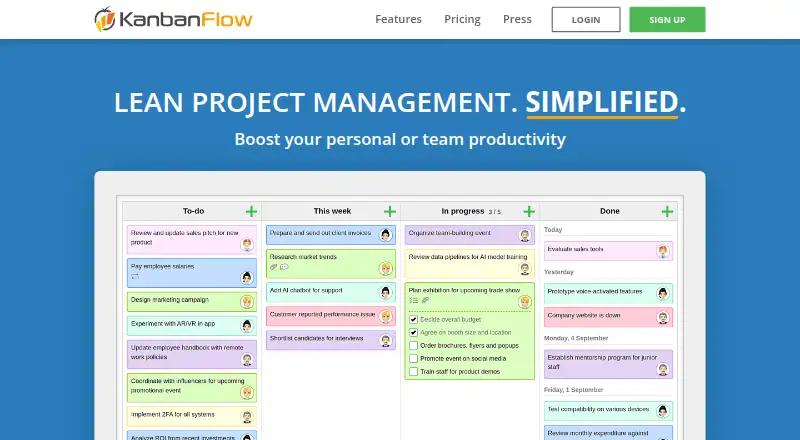
KanbanFlow is a web-based Kanban and lean project management tool for individuals and teams. It suits lean teams that want visual workflows alongside time tracking, analytics, and reporting. Boards support customizable columns, subtasks, swimlanes, recurring tasks, task relationships, and custom fields. Time tracking includes a stopwatch and Pomodoro timers, while timeline and Gantt views provide alternatives to the standard board view.
The pricing structure keeps the entry point simple. The Free plan costs $0 and includes a Kanban board with no time limit. Premium costs $5 per user per month when billed monthly and adds WIP limits, custom fields, integrations, API and webhooks, and priority support. Premium also offers a 10% discount when paying per year. A 14-day free trial is available, giving teams a way to evaluate paid capabilities before committing. The main distinction is practical: teams needing analytics, workflow controls, or connected services will likely need Premium, while basic board-based planning can remain on Free.
KanbanFlow connects with Excel, CSV, XML, JSON, email, REST API, webhooks, and Zapier, along with Outlook, Gmail, Dropbox, Google Drive, OneDrive, and Box. Its mobile web app supports boards on phones and tablets, but the product is web-only and does not include native iOS or Android applications. That makes it a good fit for teams comfortable working in a browser and needing affordable Kanban analytics, automation, and reporting. Teams requiring native mobile apps or AI features should consider alternatives with those capabilities.
Your product? Our editors can test KanbanFlow in depth and publish a review, labelled as paid · from $149/mo →
KanbanFlow pricing
All 2 KanbanFlow plans and prices →
KanbanFlow fact sheet
| Free plan | Yes |
|---|---|
| Paid from | $5/user/mo |
| WIP limits | Yes |
| Automation rules | Yes |
| Custom card fields | Yes |
| Guest access | Yes |
| Free board limit | Not verified |
| Mobile apps | None |
| Free trial | 14 days |
| Deployment | Cloud |
| Platforms | Web |
| Compliance & security | 2FA |
| Support | Email, Docs |
| Built for | Solo, Small business, Mid-market (editorial estimate) |
| Integrations | 14 integrations: Excel, CSV, XML, JSON, email, REST API … See all → |
| Pricing | Free plan · 14-day trial (source) |
| Website | kanbanflow.com |
| Facts checked | 20 Sep 2026 |
KanbanFlow integrations
KanbanFlow lists 14 integrations on its own site.
- Excel
- CSV
- XML
- JSON
- REST API
- webhooks
- Zapier
- Outlook
- Gmail
- Dropbox
- Google Drive
- OneDrive
- Box
See all KanbanFlow integrations →
Alternatives to KanbanFlow
- TrelloA flexible Kanban workspace with automation, multiple views, and broad integrations.9.3
- Kanban ToolA Kanban-focused workspace with workflow controls, analytics, integrations, and self-hosted deployment.9.1
- SwiftKanbanA deep Kanban platform for organizations that need portfolio control and workflow customization.8.6

See all KanbanFlow alternatives →
KanbanFlow vs the competition
- KanbanFlow vs Trello
- KanbanFlow vs Kanban Tool
- KanbanFlow vs SwiftKanban
- KanbanFlow vs Kanboard
- KanbanFlow vs Teamhood
- KanbanFlow vs Hygger



Compare KanbanFlow with any tool side by side →
Also Ranked In
KanbanFlow is ranked in 3 of our directories.
Used KanbanFlow? Be the first to review it
The editor score above is our own research. What this page doesn't have yet is a reader's view — what you used KanbanFlow for, what worked and what didn't. No stars are seeded and no review is paid for; an editor reads every one before it appears.
Write a reviewTwo minutes · verified accounts only · read by an editor before it appears
Featured on iTechGuides

KanbanFlow is listed in our Kanban Software directory. Add the badge to your site — it links back to this page.
<a href="https://www.itechguides.com/products/kanbanflow/"><img src="https://www.itechguides.com/best/badge/kanbanflow.svg" alt="Featured on iTechGuides" width="230" height="46"></a>
Reviewed by iTechGuides Editors · Editorial team · Updated Oct 2026
Advertiser disclosure: iTechGuides is reader-supported. Vendors can pay for top positions in our rankings and for a place on other products' pages, and we may earn a commission when you click some links. Bought places stand at the number bought; this page and our disclosure say so. Paying vendors may get a fuller, more detailed review from our editors, and that review can change their score. How we rank.
Last updated · How we research and update