
Jumpshare
Jumpshare: A flexible video, GIF, and screenshot tool with AI features and a free plan. Ranked #9 of 29 in Video Messaging Software by our editors (8.5/10); pricing: Free plan · 14-day trial; best for lightweight video, GIF, and screenshot sharing.
At a glance
- Editor score8.5 / 10
- PricingFree plan · 14-day trial
- Best forLightweight video, GIF, and screenshot sharing
- Free planYes
- Screen recordingYes
- Facts checked20 Sep 2026
Where it wins
- Captures screens, webcams, audio, screenshots, and GIFs
- Captions and transcriptions support over 50 languages
- AI adds titles, summaries, chapters, and workflow actions
Where it doesn't
- Basic limits users to 25 uploads and 5-minute recordings
- The published integration list includes Slack and Zapier
- SSO, priority support, and uptime guarantees require Enterprise
Our verdict on Jumpshare
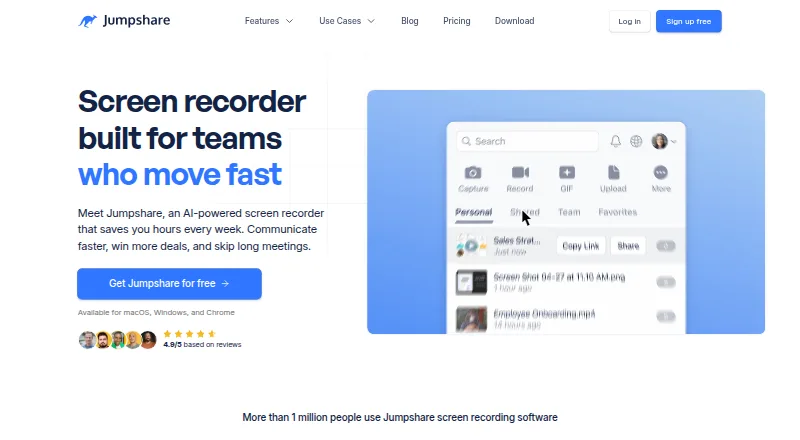
Jumpshare is a visual communication platform for individuals and teams that need to record, edit, annotate, and share screens, webcams, audio, screenshots, and GIFs. Recordings can be shared through links or embeds, with timed comments, viewer analytics, and basic editing tools such as trimming, cutting, and merging. It supports web, Windows, macOS, iOS, and a Chrome extension, making it suitable for lightweight demos, async updates, visual feedback, and internal explanations.
The plan structure scales from simple capture to team workflows. Basic includes 25 uploads, five-minute recording time, screenshot and GIF capture, video markups, and basic search. Plus costs $12 per user per month when billed monthly and adds unlimited uploads and recording time, captions and transcriptions, video and audio editing, analytics, engagements, custom domains, and branding. Business costs $16 per user per month monthly and adds Jumpshare AI, automatic titles, summaries, chapters, workflow actions, lead generation, version history, and Zapier integration. A free plan and a 14-day free trial provide lower-commitment entry points, while the pricing page indicates a 20% annual-billing discount.
Jumpshare’s standout strength is combining capture and communication features in one workflow. Users can record full screens, windows, or custom regions with webcam, microphone, system audio, and click tracking, then add annotations or review views, downloads, viewers, timing, and location. Automatic captions and transcriptions in over 50 languages broaden its usefulness for distributed teams and accessible content. However, the ecosystem is focused: the listed integrations are Slack and Zapier. Choose Jumpshare for straightforward visual sharing with editing, analytics, and AI additions; consider another tool if a wider integration ecosystem is central to your workflow.
Your product? Our editors can test Jumpshare in depth and publish a review, labelled as paid · from $149/mo →
Jumpshare pricing
All 4 Jumpshare plans and prices →
Jumpshare fact sheet
| Free plan | Yes |
|---|---|
| Paid from | Not verified |
| Screen recording | Yes |
| Webcam recording | Yes |
| Video editing | Basic |
| Transcription | Yes |
| Viewer analytics | Yes |
| Maximum video length | 5 min |
| Free trial | 14 days |
| Deployment | Cloud, Desktop, Mobile, Browser extension |
| Platforms | Web, Windows, macOS, iOS, Chrome extension |
| Compliance & security | GDPR, PCI DSS, SSO/SAML, 2FA |
| Support | Email, Docs |
| Built for | Solo, Small business, Mid-market, Enterprise (editorial estimate) |
| Integrations | 2 integrations: Slack, Zapier |
| Pricing | Free plan · 14-day trial (source) |
| Website | jumpshare.com |
| Facts checked | 20 Sep 2026 |
Jumpshare integrations
Jumpshare lists 2 integrations on its own site.
- Slack
- Zapier
Alternatives to Jumpshare
- LoomA flexible video messenger with strong recording, sharing, analytics, and AI options.9.4
- DadanA broad video messaging platform with 4K recording, AI tools, and a low annual starting price.9.3
- CapA flexible video messenger for technical teams that want open tooling and self-hosting.9.2



See all Jumpshare alternatives →
Also Ranked In
Jumpshare is ranked in 4 of our directories.
Used Jumpshare? Be the first to review it
The editor score above is our own research. What this page doesn't have yet is a reader's view — what you used Jumpshare for, what worked and what didn't. No stars are seeded and no review is paid for; an editor reads every one before it appears.
Write a reviewTwo minutes · verified accounts only · read by an editor before it appears
Featured on iTechGuides

Jumpshare is listed in our Video Messaging Software directory. Add the badge to your site — it links back to this page.
<a href="https://www.itechguides.com/products/jumpshare/"><img src="https://www.itechguides.com/best/badge/jumpshare.svg" alt="Featured on iTechGuides" width="230" height="46"></a>
Reviewed by iTechGuides Editors · Editorial team · Updated Oct 2026
Advertiser disclosure: iTechGuides is reader-supported. Vendors can pay for top positions in our rankings and for a place on other products' pages, and we may earn a commission when you click some links. Bought places stand at the number bought; this page and our disclosure say so. Paying vendors may get a fuller, more detailed review from our editors, and that review can change their score. How we rank.
Last updated · How we research and update