
iTimekeep
iTimekeep: Aderant-oriented firms get AI-assisted capture, compliance checks, and mobile entry. Ranked #13 of 24 in Legal Time Tracking Software by our editors (8.2/10); pricing: Pricing on request; best for aderant-oriented firms needing mobile capture.
At a glance
- Editor score8.2 / 10
- PricingPricing on request
- Best forAderant-oriented firms needing mobile capture
- Matter trackingYes
- Facts checked20 Sep 2026
Where it wins
- AI-assisted activity capture can generate time entries
- Matter-based timecards support manual entry and floating timers
- Offline review plus iOS and Android mobile entry
Where it doesn't
- Pricing requires contacting sales
- Integration coverage centers on Outlook, Aderant, and legal systems
- Some workflows depend on compliance validation and review processes
Our verdict on iTimekeep
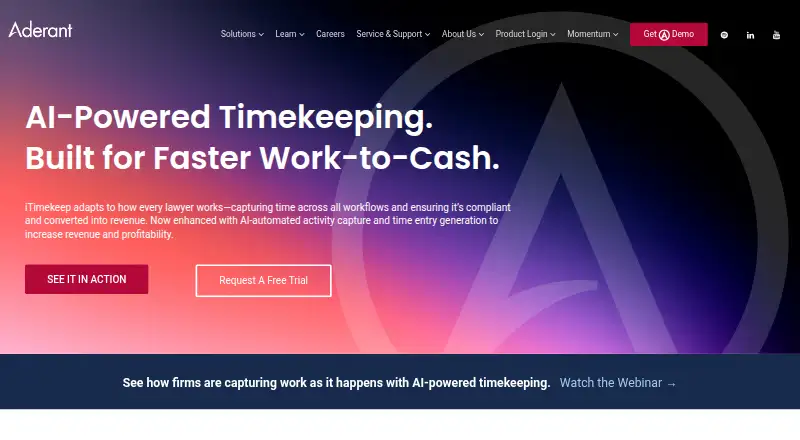
iTimekeep is legal timekeeping software from Aderant for attorneys, law firm timekeepers, and reviewers. It supports manual time entry, floating timers, Outlook-based conversion, mobile capture, and AI-assisted activity capture. Matter-based timecards organize entries around client work, while dashboards provide visibility into recorded time. Firms looking to capture billable work across web, iOS, and Android can use it as a focused timekeeping layer for legal workflows.
Its strongest area is breadth of capture and review options within a legal context. AI-assisted activity capture can generate time entries, while Microsoft Outlook email and calendar conversion helps turn existing work records into timecards. Billing-code and narrative compliance validation is designed to support billing requirements, and reviewers can reject or edit entries. Offline review adds flexibility when connectivity is limited. These features make iTimekeep a fit for firms focused on contemporaneous capture, matter organization, and billing compliance rather than basic timers alone.
The main buying considerations are commercial access and ecosystem fit. iTimekeep uses a contact-sales pricing model, so firms need a vendor conversation to evaluate the offering. Its integrations include Microsoft Outlook, the Aderant compliance platform, and legal practice management systems, giving it a clear orientation toward Aderant-connected environments. Firms already working in that ecosystem and needing mobile entry should shortlist it. Organizations seeking a wider integration range or straightforward public plan comparison should evaluate alternatives before choosing.
Your product? Our editors can test iTimekeep in depth and publish a review, labelled as paid · from $149/mo →
iTimekeep pricing
iTimekeep fact sheet
| Free plan | Not verified |
|---|---|
| Paid from | Not verified |
| Matter tracking | Yes |
| Expense tracking | Not verified |
| Billable rates | Not verified |
| Mobile access | Ios_android |
| Time entry methods | Manual_and_timer |
| Offline time entry | Yes |
| Deployment | Cloud, Mobile |
| Platforms | Web, iOS, Android |
| Compliance & security | SOC 2 |
| Support | Email, Phone |
| Built for | Mid-market, Enterprise (editorial estimate) |
| Integrations | 3 integrations: Microsoft Outlook, Aderant compliance platform, Legal practice management systems |
| Pricing | Pricing on request |
| Website | aderant.com |
| Facts checked | 20 Sep 2026 |
iTimekeep integrations
iTimekeep lists 3 integrations on its own site.
- Microsoft Outlook
- Aderant compliance platform
- Legal practice management systems
Alternatives to iTimekeep
- TimeSolvA complete legal time-and-billing suite with offline entry, approvals, invoicing, and trust accounting.9.4
- Bill4TimeBroad legal time, matter, billing, and reporting coverage with transparent plan choices.9.3
- ChrometaA strong fit for firms that want automatic activity capture and billable workflows.9.2



See all iTimekeep alternatives →
Used iTimekeep? Be the first to review it
The editor score above is our own research. What this page doesn't have yet is a reader's view — what you used iTimekeep for, what worked and what didn't. No stars are seeded and no review is paid for; an editor reads every one before it appears.
Write a reviewTwo minutes · verified accounts only · read by an editor before it appears
Featured on iTechGuides

iTimekeep is listed in our Legal Time Tracking Software directory. Add the badge to your site — it links back to this page.
<a href="https://www.itechguides.com/products/itimekeep/"><img src="https://www.itechguides.com/best/badge/itimekeep.svg" alt="Featured on iTechGuides" width="230" height="46"></a>
Reviewed by iTechGuides Editors · Editorial team · Updated Oct 2026
Advertiser disclosure: iTechGuides is reader-supported. Vendors can pay for top positions in our rankings and for a place on other products' pages, and we may earn a commission when you click some links. Bought places stand at the number bought; this page and our disclosure say so. Paying vendors may get a fuller, more detailed review from our editors, and that review can change their score. How we rank.
Last updated · How we research and update