
Chrometa
Chrometa: A broad automatic tracker for billable work, with paid plans starting at $19 per user monthly. Ranked #28 of 77 in Time Tracking Software by our editors (6.1/10); pricing: 30-day trial; best for professional services needing automatic billing capture.
At a glance
- Editor score6.1 / 10
- Pricing30-day trial
- Best forProfessional services needing automatic billing capture
- Free planNo
- Paid from$140/user/yr
- Desktop appYes
- Founded2007 · Sacramento, California
- Facts checked20 Sep 2026
Where it wins
- Captures activity across apps, emails, websites, calls, and meetings
- Automatically allocates time to clients and projects
- Supports approvals, invoicing, offline sync, and reporting
Where it doesn't
- Starts at $19 per user per month with no permanent free plan
- Screenshots and advanced allocation require higher-tier plans
- The broad feature set may exceed simple time-tracking needs
Our verdict on Chrometa
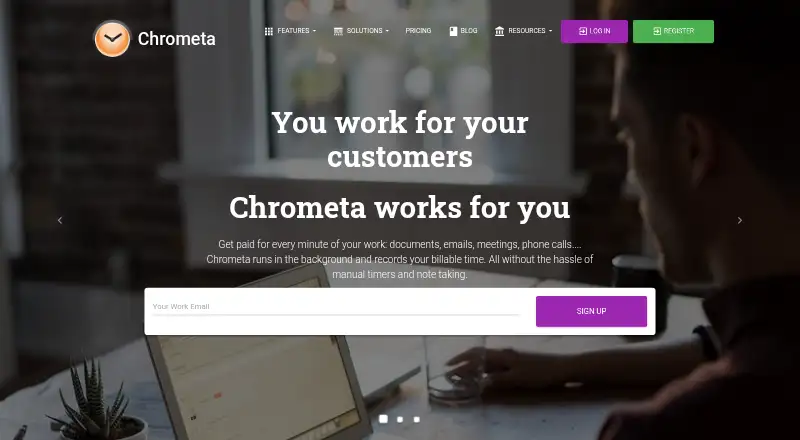
Chrometa is automatic time-tracking software for professionals, teams, and service businesses, including law firms, accounting firms, consultants, and IT services businesses. It records activity across applications, documents, emails, websites, phone calls, and meetings, then organizes that time into clients, projects, timesheets, reports, and invoices. Desktop and mobile tracking, billable-time workflows, project budgets, keyword-based allocation, approvals, integrations, exports, and offline synchronization make it suited to organizations that need more than manual timers.
Pricing is structured around three monthly plans and three annual options. Standard costs $19 per user per month and includes passive tracking, unlimited time entries, basic AI-based categorization, manual edits and tagging, daily summaries, and limited clients or workspace tracking. Plus costs $29 monthly and adds screenshots every 10 minutes, smart AI allocation, shared workspaces, a productivity dashboard, unlimited projects, and integrations. Premium costs $49 monthly, adding a full KPI dashboard, advanced AI allocation, API access, role-based access controls, screenshots every 5 minutes, and white-label reporting. Annual plans cost $140, $212, and $360 per user per year for Standard, Plus, and Premium, respectively. A 30-day trial is available.
The strongest fit is a professional-services team that needs automatic capture tied to billing, approvals, budgets, and invoicing. Chrometa also connects with Outlook, Gmail, Microsoft Teams, Zoom, Clio, QuickBooks, Google Calendar, Xero, FreshBooks, Basecamp, and Sage Timeslips, while its web, Windows, macOS, iOS, Android, and API coverage supports varied working environments. Buyers seeking basic start-and-stop time tracking may find the plans broader and costlier than necessary. Teams needing screenshots, dashboards, or advanced allocation should compare the added cost of Plus or Premium against their oversight requirements.
Your product? Our editors can test Chrometa in depth and publish a review, labelled as paid · from $149/mo →
Chrometa pricing
All 6 Chrometa plans and prices →
Chrometa fact sheet
| Free plan | No |
|---|---|
| Paid from | $140/user/yr |
| Project tracking | Yes |
| Billable time | Yes |
| Timesheet approvals | Yes |
| Mobile apps | Both |
| Desktop app | Yes |
| Offline tracking | Yes |
| Data export | Yes |
| Free trial | 30 days |
| Deployment | Cloud, Desktop, Mobile |
| Platforms | Web, Windows, macOS, iOS, Android |
| Support | Email, Live chat, Community, Docs |
| Built for | Solo, Small business, Mid-market, Enterprise (editorial estimate) |
| Integrations | 50+ integrations: Clio, PracticePanther, Rocket Matter, Salesforce, Xero, FreshBooks … See all → |
| Pricing | 30-day trial (source) |
| Website | chrometa.com |
| Facts checked | 20 Sep 2026 |
Chrometa integrations
Chrometa lists 50+ integrations on its own site — the 20 named here are the ones its pages call out.
- Clio
- PracticePanther
- Rocket Matter
- Salesforce
- Xero
- FreshBooks
- QuickBooks
- Zoho Books
- Asana
- Harvest
- Basecamp
- Teamwork
- Trello
- Jira Confluence
- Slack
- Gmail
- Google Calendar
- Office 365
- Outlook
- Zoom
See all Chrometa integrations →
Alternatives to Chrometa
- Toggl TrackA mature time tracker with strong reporting, approvals, estimates, and integrations.9.2
- RescueTimeA broad automatic tracker for productivity, billable work, focus, and team timesheets.9.0
- Deltek RepliconA broad enterprise time-tracking suite for compliance-heavy project organizations.8.9


See all Chrometa alternatives →
Also Ranked In
Chrometa is ranked in 2 of our directories.
Used Chrometa? Be the first to review it
The editor score above is our own research. What this page doesn't have yet is a reader's view — what you used Chrometa for, what worked and what didn't. No stars are seeded and no review is paid for; an editor reads every one before it appears.
Write a reviewTwo minutes · verified accounts only · read by an editor before it appears
Featured on iTechGuides

Chrometa is listed in our Time Tracking Software directory. Add the badge to your site — it links back to this page.
<a href="https://www.itechguides.com/products/chrometa/"><img src="https://www.itechguides.com/best/badge/chrometa.svg" alt="Featured on iTechGuides" width="230" height="46"></a>
Reviewed by iTechGuides Editors · Editorial team · Updated Oct 2026
Advertiser disclosure: iTechGuides is reader-supported. Vendors can pay for top positions in our rankings and for a place on other products' pages, and we may earn a commission when you click some links. Bought places stand at the number bought; this page and our disclosure say so. Paying vendors may get a fuller, more detailed review from our editors, and that review can change their score. How we rank.
Last updated · How we research and update