IObit AI Photo Enhancer
IObit AI Photo Enhancer: A straightforward free enhancer for sharper, cleaner, watermark-free image downloads. Ranked #13 of 28 in AI Image Enhancers by our editors (7.6/10); pricing: Free plan; best for simple free enhancement without watermarks.
At a glance
- Editor score7.6 / 10
- PricingFree plan
- Best forSimple free enhancement without watermarks
- Free planYes
- Paid fromFree
- AI denoisingYes
- Founded2004 · San Francisco, California, USA
- Facts checked20 Sep 2026
Where it wins
- Free browser workflow with no signup required
- Upscaling, denoising, blur, detail, and color enhancement
- Watermark-free downloads with batches of up to six images
Where it doesn't
- Web-only access limits platform flexibility
- Batch uploads are capped at six images
- Focused on core enhancement rather than a broader editing workflow
Our verdict on IObit AI Photo Enhancer
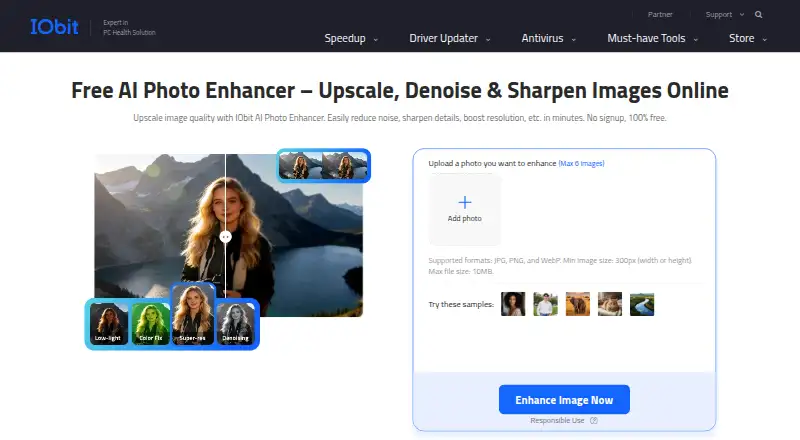
IObit AI Photo Enhancer is a free, browser-based tool for improving image quality without requiring an account. It is aimed at photographers, online sellers, content creators, designers, marketers, and personal users who need a quick way to make photos clearer, sharper, or more balanced. The workflow supports JPG, PNG, and WebP files up to 10 MB, with browser-based preview and download. Its core tools include AI upscaling, denoising, blur and detail enhancement, plus color enhancement and balancing.
The main appeal is the breadth of useful adjustments within a simple free workflow. Users can enhance low-resolution images, reduce noise, improve clarity, and balance color before downloading the result without a watermark. Batch upload supports up to six images, which adds practical value for small groups of product photos, social assets, or personal images. No signup requirement also keeps the path from upload to download short for occasional users.
The trade-off is focus. IObit AI Photo Enhancer is available through the web, so it suits browser-based tasks rather than workflows that depend on broader platform coverage. Its batch capability is useful for small sets but may feel restrictive for larger image queues. Choose it for straightforward, free enhancement with watermark-free downloads; users seeking a wider editing environment, larger-scale processing, or a more specialized workflow may prefer a different tool.
Your product? Our editors can test IObit AI Photo Enhancer in depth and publish a review, labelled as paid · from $149/mo →
IObit AI Photo Enhancer pricing
All 1 IObit AI Photo Enhancer plans and prices →
IObit AI Photo Enhancer fact sheet
| Free plan | Yes |
|---|---|
| Paid from | Free |
| AI denoising | Yes |
| Lighting enhancement | Not verified |
| Color enhancement | Yes |
| Batch processing | Yes |
| Maximum upload size | Not verified |
| API access | Not verified |
| Deployment | Cloud, Browser extension |
| Platforms | Web |
| Support | Community, Docs |
| Built for | Solo, Small business (editorial estimate) |
| Pricing | Free plan (source) |
| Website | iobit.com |
| Facts checked | 20 Sep 2026 |
Alternatives to IObit AI Photo Enhancer
- VanceAI Image EnhancerA flexible enhancer with free access, desktop apps, batch processing, and an API.9.4
- Topaz PhotoA deep desktop enhancer for photographers who need RAW, batch, masking, and AI retouching tools.9.1
- Media.io Gemini Photo EnhanceA broad free web enhancer for sharpening, restoring, upscaling, and refining photos.8.8



See all IObit AI Photo Enhancer alternatives →
Used IObit AI Photo Enhancer? Be the first to review it
The editor score above is our own research. What this page doesn't have yet is a reader's view — what you used IObit AI Photo Enhancer for, what worked and what didn't. No stars are seeded and no review is paid for; an editor reads every one before it appears.
Write a reviewTwo minutes · verified accounts only · read by an editor before it appears
Featured on iTechGuides

IObit AI Photo Enhancer is listed in our AI Image Enhancers directory. Add the badge to your site — it links back to this page.
<a href="https://www.itechguides.com/products/iobit-ai-photo-enhancer/"><img src="https://www.itechguides.com/best/badge/iobit-ai-photo-enhancer.svg" alt="Featured on iTechGuides" width="230" height="46"></a>
Reviewed by iTechGuides Editors · Editorial team · Updated Oct 2026
Advertiser disclosure: iTechGuides is reader-supported. Vendors can pay for top positions in our rankings and for a place on other products' pages, and we may earn a commission when you click some links. Bought places stand at the number bought; this page and our disclosure say so. Paying vendors may get a fuller, more detailed review from our editors, and that review can change their score. How we rank.
Last updated · How we research and update