
Insyta Pro
Insyta Pro: A low-cost WordPress heatmap suite for self-hosted teams and agencies. Ranked #40 of 63 in Heatmap Tools by our editors (5.3/10); pricing: 7-day trial; best for self-hosted users seeking low-cost UX tracking.
At a glance
- Editor score5.3 / 10
- Pricing7-day trial
- Best forSelf-hosted users seeking low-cost UX tracking
- Free planNo
- Paid from€54/yr
- Facts checked21 Sep 2026
Where it wins
- Low-cost heatmaps, scroll maps, and replay in WordPress
- Starter includes click tracking, UTM attribution, and real-time data
- Agency adds unlimited sites, central reporting, and smart alerts
Where it doesn't
- Self-hosted WordPress delivery limits platform flexibility
- No free plan is available for evaluation
- Session recordings begin with Pro at €12 per month
Our verdict on Insyta Pro
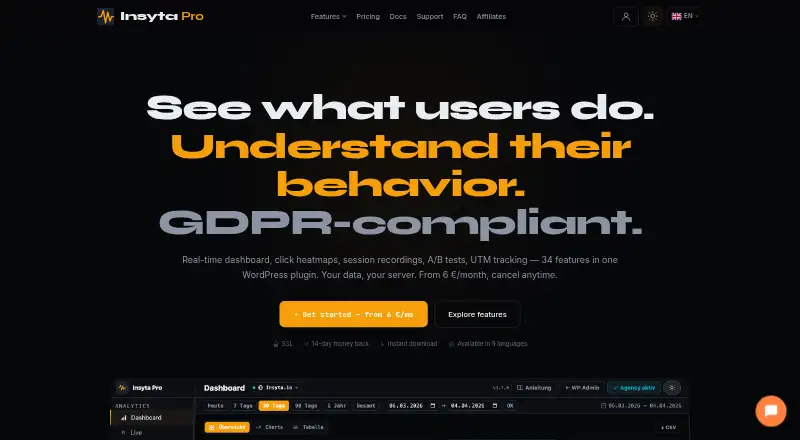
Insyta Pro is a self-hosted WordPress analytics plugin for website owners, marketers, UX teams, and agencies. It tracks clicks, scroll depth, traffic, conversions, and sessions directly in WordPress. Its feature set covers click heatmaps, scroll maps, session journeys, replay, rage-click and dead-click detection, form analytics, UTM attribution, conversion goals, funnels, A/B test tracking, reports, alerts, and multi-site analysis. It suits teams that want behavioral analytics inside their WordPress environment rather than a separate hosted analytics service.
Pricing is structured across three monthly plans. Starter costs €6 per month for one WordPress site and includes click tracking, a real-time dashboard, scroll-depth analysis, click heatmaps, and UTM attribution. Pro costs €12 per month for three sites and adds session recordings, session journeys, rage-click detection, dead-click detection, and form analytics. Agency costs €24 per month for unlimited WordPress sites, with a multi-site central dashboard, per-site analytics, branded email reports, smart alerts, and session recordings. Session recordings are therefore a paid Pro feature rather than part of the entry plan.
The product’s main distinction is its breadth within WordPress: heatmaps are combined with replay, funnels, attribution, forms, alerts, and A/B tracking. Integrations with Google Analytics 4, Google Tag Manager, and Slack extend its place in an existing measurement workflow. The vendor states that data is stored in the customer’s WordPress database and does not use third-party analytics servers. Teams that want a WordPress-centered, self-hosted toolkit should consider Insyta Pro; organizations seeking a hosted service or a broader platform footprint should choose an alternative.
Your product? Our editors can test Insyta Pro in depth and publish a review, labelled as paid · from $149/mo →
Insyta Pro pricing
All 3 Insyta Pro plans and prices →
Insyta Pro fact sheet
| Free plan | No |
|---|---|
| Paid from | €54/yr |
| Heatmap types | Not verified |
| Session recordings | Yes |
| Monthly session limit | Not verified |
| Recording retention | Not verified |
| Rage-click detection | Yes |
| Mobile capture | Yes |
| Free trial | 7 days |
| Money-back guarantee | 14 days |
| Deployment | Self-hosted |
| Compliance & security | GDPR |
| Support | Email, Tickets, Community, Docs |
| Built for | Solo, Small business, Mid-market (editorial estimate) |
| Integrations | 2 integrations: Google Analytics 4, Google Tag Manager |
| Pricing | 7-day trial (source) |
| Website | insyta.io |
| Facts checked | 21 Sep 2026 |
Insyta Pro integrations
Insyta Pro lists 2 integrations on its own site.
- Google Analytics 4
- Google Tag Manager
Alternatives to Insyta Pro
- Microsoft ClarityA free, broad heatmap toolkit for teams analyzing web and mobile behavior.9.4
- Crazy EggA familiar heatmap toolkit with recordings, testing, surveys, and AI analysis.9.2
- MatomoA broad open-source analytics suite for teams that need heatmaps and data ownership.9.1



See all Insyta Pro alternatives →
Used Insyta Pro? Be the first to review it
The editor score above is our own research. What this page doesn't have yet is a reader's view — what you used Insyta Pro for, what worked and what didn't. No stars are seeded and no review is paid for; an editor reads every one before it appears.
Write a reviewTwo minutes · verified accounts only · read by an editor before it appears
Featured on iTechGuides

Insyta Pro is listed in our Heatmap Tools directory. Add the badge to your site — it links back to this page.
<a href="https://www.itechguides.com/products/insyta-pro/"><img src="https://www.itechguides.com/best/badge/insyta-pro.svg" alt="Featured on iTechGuides" width="230" height="46"></a>
Reviewed by iTechGuides Editors · Editorial team · Updated Oct 2026
Advertiser disclosure: iTechGuides is reader-supported. Vendors can pay for top positions in our rankings and for a place on other products' pages, and we may earn a commission when you click some links. Bought places stand at the number bought; this page and our disclosure say so. Paying vendors may get a fuller, more detailed review from our editors, and that review can change their score. How we rank.
Last updated · How we research and update