
Inno Setup
Inno Setup: A mature choice for scripted, compressed and silent Windows EXE installers. Ranked #7 of 29 in Software Packaging Tools by our editors (8.5/10); pricing: Open source; best for mature free Windows EXE installers.
At a glance
- Editor score8.5 / 10
- PricingOpen source
- Best forMature free Windows EXE installers
- Paid fromFree
- Output formatsEXE installer
- Founded1997
- Facts checked20 Sep 2026
Where it wins
- Builds single-EXE installers for Windows x64 and Arm64 applications
- Combines IDE, command-line builds, scripting and silent installation modes
- Supports compression, signing, encryption, multilingual installs and uninstallers
Where it doesn't
- Focused on Windows rather than cross-platform packaging
- Advanced customization depends on Pascal scripting and preprocessor knowledge
- Commercial plans separate licensing and update terms by organization type
Our verdict on Inno Setup
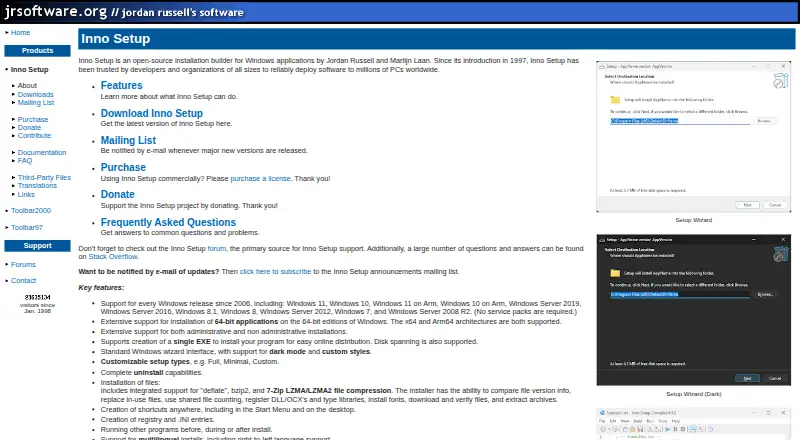
Inno Setup is an open-source Windows installation builder for developers and organizations distributing applications to end users. It creates EXE installers for 32-bit, 64-bit and Arm64 applications, with administrative and non-administrative installation modes. Its scope covers the core work of Windows packaging: setup types, uninstallers, shortcuts, registry and INI entries, compression, digital signing, multilingual installs, and silent or very silent installation. The compiler IDE and command-line compiler also support both interactive authoring and build automation.
The feature depth is the main reason to consider Inno Setup. Installers can use Deflate, bzip2, or 7-Zip LZMA/LZMA2 compression, while Pascal scripting and a compile-time preprocessor provide room for customized installation logic. Encrypted and passworded installs are supported, as are digitally signed packages. Command-line compilation fits build pipelines, and the published category specifications include command-line, silent-install, CI/CD integration, and auto-update support. This makes the product a strong fit for teams that need more control than a basic installer wizard provides.
The licensing structure offers a free and open-source foundation alongside commercial options. The Single User and Team plans provide perpetual commercial licenses with two years of updates. Enterprise provides a perpetual commercial license with at least two years of updates, with extended update periods available. Inno Setup suits Windows-focused developers and organizations that want a mature EXE installer with scripting and deployment controls. Teams seeking packaging across multiple operating systems should choose a product with broader platform coverage instead.
Questions about Inno Setup
What does Inno Setup run on? Windows. It runs as a desktop app.
Does Inno Setup offer a money-back guarantee? Yes: 30 days.
Who is Inno Setup built for? Solo users, small businesses, mid-market companies and enterprises (our editorial estimate).
Your product? Our editors can test Inno Setup in depth and publish a review, labelled as paid · from $149/mo →
Inno Setup pricing
All 3 Inno Setup plans and prices →
Inno Setup fact sheet
| Free plan | Not verified |
|---|---|
| Paid from | Free |
| Target platforms | Windows |
| Output formats | EXE installer |
| Command-line packaging | Yes |
| Silent installation | Yes |
| Auto-update support | Yes |
| Delta updates | Not verified |
| CI/CD integration | Yes |
| Money-back guarantee | 30 days |
| Deployment | Desktop |
| Platforms | Windows |
| Support | Community |
| Built for | Solo, Small business, Mid-market, Enterprise (editorial estimate) |
| Pricing | Open source (source) |
| Website | jrsoftware.org |
| Facts checked | 20 Sep 2026 |
Alternatives to Inno Setup
- electron-builderA broad Electron release toolkit covering builds, updates, signing, publishing, and CI/CD.9.4
- Advanced InstallerA broad Windows packaging suite for teams managing installers, updates, and deployment automation.9.2
- install4jA capable choice for Java publishers shipping signed installers across major desktop platforms.9.0



See all Inno Setup alternatives →
Inno Setup vs the competition
- Inno Setup vs electron-builder
- Inno Setup vs Advanced Installer
- Inno Setup vs install4j
- Inno Setup vs WiX Toolset
- Inno Setup vs Electron Forge
- Inno Setup vs Tauri Bundler



Compare Inno Setup with any tool side by side →
Also Ranked In
Inno Setup is ranked in 2 of our directories.
Used Inno Setup? Be the first to review it
The editor score above is our own research. What this page doesn't have yet is a reader's view — what you used Inno Setup for, what worked and what didn't. No stars are seeded and no review is paid for; an editor reads every one before it appears.
Write a reviewTwo minutes · verified accounts only · read by an editor before it appears
Featured on iTechGuides

Inno Setup is listed in our Software Packaging Tools directory. Add the badge to your site — it links back to this page.
<a href="https://www.itechguides.com/products/inno-setup/"><img src="https://www.itechguides.com/best/badge/inno-setup.svg" alt="Featured on iTechGuides" width="230" height="46"></a>
Reviewed by iTechGuides Editors · Editorial team · Updated Nov 2026
Advertiser disclosure: iTechGuides is reader-supported. Vendors can pay for top positions in our rankings and for a place on other products' pages, and we may earn a commission when you click some links. Bought places stand at the number bought; this page and our disclosure say so. Paying vendors may get a fuller, more detailed review from our editors, and that review can change their score. How we rank.
Last updated · How we research and update