
GoodSign
GoodSign: GoodSign pairs pay-per-document signing with flexible workflows and audit certificates. Ranked #32 of 67 in E-Signature Software by our editors (6.1/10); pricing: Paid; best for teams preferring pay-per-document signing.
At a glance
- Editor score6.1 / 10
- PricingPaid
- Best forTeams preferring pay-per-document signing
- Free planNo
- Paid from$10/user/mo
- Audit trailYes
- Facts checked22 Sep 2026
Where it wins
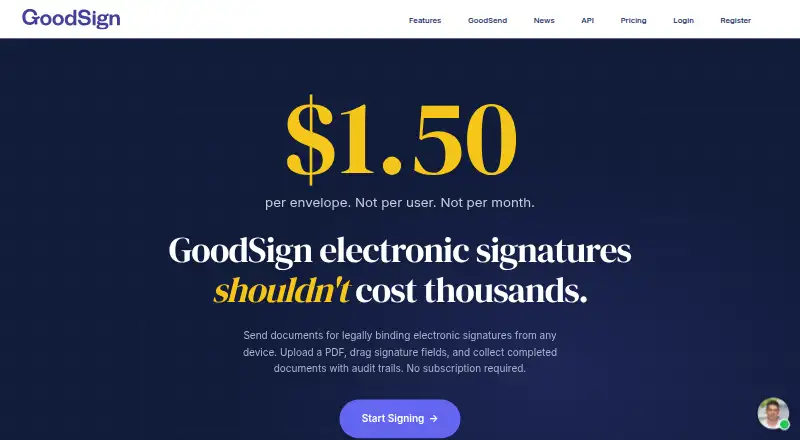
- Everyday pricing is $1.50 per document and includes unlimited users and signers.
- Sequential and parallel workflows, templates and bulk sending cover varied signing needs.
- Audit certificates record timestamps, IP addresses and signer actions.
Where it doesn't
- Creating and maintaining an account is free, but sending documents requires paid credits.
- SMS reminders, SMS signer verification and eWitness use extra credits on usage pricing.
- The listed integrations are Zapier, Google Drive, Slack and webhooks.
Our verdict on GoodSign
GoodSign is a browser-based electronic signature service for individuals, small businesses, teams and organisations that need to send documents for signing. Users can upload PDFs, add signature and form fields, set sequential or parallel signing workflows, send reminders, track progress and retain completed documents with audit certificates. Its pay-per-document approach suits teams that want signing costs tied to document use rather than a fixed user subscription.
Everyday costs $1.50 per document and includes unlimited users and teams, unlimited signers per document, lifetime storage, daily reports and 2FA login security. The Pro usage option is listed at $1.50 per credit and adds SMS 2FA login codes, custom branding, Google Drive support, Slack integration and iFrame embedding. A separate Pro option is $10 per user per month, with custom email domain and templates among its listed features. The Unlimited plan includes unlimited documents per month, unlimited users and teams, SMS and eWitness, a dedicated account manager, priority support, and custom onboarding and training. Sending requires paid credits; SMS reminders, SMS signer verification and eWitness use additional credits on Everyday and Pro usage pricing.
Templates, bulk sending, verification, automatic reminders and flattened signed PDFs make the feature set broader than basic signature collection. REST API access and webhooks support integration work, while the listed integrations are Zapier, Google Drive and Slack. The service is cloud-based, with web and API access, and offers email, chat and documentation support. Teams wanting cost-per-document signing, workflow choices and audit records should consider GoodSign; teams needing predictable subscription costs without usage credits should compare alternatives. The Unlimited tier may fit organizations that send documents regularly and value its included support and onboarding.
Your product? Our editors can test GoodSign in depth and publish a review, labelled as paid · from $149/mo →
GoodSign pricing
All 3 GoodSign plans and prices →
GoodSign fact sheet
| Free plan | No |
|---|---|
| Paid from | $10/user/mo |
| Audit trail | Yes |
| Document templates | Yes |
| Bulk sending | Yes |
| API access | Yes |
| SMS authentication | Yes |
| Signature order | Both |
| Deployment | Cloud |
| Platforms | Web |
| Compliance & security | SOC 2, ISO 27001, PCI DSS, 2FA |
| Support | Email, Live chat, Docs |
| Built for | Solo, Small business, Mid-market, Enterprise (editorial estimate) |
| Integrations | 5,000+ integrations: Zapier, Google Drive, Slack, Webhooks |
| Pricing | Paid (source) |
| Website | goodsign.io |
| Facts checked | 22 Sep 2026 |
GoodSign integrations
GoodSign lists 5,000+ integrations on its own site — the 4 named here are the ones its pages call out.
- Zapier
- Google Drive
- Slack
- Webhooks
Alternatives to GoodSign
- DocuSign eSignatureA full-featured e-signature platform for teams that need integrations and workflow controls.9.4
- Zoho SignAffordable signing with broad workflows, authentication, integrations, and APIs.9.2
- Dropbox SignA flexible signing service with a free plan, team features, and Dropbox workflows.9.1



See all GoodSign alternatives →
Used GoodSign? Be the first to review it
The editor score above is our own research. What this page doesn't have yet is a reader's view — what you used GoodSign for, what worked and what didn't. No stars are seeded and no review is paid for; an editor reads every one before it appears.
Write a reviewTwo minutes · verified accounts only · read by an editor before it appears
Featured on iTechGuides

GoodSign is listed in our E-Signature Software directory. Add the badge to your site — it links back to this page.
<a href="https://www.itechguides.com/products/goodsign/"><img src="https://www.itechguides.com/best/badge/goodsign.svg" alt="Featured on iTechGuides" width="230" height="46"></a>
Reviewed by iTechGuides Editors · Editorial team · Updated Oct 2026
Advertiser disclosure: iTechGuides is reader-supported. Vendors can pay for top positions in our rankings and for a place on other products' pages, and we may earn a commission when you click some links. Bought places stand at the number bought; this page and our disclosure say so. Paying vendors may get a fuller, more detailed review from our editors, and that review can change their score. How we rank.
Last updated · How we research and update