
FindThat.Email
FindThat.Email: A Chrome extension for LinkedIn-driven email lookup, bulk search and CSV export. Ranked #30 of 33 in Email Finder Software by our editors (6.3/10); pricing: Paid; best for linkedIn users needing simple bulk lookups.
At a glance
- Editor score6.3 / 10
- PricingPaid
- Best forLinkedIn users needing simple bulk lookups
- Free planNo
- Paid from$19/mo
- Facts checked19 Sep 2026
Where it wins
- Finds corporate emails from names and company domains, with reverse lookup.
- Collects names from LinkedIn profiles and employee pages for bulk searches.
- Includes email verification, CSV export and unlimited emails and names.
Where it doesn't
- Available as a Chrome extension, with no broader platform options listed.
- No API is offered for custom workflows.
- The only listed plan costs $19 per month; there is no free plan.
Our verdict on FindThat.Email
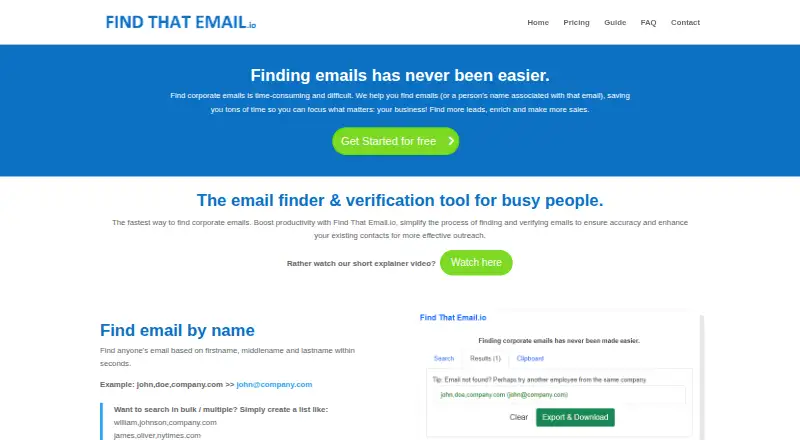
FindThat.Email is an email-finding and verification tool for sales teams, recruiters, marketers and other professionals who need corporate contact details. It looks up email addresses from a person's name and company domain, and can work in reverse to identify a person's name from an email address. Its Chrome extension also collects names from LinkedIn profiles and company employee pages, making it a fit for users who source prospects on LinkedIn and want to process multiple entries rather than look up contacts one at a time.
The workflow is focused on prospect research: users can run bulk email and name searches using multiple rows, validate addresses, and export results as CSV. A clipboard feature supports saving or collecting prospect names. LinkedIn is the listed integration, and the product is offered as a Chrome extension rather than a broader app or integration suite. That narrow fit may suit teams whose contact sourcing starts in LinkedIn, but the lack of an API makes it less suitable for teams seeking to connect lookups to custom systems or automated workflows.
According to the vendor's pricing page, Unlimited Access costs $19 per month, billed monthly, and includes unlimited emails and names. The published plan also includes a 30-day money-back guarantee. The site describes a limited trial of 10 monthly emails or reverse name lookups, without specifying a duration. Choose FindThat.Email if you want LinkedIn collection, bulk lookup, validation and CSV output in a simple extension at a fixed monthly price. Consider another option if you need an API, broader integrations, or a free plan.
Your product? Our editors can test FindThat.Email in depth and publish a review, labelled as paid · from $149/mo →
FindThat.Email pricing
All 1 FindThat.Email plans and prices →
FindThat.Email fact sheet
| Free plan | No |
|---|---|
| Paid from | $19/mo |
| Monthly credits | Not verified |
| Search methods | Not verified |
| Bulk search | Yes |
| Email verification | Yes |
| Browser extension | Yes |
| API access | Not verified |
| Deployment | Browser extension |
| Platforms | Chrome extension |
| Integrations | 1 integrations: LinkedIn |
| Pricing | Paid (source) |
| Website | findthatemail.io |
| Facts checked | 19 Sep 2026 |
FindThat.Email integrations
FindThat.Email lists 1 integrations on its own site.
Alternatives to FindThat.Email
- HunterA broad prospecting toolkit for finding addresses, checking deliverability, and sending sequences.9.4
- Snov.ioA broad prospecting and outreach suite with a free plan and paid tiers from $39 per month.9.2
- GetProspectA database-led prospecting suite with email verification, phone discovery, and a free plan.9.1



See all FindThat.Email alternatives →
Used FindThat.Email? Be the first to review it
The editor score above is our own research. What this page doesn't have yet is a reader's view — what you used FindThat.Email for, what worked and what didn't. No stars are seeded and no review is paid for; an editor reads every one before it appears.
Write a reviewTwo minutes · verified accounts only · read by an editor before it appears
Featured on iTechGuides

FindThat.Email is listed in our Email Finder Software directory. Add the badge to your site — it links back to this page.
<a href="https://www.itechguides.com/products/findthat-email/"><img src="https://www.itechguides.com/best/badge/findthat-email.svg" alt="Featured on iTechGuides" width="230" height="46"></a>
Reviewed by iTechGuides Editors · Editorial team · Updated Oct 2026
Advertiser disclosure: iTechGuides is reader-supported. Vendors can pay for top positions in our rankings and for a place on other products' pages, and we may earn a commission when you click some links. Bought places stand at the number bought; this page and our disclosure say so. Paying vendors may get a fuller, more detailed review from our editors, and that review can change their score. How we rank.
Last updated · How we research and update