
ExpenseBot
ExpenseBot: A web-based receipt manager for reconciliation, tax reporting, and accounting exports. Ranked #9 of 27 in Receipt Management Software by our editors (7.4/10); pricing: Free plan · 60-day trial; best for teams needing reconciliation and tax reporting.
At a glance
- Editor score7.4 / 10
- PricingFree plan · 60-day trial
- Best forTeams needing reconciliation and tax reporting
- Free planYes
- Mobile captureYes
- Facts checked20 Sep 2026
Where it wins
- Captures receipts through Gmail, forwarding, files, and phone-browser photos
- Extracts vendor, amount, date, tax, and line-item data with AI
- Reconciles receipts with bank and credit-card transactions
Where it doesn't
- The product is available on the web only
- Monthly access connects up to 3 Gmail accounts and 6 forwarding addresses
- Historical-year access is split across separate plan options
Our verdict on ExpenseBot
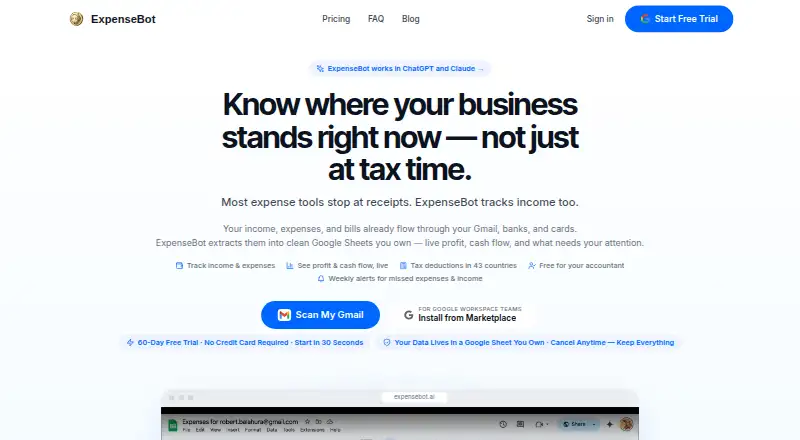
ExpenseBot is a web-based receipt and expense management tool for freelancers, small businesses, teams, accountants, and bookkeepers. It collects receipts and transactions from Gmail, email forwarding, phone-browser photos, Google Photos, Google Drive, bank feeds, and files. AI extracts vendor, amount, date, tax, and line-item details, while the product organizes the results in Google Sheets for reporting and export.
Its strongest fit is reconciliation and accounting workflow depth. ExpenseBot can detect duplicates across receipt and transaction sources, categorize expenses, reconcile receipts with bank and card statements, and generate tax reports. It exports to QuickBooks Online, Xero, FreshBooks, Wave, Zoho Books, NetSuite, Business Central, Sage Intacct, Sage 50 Canada, and Sage 50 US. That combination makes it more suitable for teams that need records to move beyond receipt storage into bookkeeping and tax preparation.
The published plans show a freemium model with free access, a 60-day trial, and a Monthly plan covering automatic income and expense tracking, daily Gmail scanning, unlimited receipt processing, and QuickBooks, Xero, and CSV exports. Monthly access includes up to 3 connected Gmail accounts and 6 forwarding addresses. Annual includes everything in Monthly plus a 2025 historical scan, while separate options unlock one selected completed calendar year or every completed calendar year available when purchased. ExpenseBot should appeal to teams that value automated capture and reconciliation; organizations wanting a native mobile app or a simpler single-purpose receipt archive may prefer a narrower tool.
Your product? Our editors can test ExpenseBot in depth and publish a review, labelled as paid · from $149/mo →
ExpenseBot pricing
All 4 ExpenseBot plans and prices →
ExpenseBot fact sheet
| Free plan | Yes |
|---|---|
| Paid from | Not verified |
| Mobile capture | Yes |
| Email receipt forwarding | Yes |
| Line-item extraction | Yes |
| Duplicate detection | Yes |
| Accounting sync | Yes |
| Receipt storage limit | Not verified |
| Supported platforms | Web |
| Free trial | 60 days · no card needed |
| Deployment | Cloud |
| Platforms | Web |
| Support | Email, Docs |
| Built for | Solo, Small business, Mid-market (editorial estimate) |
| Integrations | 10 integrations: QuickBooks Online, Xero, FreshBooks, Wave, Zoho Books, NetSuite … |
| Pricing | Free plan · 60-day trial (source) |
| Website | expensebot.ai |
| Facts checked | 20 Sep 2026 |
ExpenseBot integrations
ExpenseBot lists 10 integrations on its own site.
- QuickBooks Online
- Xero
- FreshBooks
- Wave
- Zoho Books
- NetSuite
- Business Central
- Sage Intacct
- Sage 50 Canada
- Sage 50 US
Alternatives to ExpenseBot
- Dext PrepareDext Prepare automates document capture, extraction, approvals, and accounting publication.8.9
- AutoEntryBroad receipt and invoice capture with AI extraction and accounting-software publishing.8.7
- ShoeboxedA receipt platform combining multi-channel capture, human verification, and accounting exports.8.4



See all ExpenseBot alternatives →
Used ExpenseBot? Be the first to review it
The editor score above is our own research. What this page doesn't have yet is a reader's view — what you used ExpenseBot for, what worked and what didn't. No stars are seeded and no review is paid for; an editor reads every one before it appears.
Write a reviewTwo minutes · verified accounts only · read by an editor before it appears
Featured on iTechGuides

ExpenseBot is listed in our Receipt Management Software directory. Add the badge to your site — it links back to this page.
<a href="https://www.itechguides.com/products/expensebot/"><img src="https://www.itechguides.com/best/badge/expensebot.svg" alt="Featured on iTechGuides" width="230" height="46"></a>
Reviewed by iTechGuides Editors · Editorial team · Updated Oct 2026
Advertiser disclosure: iTechGuides is reader-supported. Vendors can pay for top positions in our rankings and for a place on other products' pages, and we may earn a commission when you click some links. Bought places stand at the number bought; this page and our disclosure say so. Paying vendors may get a fuller, more detailed review from our editors, and that review can change their score. How we rank.
Last updated · How we research and update