
DuckDB UI
DuckDB UI: A free, open-source DuckDB client for local analysis with optional MotherDuck access. Ranked #34 of 53 in Database Client Software by our editors (5.7/10); pricing: Free plan; best for duckDB analytics on local data.
At a glance
- Editor score5.7 / 10
- PricingFree plan
- Best forDuckDB analytics on local data
- Free planYes
- Paid fromFree
- DeploymentBoth
- Facts checked22 Sep 2026
Where it wins
- Free and open source with web and desktop deployment
- SQL notebooks include autocomplete and syntax highlighting
- Profiles, previews, filtering, transformations, and CSV export
Where it doesn't
- Focused on DuckDB and MotherDuck rather than broad database coverage
- Local execution centers data and queries on the computer by default
- The frontend source code is not included in the repository
Our verdict on DuckDB UI
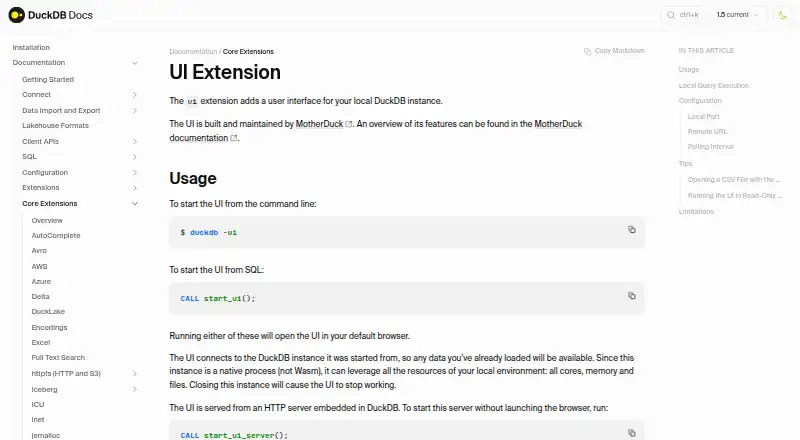
DuckDB UI is a browser-based interface for analysts, developers, and data professionals working with DuckDB databases and local or remote data files. Distributed as a DuckDB extension, it runs against the DuckDB instance that starts it and provides SQL notebooks, catalog browsing, query autocomplete, data previews, and result exploration. It is available through web, Windows, macOS, and Linux deployment, with local browser access delivered by an embedded HTTP server.
Its strongest area is exploratory analytics. Notebooks support multiple cells, syntax highlighting, and autocomplete, while catalog browsing covers attached databases, schemas, tables, and views. Table summaries include row counts, column types, profiles, and previews, and Column Explorer adds summaries for query results. Interactive sorting, filtering, and transformation controls help refine results before export. Result data can be copied to the clipboard or exported to a file, with CSV listed as the result export format. These capabilities make the interface a practical fit for inspecting local data without leaving the DuckDB environment.
The product keeps a narrow database focus: its supported database options are DuckDB and MotherDuck, rather than a broad collection of database systems. Local query execution means data and queries remain on the computer by default, while optional MotherDuck sign-in adds access to cloud databases. That combination suits users who want a free, open-source interface for DuckDB analysis and a path to MotherDuck data. Teams needing a multi-database client or a wider platform ecosystem should choose a different tool.
Your product? Our editors can test DuckDB UI in depth and publish a review, labelled as paid · from $149/mo →
DuckDB UI pricing
DuckDB UI fact sheet
| Free plan | Yes |
|---|---|
| Paid from | Free |
| Deployment | Both |
| Database support | DuckDB |
| SSH tunneling | Not verified |
| Data editing | Yes |
| Visual query builder | Not verified |
| Result export formats | CSV |
| Query history | Not verified |
| Deployment | Self-hosted, Desktop |
| Platforms | Web, Windows, macOS, Linux |
| Support | Docs, Community |
| Built for | Solo, Small business, Mid-market, Enterprise (editorial estimate) |
| Integrations | 1 integrations: MotherDuck |
| Pricing | Free plan |
| Website | duckdb.org |
| Facts checked | 22 Sep 2026 |
DuckDB UI integrations
DuckDB UI lists 1 integrations on its own site.
- MotherDuck
Alternatives to DuckDB UI
- DBeaverA broad desktop database client with a capable free open-source Community edition.9.4
- DataGripA deep desktop database IDE for developers working across diverse data systems.9.2
- Navicat PremiumA broad desktop client for enterprise database modeling, automation, and administration.9.0



See all DuckDB UI alternatives →
Also Ranked In
DuckDB UI is ranked in 7 of our directories.
Used DuckDB UI? Be the first to review it
The editor score above is our own research. What this page doesn't have yet is a reader's view — what you used DuckDB UI for, what worked and what didn't. No stars are seeded and no review is paid for; an editor reads every one before it appears.
Write a reviewTwo minutes · verified accounts only · read by an editor before it appears
Featured on iTechGuides

DuckDB UI is listed in our Database Client Software directory. Add the badge to your site — it links back to this page.
<a href="https://www.itechguides.com/products/duckdb-ui/"><img src="https://www.itechguides.com/best/badge/duckdb-ui.svg" alt="Featured on iTechGuides" width="230" height="46"></a>
Reviewed by iTechGuides Editors · Editorial team · Updated Oct 2026
Advertiser disclosure: iTechGuides is reader-supported. Vendors can pay for top positions in our rankings and for a place on other products' pages, and we may earn a commission when you click some links. Bought places stand at the number bought; this page and our disclosure say so. Paying vendors may get a fuller, more detailed review from our editors, and that review can change their score. How we rank.
Last updated · How we research and update