
Drafts
Drafts: Drafts combines instant capture, automation, and organization for Apple users. Ranked #68 of 214 in Note-Taking Apps by our editors (3.0/10); pricing: Free plan · 7-day trial; best for fast capture and automation on Apple devices.
At a glance
- Editor score3.0 / 10
- PricingFree plan · 7-day trial
- Best forFast capture and automation on Apple devices
- Free planYes
- Paid from$19.99/yr
- Offline accessYes
- Facts checked20 Sep 2026
Where it wins
- Opens ready for immediate text entry and stores drafts in an inbox
- Configurable actions connect text with services including Notion and Gmail
- Supports Markdown, dictation, widgets, web capture, and Shortcuts automation
Where it doesn't
- Limited primarily to Apple platforms, with no general web app presented
- Advanced features require the Drafts Pro subscription
- Its extensive actions and automation may take time to configure
Our verdict on Drafts
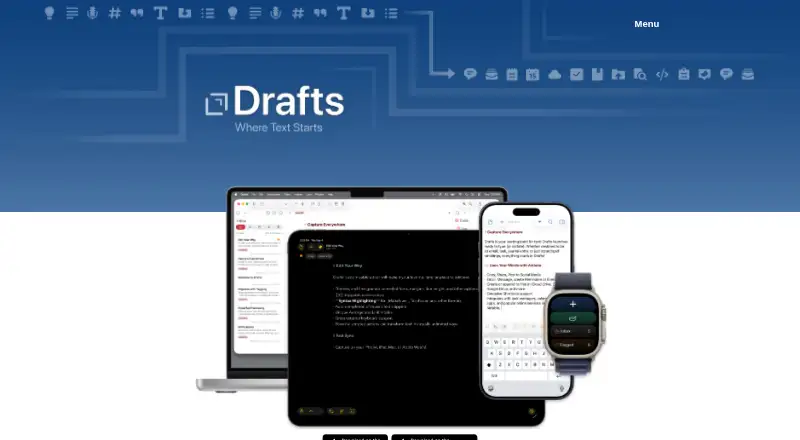
Drafts is a quick-capture note-taking app for iPhone, iPad, Mac, and Apple Watch. It opens ready for text entry, places new writing in an inbox, and provides tagging, flags, archiving, Markdown, and other markup syntax highlighting for organizing drafts. The app suits Apple users who want a fast place to collect thoughts before processing them into other apps or services. Dictation, widgets, share extensions, web capture, iCloud synchronization, and offline access extend its capture workflow across supported devices.
Its strongest differentiator is the combination of immediate entry and configurable actions. Actions can process, share, or send text to services including Mastodon, Dropbox, Notion, Airtable, Evernote, WordPress, Ghost, Medium, Google Drive, Gmail, Google Tasks, Box, OneDrive, OneNote, and Outlook. Shortcuts and URL schemes add further automation options, while Workspaces provide saved draft-list views. Drafts also includes an AI Chat Console for querying and modifying drafts. This breadth makes it a good fit for users who want notes to move into downstream workflows rather than remain in a standalone notebook.
The Free plan supports creating, editing, and syncing drafts, plus running installed actions. Drafts Pro costs $1.99 per month or $19.99 per year and adds advanced features across iPhone, iPad, Mac, and Apple Watch, including action creation and editing, themes, syntaxes, icons, Workspaces, Chat Console, and Mail Drop. A 7-day free trial is available. Drafts should appeal to Apple-focused users who value capture speed and automation; those who need a general web app or broader platform coverage should choose another note-taking app.
Your product? Our editors can test Drafts in depth and publish a review, labelled as paid · from $99/mo →
Drafts pricing
All 2 Drafts plans and prices →
Drafts fact sheet
| Free plan | Yes |
|---|---|
| Paid from | $19.99/yr |
| Offline access | Yes |
| Supported platforms | ios, macos |
| Note sharing | Yes |
| Real-time collaboration | Not verified |
| Storage limit | Not verified |
| Integrations | Mastodon, Dropbox, Notion, Airtable, Evernote, WordPress, Ghost, Medium, Google Drive, Gmail, Google Tasks, Box, OneDrive, OneNote, Outlook, Microsoft To Do, Todoist, WebDAV |
| Free trial | 7 days |
| Deployment | Desktop, Mobile, Cloud |
| Platforms | iOS, macOS |
| Support | Tickets, Community, Docs |
| Built for | Solo, Small business (editorial estimate) |
| Integrations | 20 integrations: Mastodon, Dropbox, Notion, Airtable, Evernote, WordPress … See all → |
| Pricing | Free plan · 7-day trial (source) |
| Website | getdrafts.com |
| Facts checked | 20 Sep 2026 |
Drafts integrations
Drafts lists 20 integrations on its own site.
- Mastodon
- Dropbox
- Notion
- Airtable
- Evernote
- WordPress
- Ghost
- Medium
- Google Drive
- Gmail
- Google Tasks
- Box
- OneDrive
- OneNote
- Outlook
- Microsoft To Do
- Todoist
- WebDAV
- Apple Shortcuts
- Apple Reminders
Alternatives to Drafts
- Microsoft OneNoteA broad, collaborative note system with strong Microsoft integration and a capable free option.9.3
- NotionA flexible workspace for teams that want notes and knowledge bases alongside databases and collaboration.9.2
- EvernoteA broad note-taking workspace for organizing information, tasks, calendars, and documents.9.0


Used Drafts? Be the first to review it
The editor score above is our own research. What this page doesn't have yet is a reader's view — what you used Drafts for, what worked and what didn't. No stars are seeded and no review is paid for; an editor reads every one before it appears.
Write a reviewTwo minutes · verified accounts only · read by an editor before it appears
Featured on iTechGuides

Drafts is listed in our Note-Taking Apps directory. Add the badge to your site — it links back to this page.
<a href="https://www.itechguides.com/products/drafts/"><img src="https://www.itechguides.com/best/badge/drafts.svg" alt="Featured on iTechGuides" width="230" height="46"></a>
Guides on Note-Taking apps
- Best note-taking apps for iPad and Apple Pencil 2026Aug 2026
- Best Note-Taking Apps for iPad: Top 7 in 2026Aug 2026
- Best Note-Taking Apps to Use in 2026Aug 2026
Reviewed by iTechGuides Editors · Editorial team · Updated Oct 2026
Advertiser disclosure: iTechGuides is reader-supported. Vendors can pay for top positions in our rankings and for a place on other products' pages, and we may earn a commission when you click some links. How we rank.
Last updated · How we research and update