
Done Bear
Done Bear: A GTD-focused task manager for import-heavy workflows and AI-assisted automation. Ranked #47 of 148 in To-Do List Apps by our editors (4.3/10); pricing: Free plan; best for early adopters wanting import-heavy GTD workspaces.
At a glance
- Editor score4.3 / 10
- PricingFree plan
- Best forEarly adopters wanting import-heavy GTD workspaces
- Free planYes
- Paid from$7/user/mo
- Recurring tasksYes
- Founded2026 · Melbourne, Australia
- Facts checked22 Sep 2026
Where it wins
- GTD views cover Inbox, Today, Upcoming, Anytime, Someday, and Logbook
- Imports from major task managers, calendars, CSV, JSON, and iCal
- Offline work, synchronization, shared workspaces, APIs, and MCP access
Where it doesn't
- The Free plan limits active tasks to 250
- Android is currently on the waitlist
- Reminders, calendar sync, and subtasks are not verified
Our verdict on Done Bear
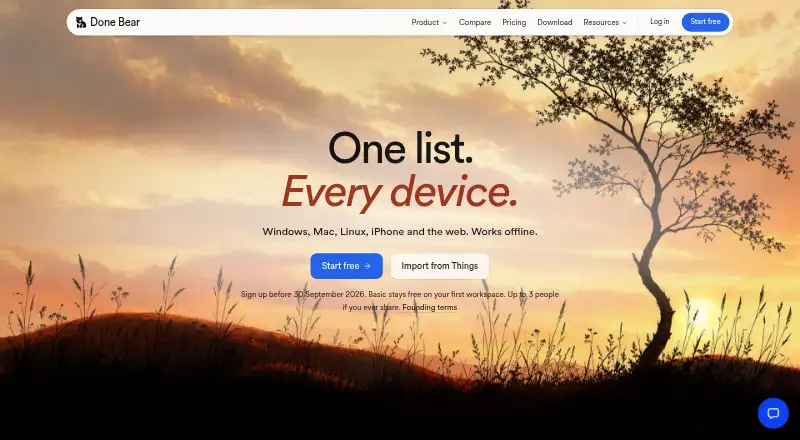
Done Bear is a local-first GTD task manager for individuals and small teams. Its Inbox, Today, Upcoming, Anytime, Someday, and Logbook views organize tasks across web, desktop, and iOS apps. Tasks continue working offline before synchronizing across devices, while shared workspaces add real-time collaboration. The product also supports repeating tasks, broad imports, API access, command-line automation, and a hosted MCP server for AI assistants.
Pricing follows a freemium model. The Free plan costs $0 per workspace and includes offline-first sync, real-time collaboration, API keys and agent access, plus web, macOS, Windows, Linux, and iOS access. Basic costs $7 per member per month with annual billing or $8 monthly, adding unlimited tasks, unlimited active projects, five teams, and priority email support. Business costs $12 per member per month with annual billing and adds unlimited teams and projects, centralised billing, migration help, and priority support with onboarding. Enterprise adds annual invoicing, security and legal review support, custom onboarding and migration planning, a dedicated success contact, and priority incident response.
Done Bear’s strongest fit is for early adopters moving from another task system or building automation around a GTD workspace. Imports cover Todoist, Things 3, TickTick, Apple Reminders, Microsoft To Do, Any.do, Trello, Asana, Notion, Google Tasks, iCal, CSV, and JSON. GraphQL, CLI, Slack, and MCP connections extend that ecosystem. The trade-off is a 250-task limit on the Free plan, while Android remains on the waitlist; users requiring verified reminders, calendar sync, or subtasks should consider another option. Solo users and small teams already working across supported platforms are the clearest audience.
Your product? Our editors can test Done Bear in depth and publish a review, labelled as paid · from $149/mo →
Done Bear pricing
All 4 Done Bear plans and prices →
Done Bear fact sheet
| Free plan | Yes |
|---|---|
| Paid from | $7/user/mo |
| Recurring tasks | Yes |
| Task reminders | Not verified |
| Calendar sync | Not verified |
| Subtasks | Not verified |
| Offline access | Web_and_mobile |
| Active task limit | 250 tasks |
| Supported platforms | web, windows, macos, linux, ios |
| Deployment | Cloud, Desktop, Mobile, Browser extension |
| Platforms | Web, Windows, macOS, Linux, iOS, Chrome extension |
| Support | Email, Docs |
| Built for | Solo, Small business (editorial estimate) |
| Integrations | 18 integrations: Todoist, Things 3, TickTick, Apple Reminders, Microsoft To Do, Any.do … See all → |
| Pricing | Free plan (source) |
| Website | donebear.com |
| Facts checked | 22 Sep 2026 |
Done Bear integrations
Done Bear lists 18 integrations on its own site.
- Todoist
- Things 3
- TickTick
- Apple Reminders
- Microsoft To Do
- Any.do
- Trello
- Asana
- Notion
- Google Tasks
- iCal
- CSV
- JSON
- Slack
- MCP
- GraphQL API
- CLI
- Raycast
See all Done Bear integrations →
Alternatives to Done Bear
- TodoistA complete task manager with broad platform coverage, recurring tasks, and team workspaces.9.2
- TickTickA broad to-do app for users who want tasks, planning, habits, and focus tools together.9.0
- Microsoft To DoA capable free choice for daily planning, shared lists, and Microsoft-connected task management.8.8



See all Done Bear alternatives →
Used Done Bear? Be the first to review it
The editor score above is our own research. What this page doesn't have yet is a reader's view — what you used Done Bear for, what worked and what didn't. No stars are seeded and no review is paid for; an editor reads every one before it appears.
Write a reviewTwo minutes · verified accounts only · read by an editor before it appears
Featured on iTechGuides

Done Bear is listed in our To-Do List Apps directory. Add the badge to your site — it links back to this page.
<a href="https://www.itechguides.com/products/done-bear/"><img src="https://www.itechguides.com/best/badge/done-bear.svg" alt="Featured on iTechGuides" width="230" height="46"></a>
Reviewed by iTechGuides Editors · Editorial team · Updated Oct 2026
Advertiser disclosure: iTechGuides is reader-supported. Vendors can pay for top positions in our rankings and for a place on other products' pages, and we may earn a commission when you click some links. Bought places stand at the number bought; this page and our disclosure say so. Paying vendors may get a fuller, more detailed review from our editors, and that review can change their score. How we rank.
Last updated · How we research and update